CompTrol Interface V4.0.x | Issue 21-05-2021 | 1000932 69
Program 8 – direct frequency request
Procedure
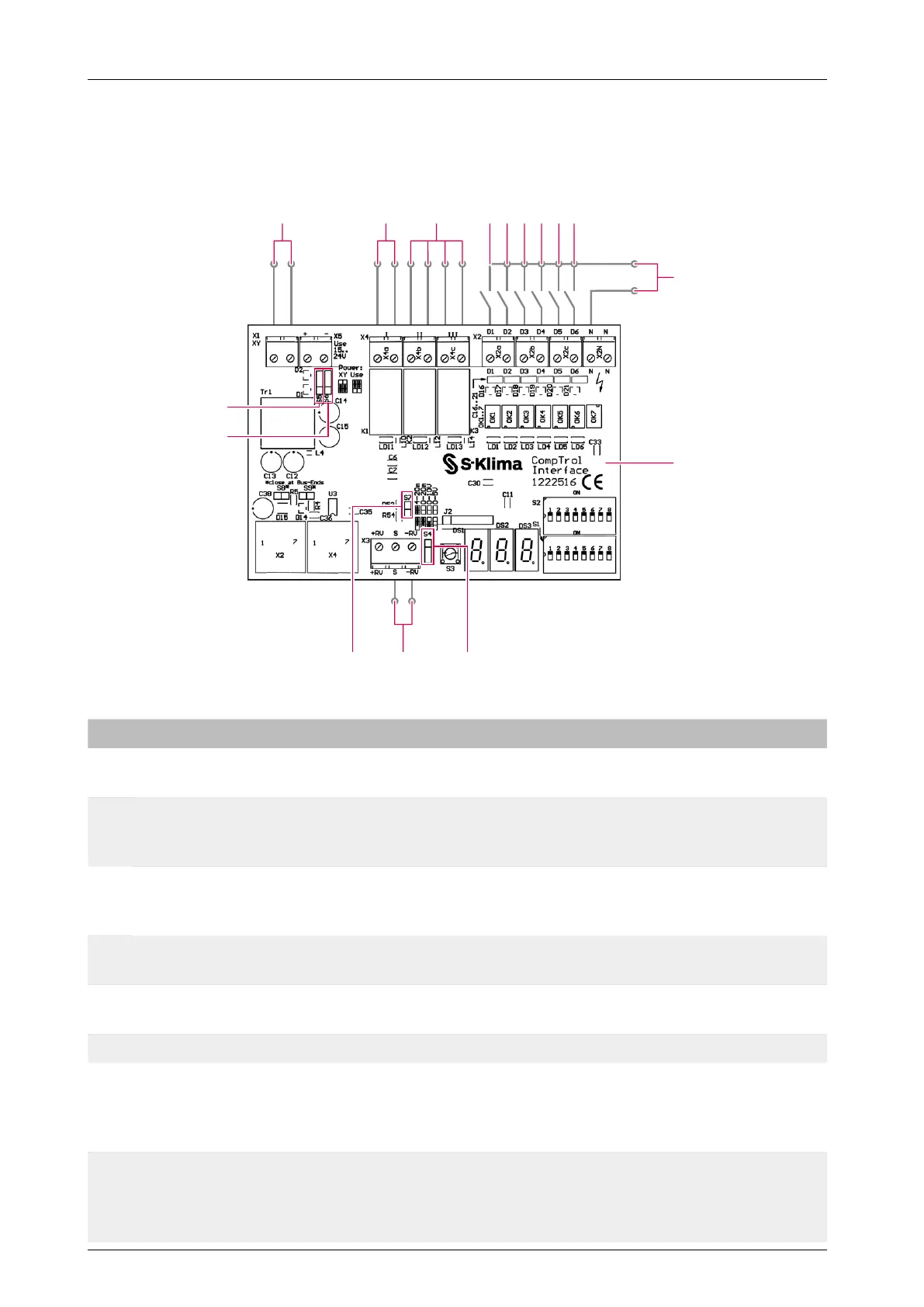
1. Connect the CompTrol Interface as shown in the connection diagram below.
12
11
1 2 3 987654
10
1314
15
16
Figure 14: Connection diagram for program 8
No. Name No. Name
1 X/Y remote control bus 2
Digital outputs X4a-I
Alarm signal
3
Digital outputs X4b-II, X4c-III
(see “Table 53: Digital outputs in program 8”
on page 73)
4
Digital input X2a-D1
Remote ON/OFF
5
Digital input X2a-D2
Cooling/Heating mode
6
Digital input X2b-D3
Center/Center-Remote
7
Digital input X2b-D4
Evaluate analog input
8
Digital input X2c-D5
Fan speed F1; D5+D6 Fan speed F3
9
Digital input X2c-D6
Fan speed F2; D5+D6 Fan speed F3
10 Input voltage 24-230 V AC / 20-130 V DC
11 CompTrol Interface expansion module 12 Analog input X3-S, X3-(-RV)
13
Pin header S4 for setting the analog signal
type (analog input X3)
(see “Table 6: Analog signal type” on
page 19)
14
Pin header S7 for setting the analog signal
type (analog input X3)
(see “Table 6: Analog signal type” on
page 19)
15
Pin header S6 for setting the electrical
supply
(see “Table 5: Type of electrical supply” on
page 18)
16
Pin header S5 for setting the electrical
supply
(see “Table 5: Type of electrical supply” on
page 18)


 To Next Page