Installer reference guide / Mono tank integrated type 164
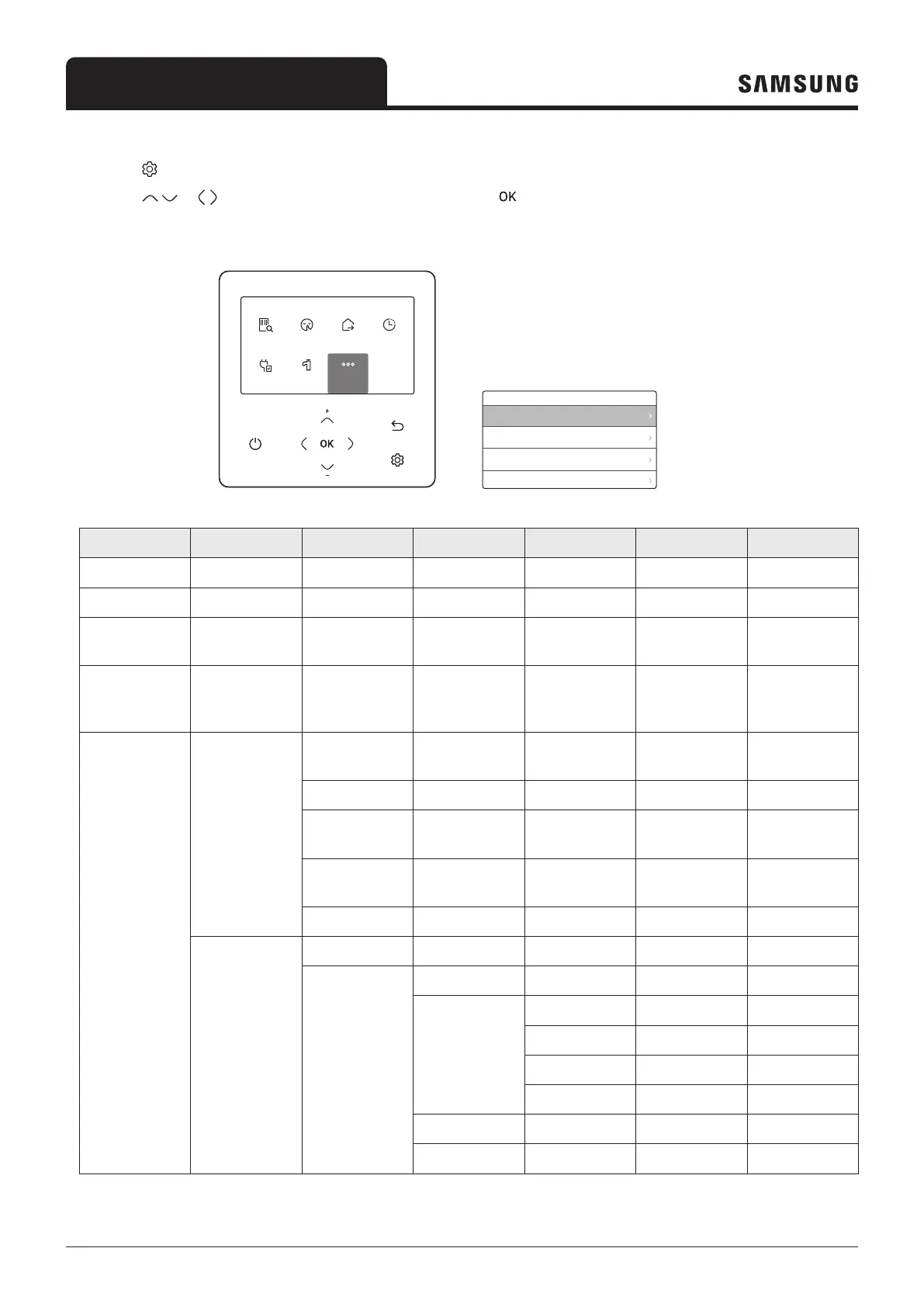
How to set the Options
Press the button.
Press the
or button to select Option, and then press the button.
See the following pages to select the desired menu.
Outdoor 07/30/2022 1:30 PM
Zone1
Zone2
30
Heat
Set
°
°
28.2
.0
24
Heat
Set
°
.0
DHW
45
Economic
Set
°
.0
Operation
Status
Quiet
ON
Priority
DHW
OptionEnergy
Outing
OFF
Schedule
Settings
Operation
Status
Quiet
ON
Priority
DHW
OptionEnergy
Outing
OFF
Schedule
Settings
Energy
Energy Usage
Energy Setting
Operation
Status
Quiet
ON
Priority
DHW
OptionEnergy
Outing
OFF
Schedule
Settings
Operation
Status
Quiet
ON
Priority
DHW
OptionEnergy
Outing
OFF
Schedule
Settings
Option
Button Lock
Error List
Indoor Unit Information
User Mode
Step 1 Step 2 Step 3 Step 4 Step 5 Description Default
Button Lock - - - - ON/OFF OFF
Error List - - - - - -
Indoor Unit
Information
- - - - - -
User Mode Language - - -
Differs
depending on
the language
First value for
the language
pack
User Mode
Daylight Saving
Time
Daylight Saving
Time
- - ON/OFF OFF
Unit - - Day/Week Week
Month - -
January to
December
Mar
Week - -
1st to 4th, F
(final week)
F (final week)
Day - - 1 to 31 22
Lock
All Lock - - ON/OFF OFF
Lock of partial
function
Operation Lock
- ON/OFF OFF
Operation Mode
Lock
All Mode Lock ON/OFF OFF
Auto Mode Lock ON/OFF OFF
Cool Mode Lock ON/OFF OFF
Heat Mode Lock ON/OFF OFF
Temperature Lock
- ON/OFF OFF
Schedule Lock - ON/OFF OFF



 To Next Page