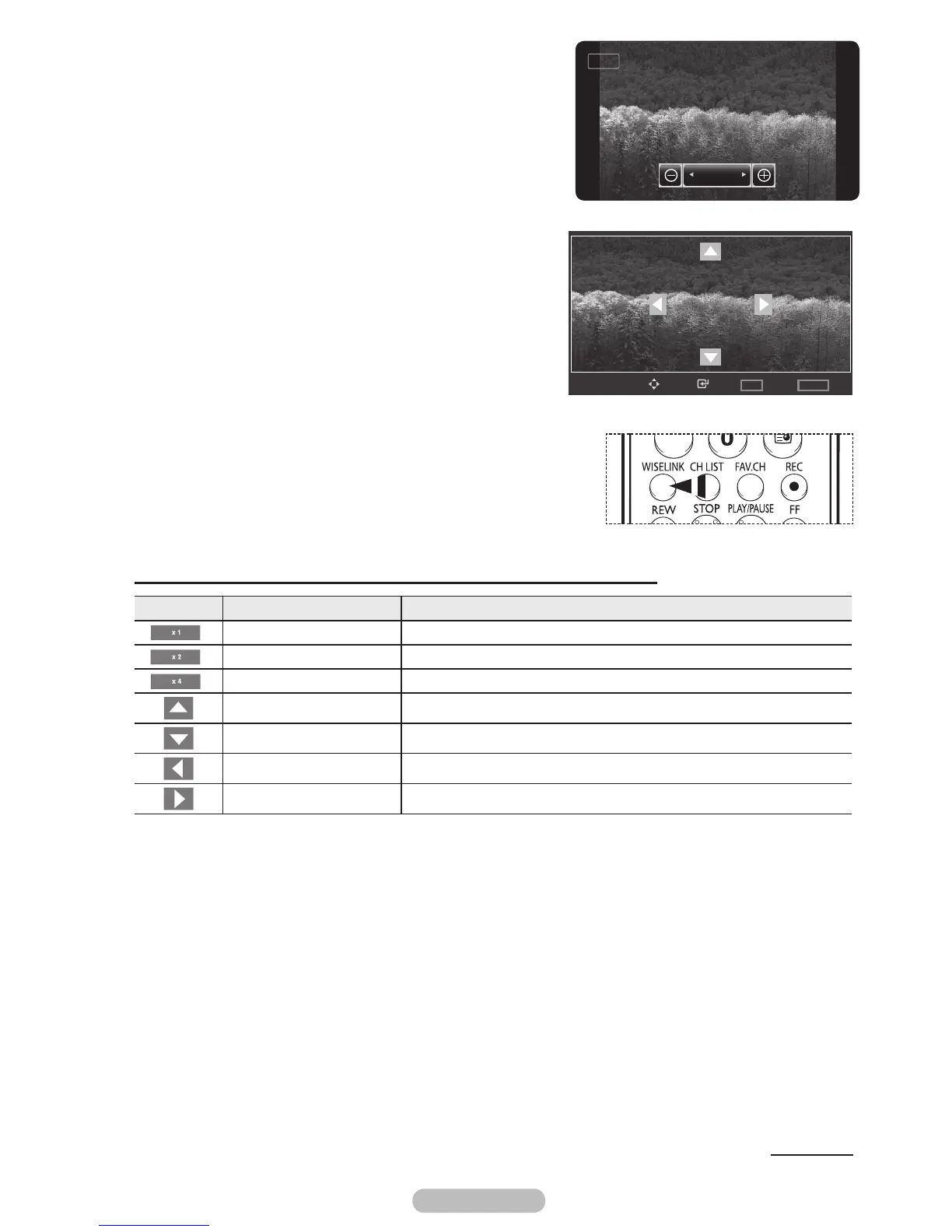
5 To move the enlarged photo image up/down/left/right, press
the ENTER/OK button, then press the ▲/▼/◄/► buttons.
➢
Note that when the enlarged picture is smaller than
the original screen size, the location change function
doesn’t work.
6 To exit WISELINK mode, press the EXIT button on the
remote control.
➢
The enlarged file is not saved.
➢
Press the WISELINK button on the remote control to turn on
the WISELINK mode.
Zoom function information icon (Displayed at the top left of the screen).
Icon Current OSD Function
Zoom (x 1) Restore a photo to its original size.
Zoom (x 2) Zoom-in to a photo x2.
Zoom (x 4) Zoom-in to a photo x4.
Pan Up Pan up to view the upper part of a zoomed-in photo.
Pan Down Pan down to view the lower part of a zoomed-in photo.
Pan Left Pan left to view the left side of a zoomed-in photo.
Pan Right Pan right to view the right side of a zoomed-in photo.
Continued...
Enter
Move
Option
TOOLS
List
WISELINK
x2
x1
Zoom Out Zoom In



 To Next Page