19/95
User manual SCAIME: NU-soft-eNod4B-E-0716_236704-C.doc
5 CANOPEN®
5.1 Physical interface
eNod4 is equipped with a CAN 2.0A compatible interface supporting CANopen® communication protocol. The device
can be connected to a CAN bus using CANH and CANL connections. A REF pin can also be connected. Supported baud
rates are 50000, 125000, 250000, 500000 and 1000000.
For a complete description of the recommendations about eNod4 CAN connexion, please refer to documentation
“characteristics and functioning”.
5.2 LED CANopen
The subsequent table describes the meaning of the LEDs for the CAN:
At least one of the error counters of the CAN controller has reached or
exceed the warning level (too many error frame)
A guard event (NMT-slave or NMT-master) or a heartbeat event
(heartbeat consumer) has occurred
The CAN controller is bus off
Self-test: while the device is performing its power up testing, the LED
shall be flashing red
The device is in state PRE OPERATIONAL
The device is in state STOPPED
The device is in state OPERATIONAL
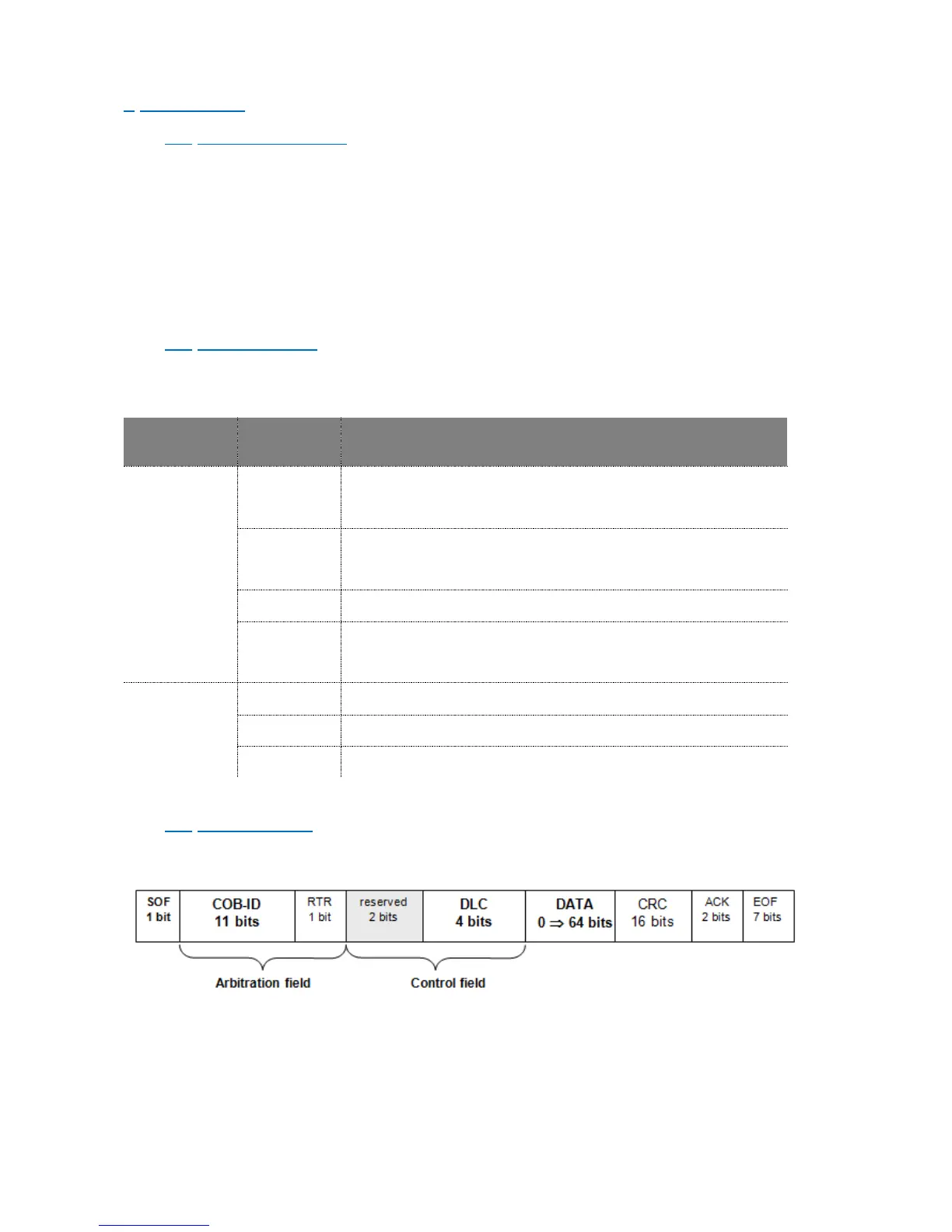
5.3 Frame format
Every data frame sent on the CAN bus has the following structure:
- Start of frame (SOF) : 1 bit
The beginning of a request or a data frame is indicated by the transmission of one
dominant bit.
- Arbitration field : 12 bits



 To Next Page