Start-up
04.00 | WSG 50 | Assembly and operating manual | en | 389474
43
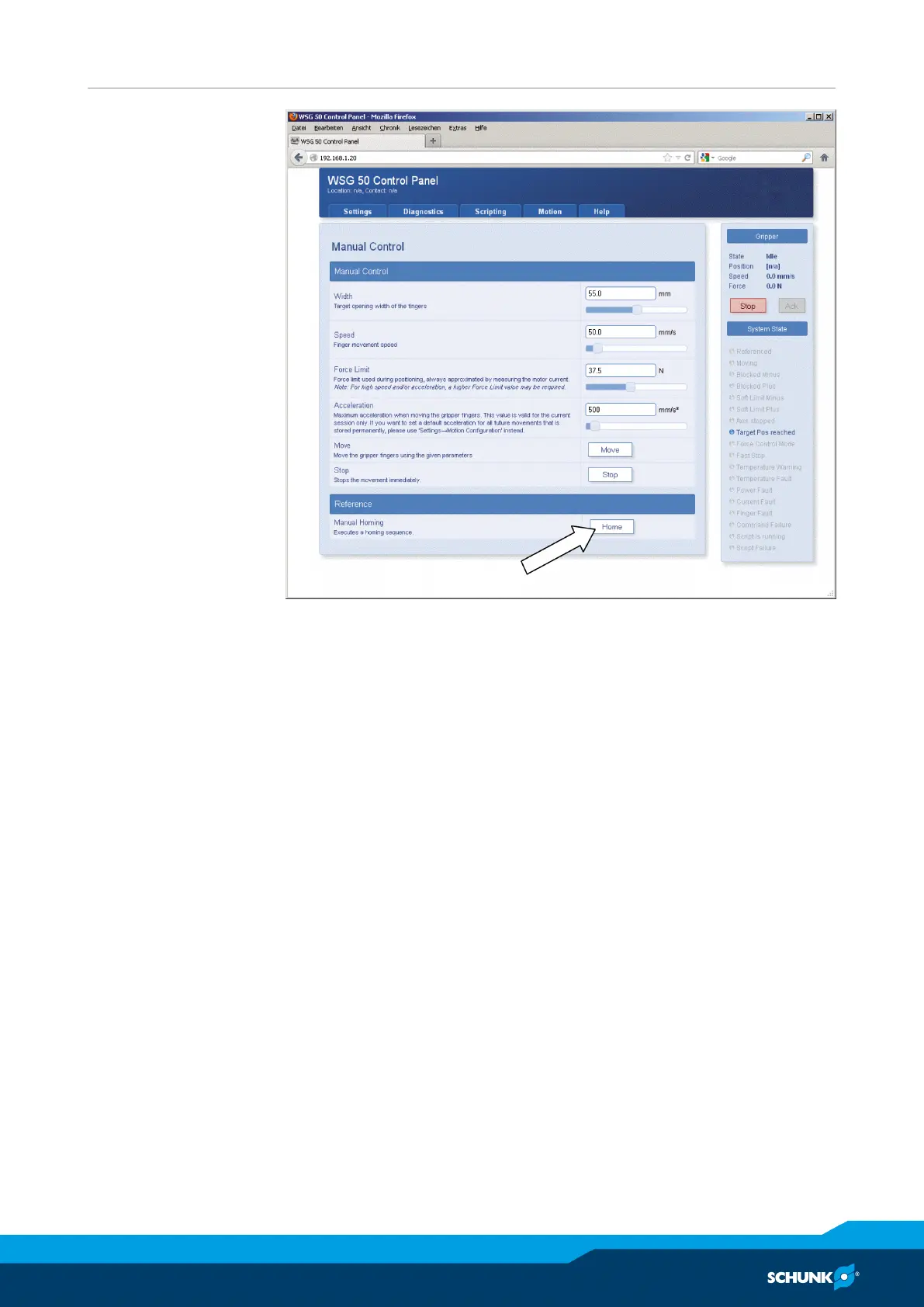
“Manual Control“ configuration page
Ø Once the homing sequence has been finished, for test purposes,
you can move the product via the web interface. For this, select
the movement parameters about the adjuster and then click on
the “Move” button.
Important: The product must have been zeroed to be able to
execute movement commands.
Other steps which you should take during the commissioning:
Ø Call up the Diagnostics -> System State page, to check the
product’s supply voltage.
Ø On the Settings -> Command Interface page, select the protocol
on which your product is to be operated.
Ø If necessary, on the Settings -> Motion Configuration page
enable automatic homing during startup („Homing on Startup“)
Ø On the Settings -> System page, create a user with
corresponding rights and activate the web interface’s security
function, to prevent changes to your setting by unauthorized
persons.


 To Next Page