MEDIA 51
Operating RADIO, MEDIA (audiovisual
systems)
NAME, TEL NAV, INFO CAR, SETUP
• SD1 (memory card 1)
• SD2 (memory card 2)
• Audio CD / MP3 CD
• iPod / USB*
• AUX*
Various submenus are available, depending on the equipment selected.
Note
• Sound settings can be adjusted individually for each piece of equipment
⇒ page 59.
• The audio source selected in shown in the title line of the display.
Main audio CD / MP3 CD menu
Selecting a CD track
The main CD menu title line indicates the CD currently being
played.
–Press the Source control button from the Media menu.
– Select Audio CD.
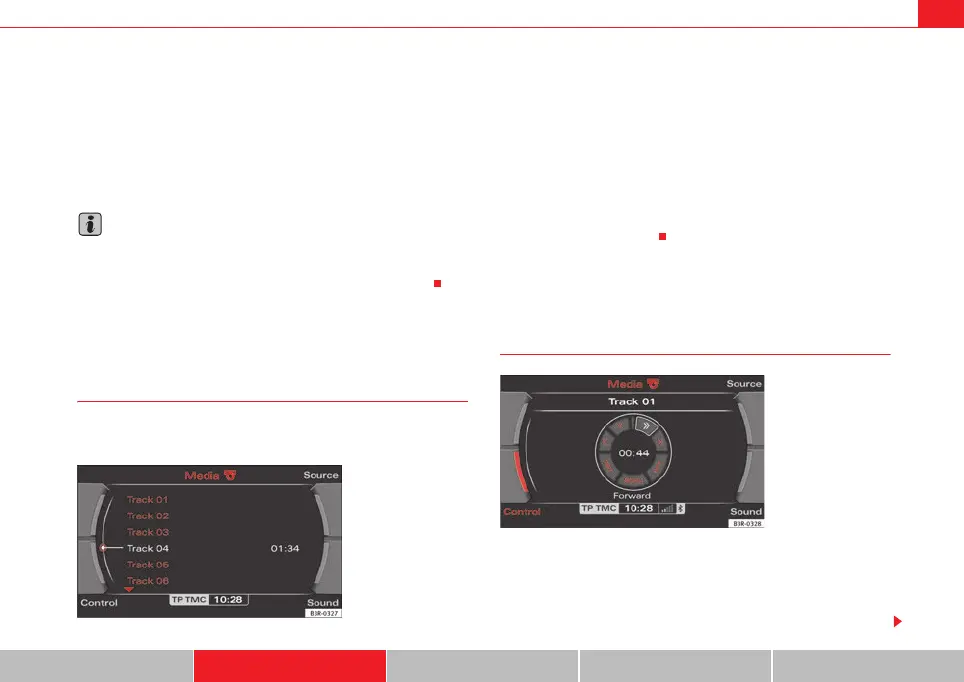
– In the main audio CD menu, select the desired track on the active
CD with the control knob ⇒ fig. 56.
The playing time of the track is displayed after the track name.
An audio CD inserted into the navigation DVD drive ⇒ page 22, fig. 24 is
shown as CD 1 in the title line.
Audio CD: Control menu
Fast forward/reverse within a track
– Press the corresponding CD Control button in the audio CD
menu.
– Select >> (“fast forward”) ⇒ fig. 57 or << (“fast reverse”) by
rotating the control knob.
Fig. 56 CD: Track list
(main menu)
Fig. 57 CD: Fast forward
within a track
media_systemE_EN.book Seite 51 Montag, 21. September 2009 1:48 13



 To Next Page