Drives26
• Please observe the notes for handling memory cards ⇒ page 28.
Removing a card
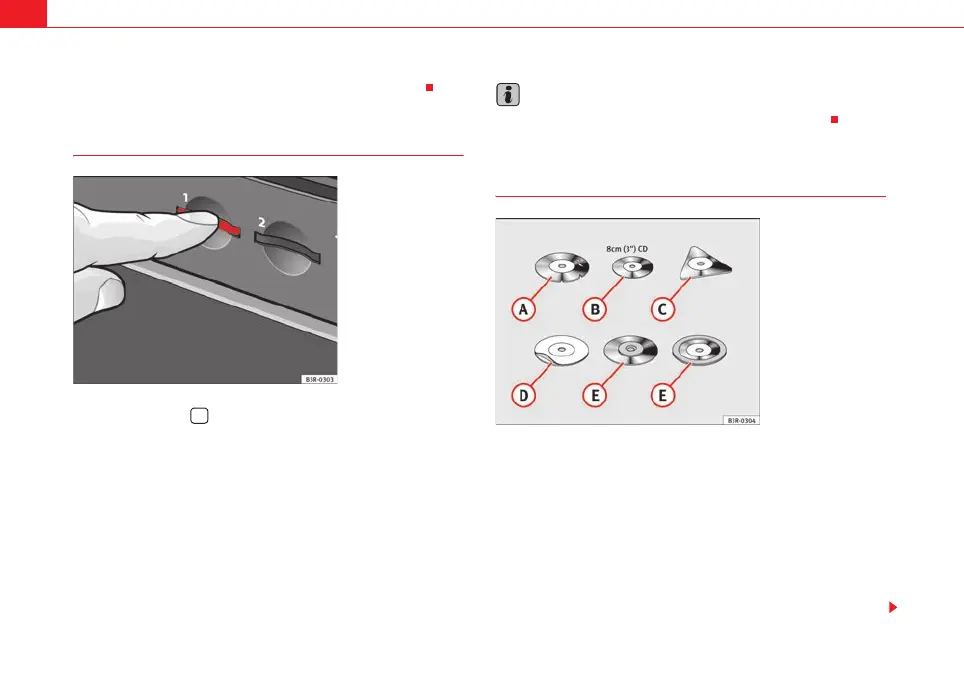
– Press the button ⇒ page 24, fig. 27 to open the display.
– Briefly press the memory card ⇒ fig. 30. The card is released
from the slot.
– Remove the memory card.
When the memory card has been removed, the open display will show Empty.
Do not remove the card from the drive while the message Reading card... Do
not remove. is shown on the display. If the memory card is removed, data
could be lost. The memory card will then have to be re-formatted before it can
be used again.
Note
Please observe the notes for handling memory cards ⇒ page 28.
General instructions on CD mode
Requirements for good sound reproduction
Please note the following in order to ensure perfect high-quality sound repro-
duction and avoid damage to media drives:
Do not use CDs or navigation DVDs that are damaged or scratched.
Do not play CD singles (8 cm / 3" in diameter).
Do not play CDs that are not round (shape CDs).
Do not place adhesive labels on a CD.
Do not use protective rings.
Fig. 30 Display open:
Removing a memory card
A
2
Fig. 31 CDs that should
not be used
A
A
A
B
A
C
D
E
media_systemE_EN.book Seite 26 Montag, 21. September 2009 1:48 13



 To Next Page