Navigation (NAV)*104
Main navigation menu
Entering a destination
There are various ways of entering the navigation destina-
tions.
First determine whether you would like to navigate to a final destination with
or without stopovers ⇒ page 120. After you have selected the type of guid-
ance (with/without stopovers) you can enter a destination over different
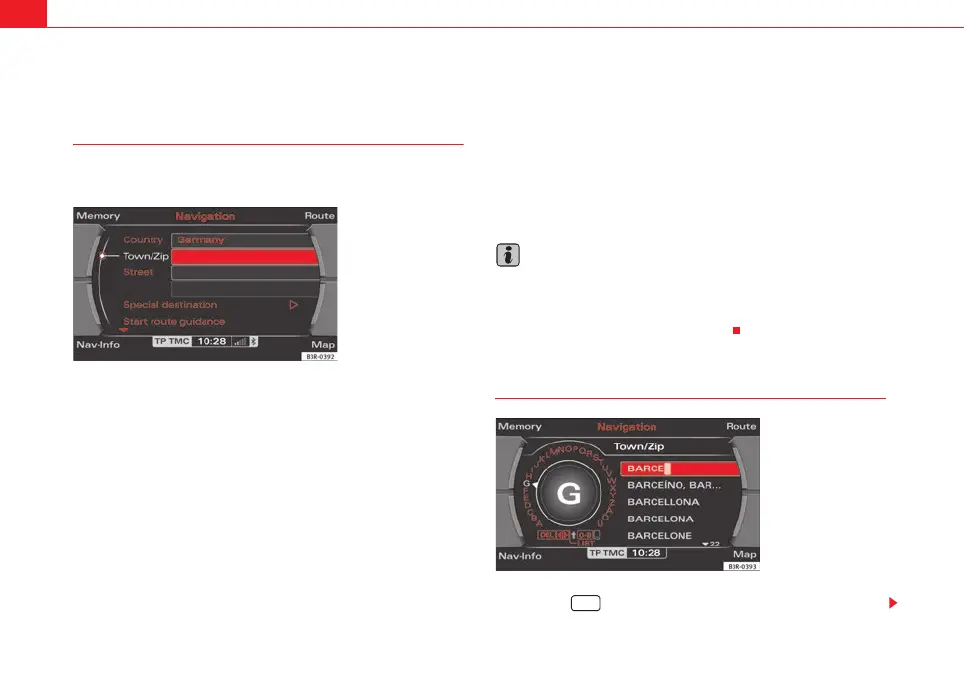
routes. Entering destination data in the entry menu ⇒ fig. 121 is handled in
the same way in single destination and route planning mode.
There are various methods of entering navigation destinations:
• Single destination mode ⇒ page 104, “Single destination (route without
stopover)”
• Route plan ⇒ page 106, “Route plan (route with stopover)”
• City (with special character in name) ⇒ page 107, “Entering a city/street
with special characters”
• Post code ⇒ page 108, “Entering a destination using the post code”
• Street ⇒ page 109, “Entering the destination street”
• Special destination ⇒ page 110, “Special destination”
• Telephone number for special destination ⇒ page 110, “Special destina-
tion”
• Map (coordinates) ⇒ page 111, “Entering a destination from the map”
• Last destinations ⇒ page 116, “Last destinations”
• Top categories ⇒ page 116, “Top categories”
• Directory ⇒ page 118, “Loading a destination from the directory”
• Load route ⇒ page 119, “Loading a route”
Note
• If you are using two different navigation DVDs please refer to the notes on
⇒ page 98.
• Options that are not available due to your preset criteria cannot be
selected (these are greyed out in the display).
Single destination (route without stopover)
– Press the function button ⇒ page 9.
Fig. 121 Navigation:
Destination entry menu
(main menu)
Fig. 122 Navigation
system: Enter the destina-
tion using the keyboard
NAV
media_systemE_EN.book Seite 104 Montag, 21. September 2009 1:48 13



 To Next Page