Navigation (NAV)*106
You can also store the selected map destination using the option Store in
directory ⇒ page 117.
Enter a street name to specify a more detailed position of the map.
Note
Once you have entered a city in the keyboard, you can confirm the entry by
pressing and holding down the control knob. Or, you can enter the first few
letters of a city until you see the desired town listed on the keyboard display
and then shift directly to the city list by pressing down on the control knob.
Route plan (route with stopover)
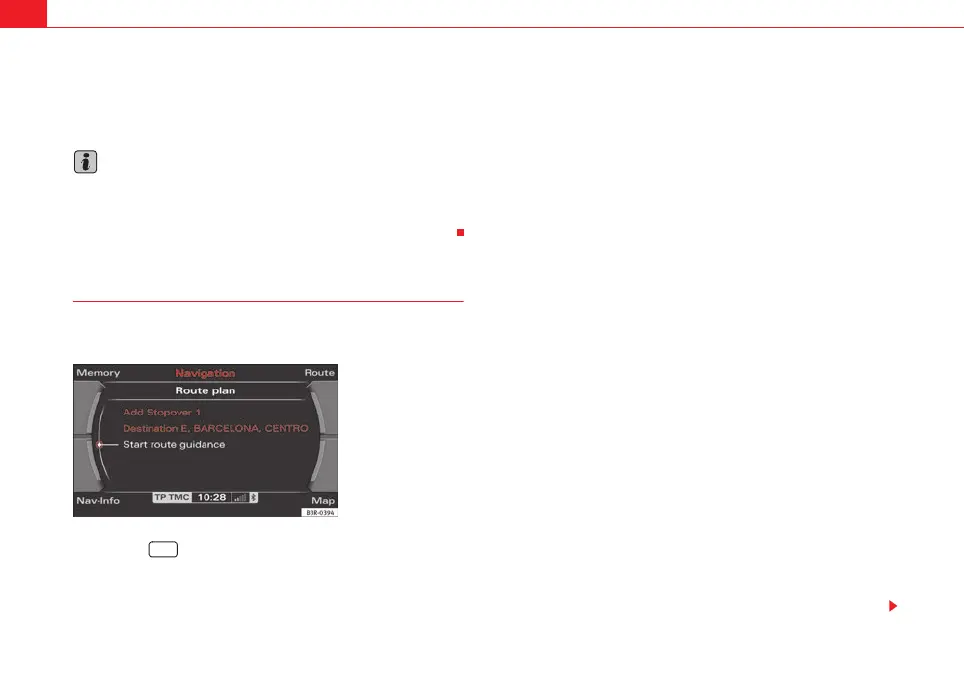
In the route with stopover mode you can enter up to three
intermediate destinations and a final destination.
– Press the function button ⇒ page 9.
– Press the control button with the Route function and confirm the
Route with stopovers function to switch to Route plan
⇒ fig. 123.
– Select Destination and enter the final destination.
– Select a country from the list by rotating and pressing the control
knob.
– Select Town/ZIP, enter the data using the keyboard and confirm
with OK, or
– Select LIST in the keyboard and select a city from the list.
– Select City centre (end entry) to navigate to the centre of a
selected locality or
– Choose Street, Special destination in city or Destination input
on map to enter more detailed destination criteria.
– Enter stopovers by means of Stopover 1, Stopover 2 or
Stopover 3.
– Select Start route guidance ⇒ page 112.
When you start the route guidance the display will first show the calculated
route plan including various details in an overview map. Confirm the route by
pressing the control knob. For more information about the route plan, please
refer to ⇒ page 114.
You can switch from the keyboard for letters to the keyboard for numbers to
be able to enter special characters (e.g. dash, apostrophe or full stop) for a
city name ⇒ page 107 or to enter a post code for a city ⇒ page 108.
When you enter the name of a city in the keyboard you will be offered a list of
the most recent entries as soon as you enter the first letters.
Select City Centre (end entry)
This navigation system calculates route guidance to the centre of the city
entered.
Fig. 123 Navigation
system: Route planned
NAV
media_systemE_EN.book Seite 106 Montag, 21. September 2009 1:48 13



 To Next Page