Mobile phone system*72
Note
• The use of mobile phones in the vehicle can generate electromagnetic
fields.
− Therefore, you should always operate mobile phones with an external
aerial. It is also valid for the use of mobiles using Bluetooth technology.
The external aerial directs the electromagnetic fields to the exterior,
which reduces the field strength in the vehicle interior.
− If retrofitting an external aerial, please ensure that it is installed
correctly.
• For more information on how to bond your mobile phone, please refer to
the mobile phone operating instructions.
Using the telephone
Introduction
Press the button to activate the telephone functions in
the navigation system.
– Press the function button ⇒ page 9. The main telephone
menu or the telephone submenu last used will appear in the
display.
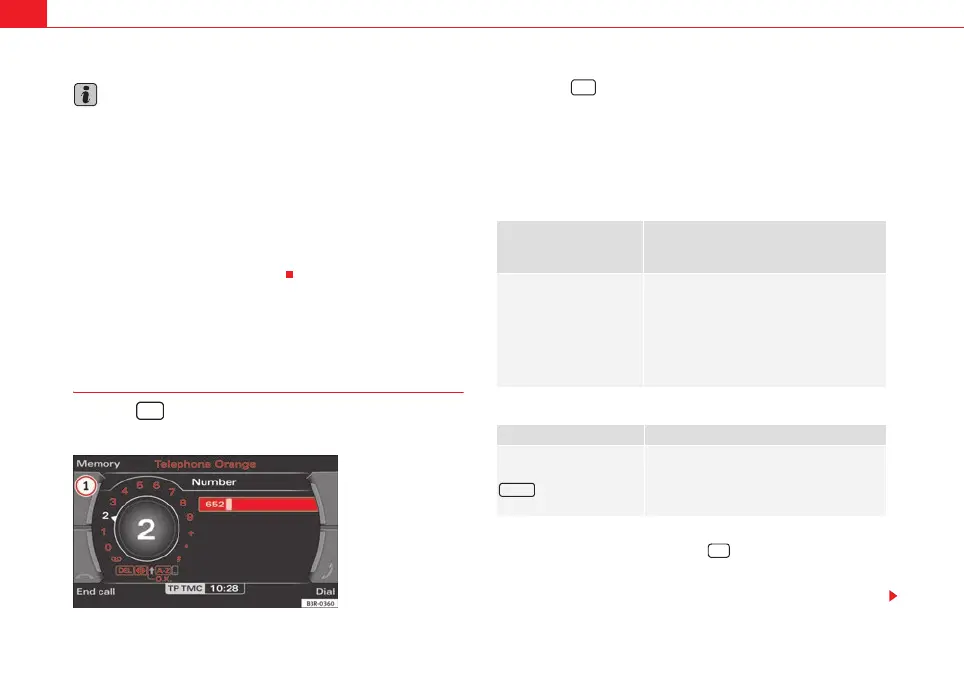
– Press the control button for Memory ⇒ fig. 88 to call up the
submenus for this function.
The following submenus are available in the telephone function:
The following submenus are available in the telephone setup function:
The message “Your telephone may not be connected or attached properly.”
will appear in the display if you press the button when there is no
connection between the phone and the adapter. Insert the mobile phone in
the adapter ⇒ page 69 or connect the phone to the system via Bluetooth
⇒ page 71.
TEL
Fig. 88 Display: Main
telephone menu
Control button
functions
⇒ fig. 88
Telephone functions
Memory
Numbers dialled
Call voice mailbox
Directory
Phone book
Received calls
Missed calls
Store current number
Telephone Setup menu
In the telephone menu,
press the
button ⇒ page 83
Telephone settings
Call options
Voice mailbox number
TEL
A
1
1
SETUP
TEL
media_systemE_EN.book Seite 72 Montag, 21. September 2009 1:48 13



 To Next Page