Mobile phone system* 69
Operating RADIO, MEDIA (audiovisual
systems)
NAME, TEL NAV, INFO CAR, SETUP
• In some cases there may be a delay before the connection is established
between the mobile phone adapter and the navigation system. During this
time the display will show the message “Telephone not available”.
• For up-to-date information on the mobile phone adapter, please ask your
dealer or refer to our website.
Installation
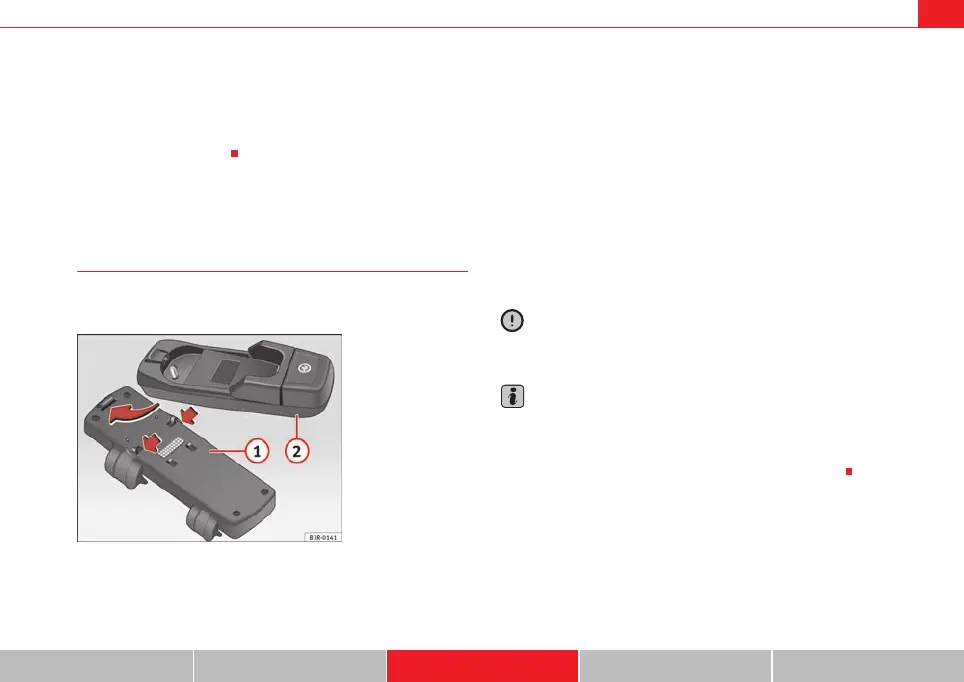
Installing and removing the mobile phone adapter
The mobile phone adapter is fitted to the top of the mounting
unit.
Installing the mobile phone adapter
– Open the central armrest, where applicable.
– Slide the lock on the mobile phone adapter ⇒ fig. 85 into the
guide tab of the mounting unit .
– Push the bottom part of the mobile phone adapter down to
make it engage.
Removing the mobile phone adapter
– Open the central armrest, where applicable.
– If the mobile phone is in the adapter, take it out ⇒ page 70.
– Carefully pull the rear section of the adapter upwards out of the
retainer.
Caution
To avoid damaging the adapter, you should only remove the mobile phone
adapter when necessary.
Note
• To avoid system malfunctions, ensure that the adapter unit is properly
attached.
• The adapter set you require depends on your type of mobile phone and
may be different from the adapter version shown in the illustration.
Fig. 85 Installing the
mobile phone adapter
A
2
A
1
A
2
media_systemE_EN.book Seite 69 Montag, 21. September 2009 1:48 13



 To Next Page