Mobile phone system*70
Inserting/Removing the mobile phone
Important: The mobile phone adapter must be fitted ⇒ page 69.
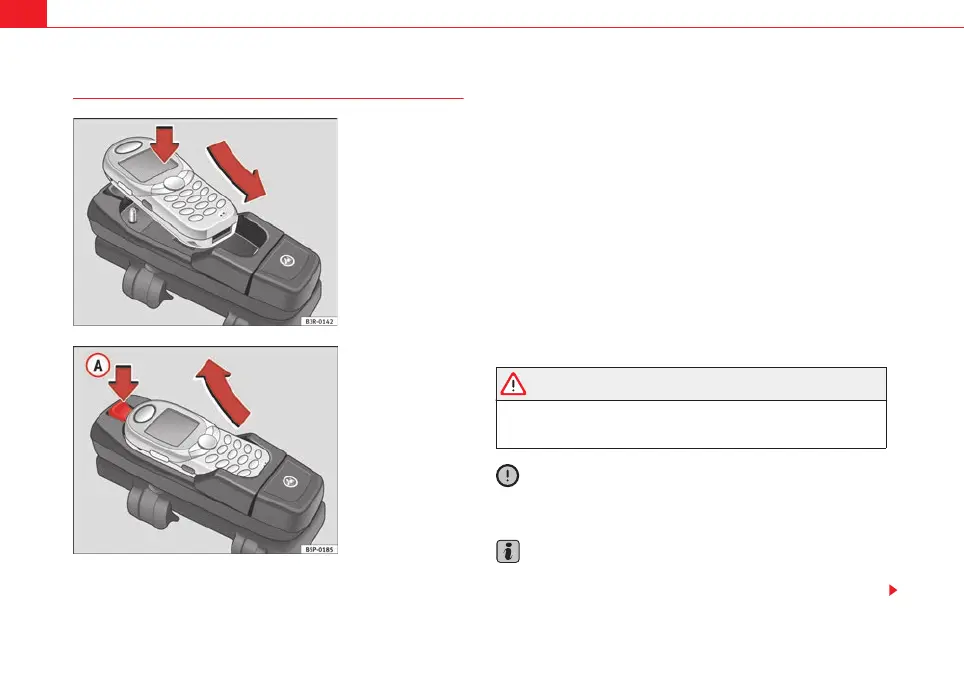
Inserting
– Place the mobile phone in the phone adapter ⇒ fig. 86.
– Press the mobile phone into the adapter until it locks into place.
The mobile phone will be connected up to the mobile phone
aerial and the battery will be charged.
Removal
– Press the release button ⇒ fig. 87.
– Lift the mobile phone out.
Should you insert the mobile phone into the adapter or remove it during a
call, the audio output or the connection may be interrupted.
A Bluetooth compatible mobile phone is required for the wireless connection
via Bluetooth ⇒ page 71.
WARNING
Always make sure that the mobile phone is properly engaged. In the event
of an accident, a mobile phone that is not securely fitted could be flung out
of the adapter unit and injure the driver or passengers.
Caution
The mobile phone could possibly be damaged if it is not properly inserted in
the adapter and falls out when driving.
Note
• The use of mobile phones in the vehicle can generate electromagnetic
fields.
Fig. 86 Inserting the
mobile phone into the
phone adapter
Fig. 87 Removing the
mobile phone from the
phone adapter
A
A
media_systemE_EN.book Seite 70 Montag, 21. September 2009 1:48 13



 To Next Page