Handling: General information8
Handling: General information
Control switches
Concept for handling
You can operate all the functions of the navigation system by
pressing and rotating the control knob.
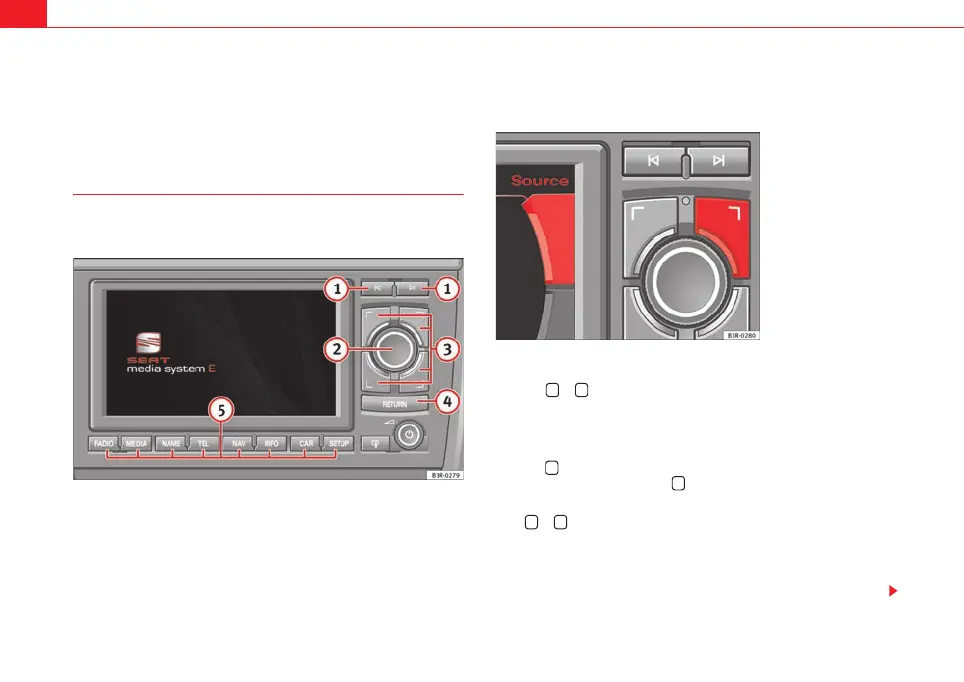
Fig. 5 Navigation system: Control switches
Forward/reverse buttons
Press the or button to select the previous or next radio station on the
corresponding list.
When the radio memory list ⇒ page 38 is shown in the display, you can also
use these buttons to select a station from the list.
Press the button to call up the next CD or MP3 track. You can jump back to
the previous track by pressing the button within the first ten seconds of
play time for the track. After 10 seconds it jumps to the start of the track.
If the or button is held down in CD/MP3 mode, fast forward or reverse
is activated, respectively.
If you would like to scroll in a list of radio stations or a CD or MP3 track list
using the forward/reverse buttons, it is not necessary to show the list of
stations or track list on the navigation system display.
Fig. 6 Navigation system:
Correspondence between
the control buttons and
the menus in the corners
of the display
A
1
media_systemE_EN.book Seite 8 Montag, 21. September 2009 1:48 13



 To Next Page