Navigation (NAV)*108
– Select 0-9 ⇒ page 107, fig. 124 in the keyboard display to
switch from the keyboard for letters to the keyboard for numbers.
– Enter the special character (e.g. a dash) for the city/street name.
– Then switch back to the keyboard for letters to continue entering
letters for the city/street name.
– Confirm the city/street name with OK, or
– Select List in the keyboard and choose a city/street from the list.
– Enter the remaining details for your route and start route guid-
ance ⇒ page 112.
You can enter special characters (e.g. a dash, apostrophe or full stop) using
the keyboard for numbers.
Example: To enter “Stratford-upon-Avon”, first enter “Stratford” using the
keyboard for letters. Then switch to the keyboard for numbers ⇒ page 107,
fig. 124 to add the dash. Then switch back to the keyboard for letters to enter
“UPON”, and so on.
As an alternative to spelling out the place name, you can also enter the post
code ⇒ page 108.
Note
Options that are not available due to your preset criteria cannot be selected
(these are greyed out in the display).
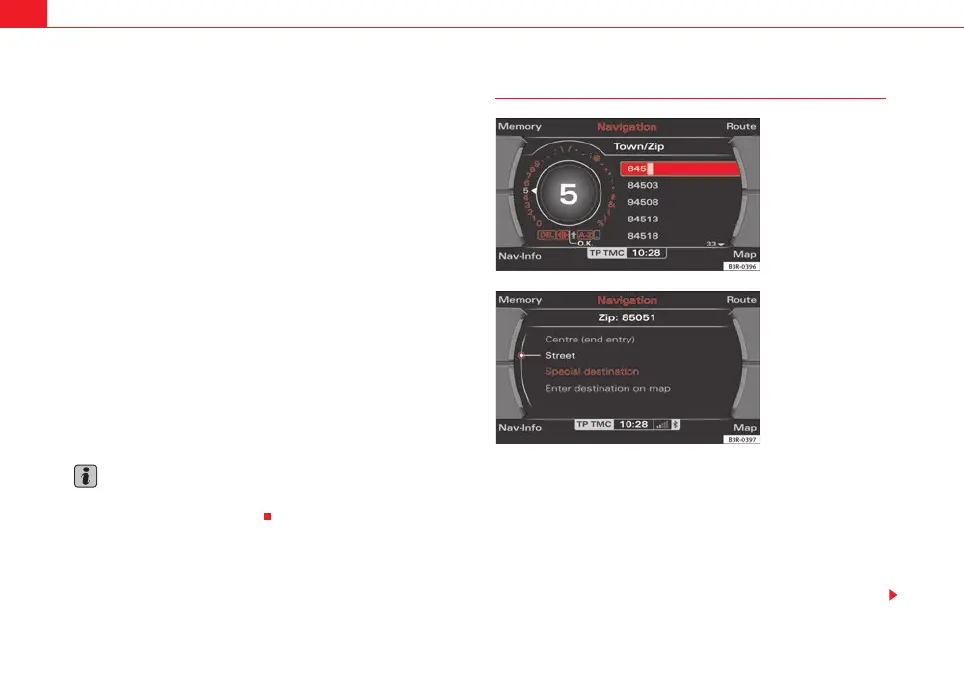
Entering a destination using the post code
– In the destination entry menu ⇒ page 104, fig. 121, select a
country from the list by rotating and pressing the control knob.
– Select City/ZIP.
– Switch to the keyboard for numbers ⇒ page 107, fig. 124.
– Enter the desired post code using the keyboard ⇒ fig. 125 and
confirm the entry with OK, or
Fig. 125 Navigation
system: Enter the post
code using the keyboard
Fig. 126 Navigation
system: Additional infor-
mation for the destination
media_systemE_EN.book Seite 108 Montag, 21. September 2009 1:48 13



 To Next Page