Drives 25
Operating RADIO, MEDIA (audiovisual
systems)
NAME, TEL NAV, INFO CAR, SETUP
Loading a memory card
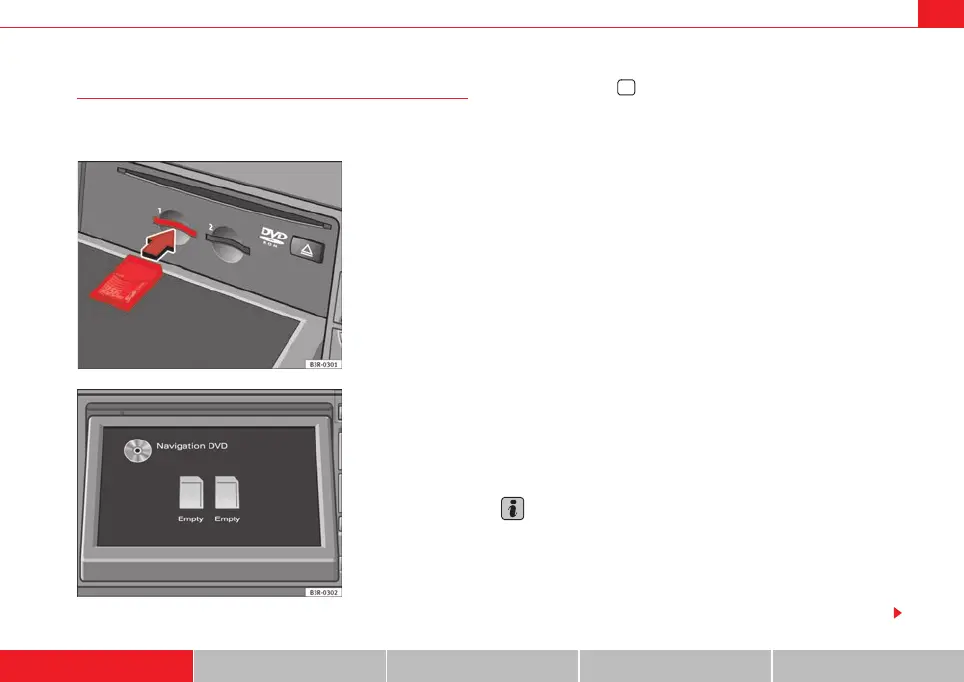
The navigation system is equipped with two MP3 memory
card readers.
– Press the button ⇒ page 24, fig. 27 to open the display.
– Insert the memory card (printed side faces up, contact surface
faces down) into the slot of the card reader ⇒ fig. 28. The
missing corner of the memory card must face to the front right (in
the direction of travel) ⇒ fig. 29.
– Then push the memory card into the slot until you feel it engages.
The memory card must be flush with the surrounding area.
If the memory card has been inserted correctly the display (when folded
open) will indicate the formatted memory capacity of the card. If there are
MP3 audio files which can be read by the MP3 player stored on the card, the
display will also show the file format “MP3 audio” or the data carrier name (if
allocated).
Do not remove the card from the drive while the message Reading card... Do
not remove. is shown on the display. If the memory card is removed, data
could be lost. The memory card will then have to be re-formatted before it can
be used again.
If you insert a memory card and do not play it immediately, the ID3 tags will
load in the background. If you start playing the memory card immediately, the
ID3 tag for the current track will be displayed.
Use the MP3 function to play back a memory card which is already loaded in
the player ⇒ page 54.
Note
• The memory capacity indicated in the display is the formatted memory
capacity of the SD/MMC card you are using. It may differ from the capacity
printed onto the card.
• The time required for loading the memory card depends on the number of
files on the memory card. The more files there are the longer it will take to load
the memory card.
Fig. 28 Display open:
Inserting memory card
Fig. 29 Display open:
Position of the memory
card during the loading
process
2
media_systemE_EN.book Seite 25 Montag, 21. September 2009 1:48 13



 To Next Page