MRD 5800 – User Manual
Page 69 (116)
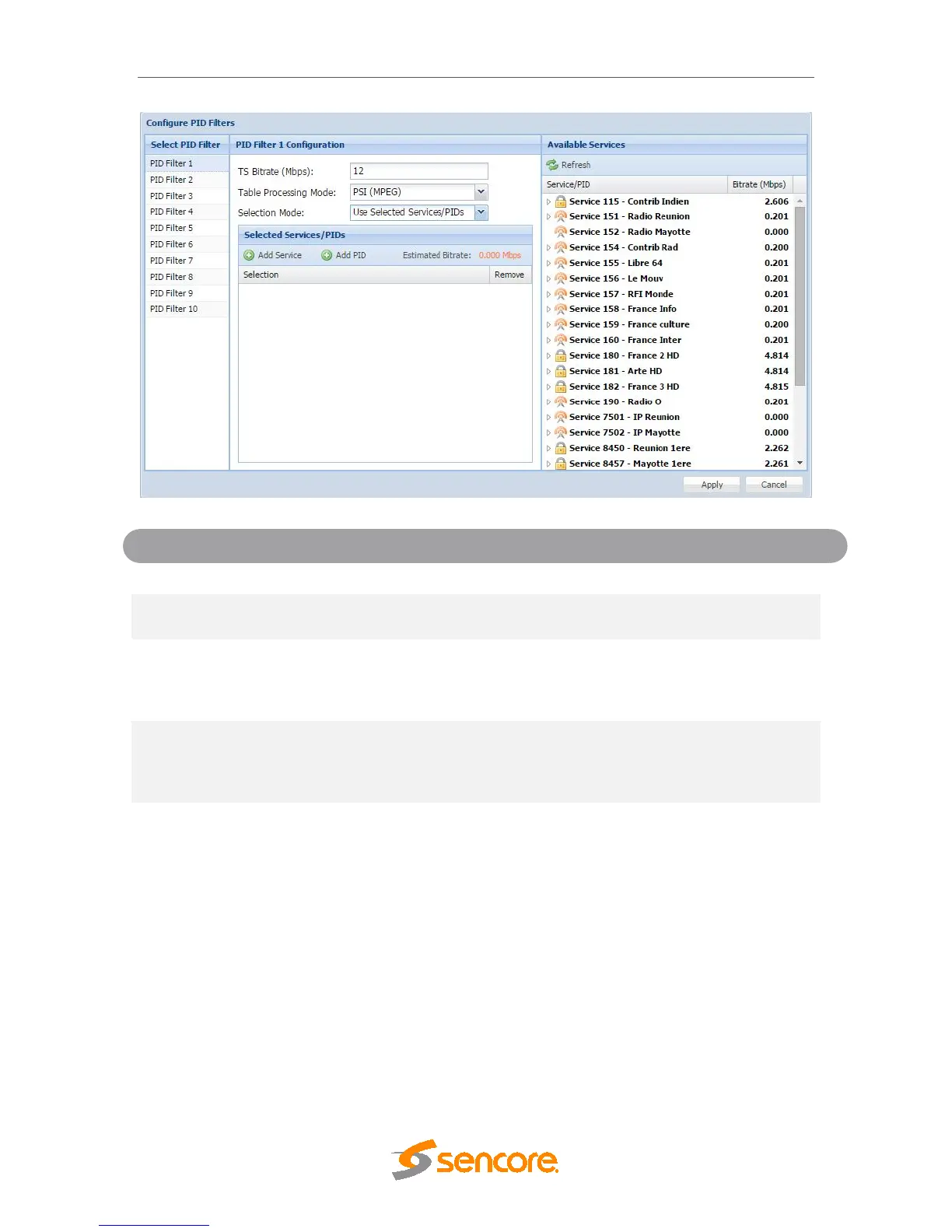
Select which PID filter to configure
Configure the TS Bitrate for the PID filter stream
selected
Mode
Adjusted tables: PAT, PMT
Passed tables: CAT, NIT
Discarded tables: all remaining
Mode
Adjusted tables: PAT, PMT,SDT
Passed tables: CAT, NIT, EIT, RST, TDT, TOT
Discarded tables: TSDT, BAT
Services/PIDs
Use Decoded Service
Use Selected Services/PIDs will allow the user to
select which services are in the new TS. Use
Decoded Service will only include the service that
is currently selected for decoding by the MRD 5800
4.2.26 Configuring ASI Output
This menu allows the user to configure the ASI output of the MRD 5800. When enabled
this output acts as an active loop output of the active input. For example, if the DVB-
S/S2 input card is the current active input the ASI output port will output a demodulated
signal of the satellite input.



 To Next Page