DVR Setup
700-1014 R002 2–5
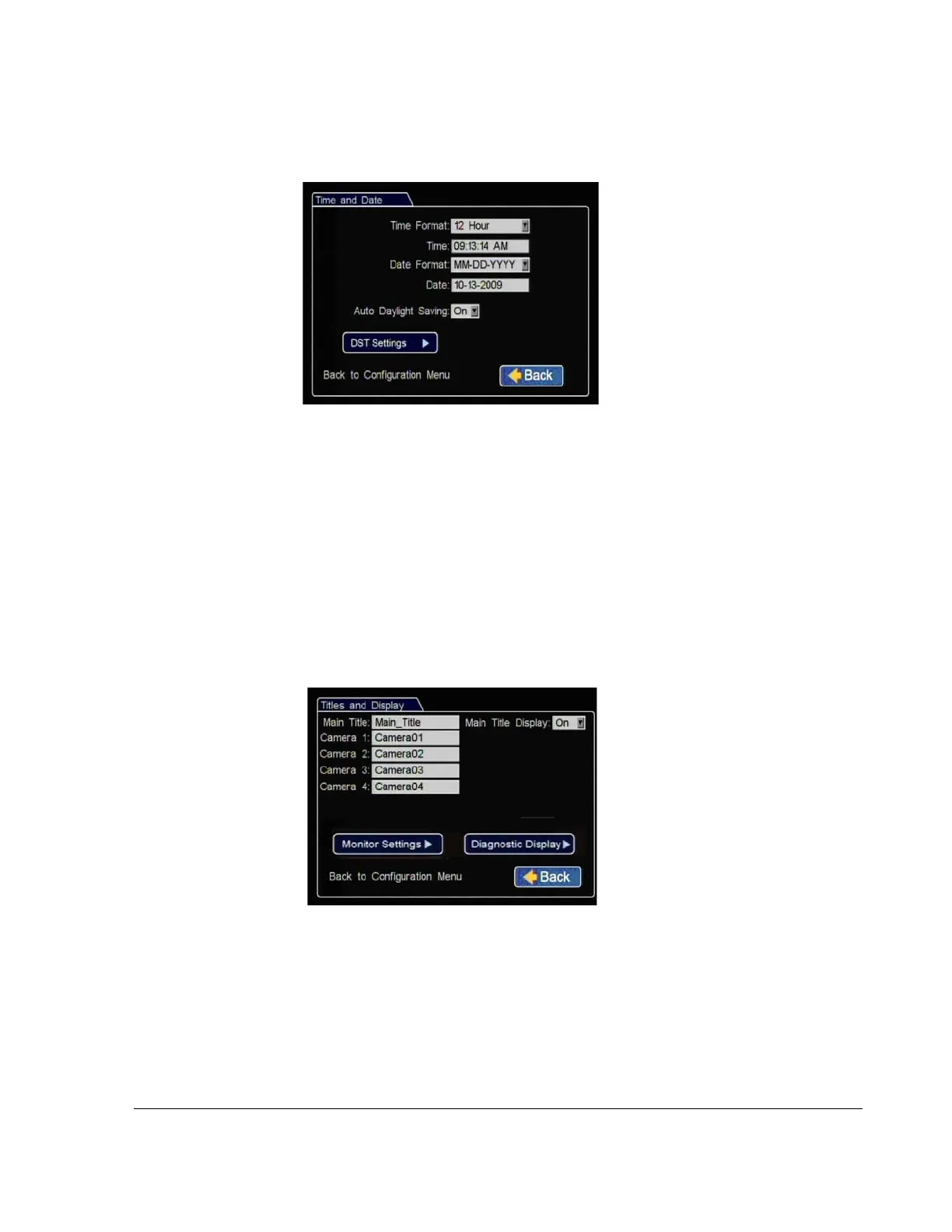
3. In the Time and Date menu, select the following fields to show time and date for
the video overlays:
4. In the Configuration menu, click Titles/Display.
5. In the Titles and Display menu, enter vehicle ID and camera output labels to
display on overlay and menus.
6. In the Titles and Display menu, click Monitor Settings.
Time Format
:
Choose 12 or 24 hour
time display format.
Time
:
Input the correct time.
Date Format
:
Select the date
format.
Date
:
Input the correct date.
Note
:
If GPS is installed and GPS
time is selected in the Alarm/Signal
Speed and GPS settings then the date
and time automatically update when
the GPS detects satellites.
Auto Daylight Saving: should be left On and dates left as default unless in a
geographic area that does not subscribe to daylight savings such as Arizona,
Hawaii, or Saskatchewan.
Click Back to save the menu settings.
Figure 2-6
Time and Date Menu
Main Title: Enter the bus number.
Main Title Display
:
Leave On to
display.
Camera 1-4
:
Select camera titles
that reflect the views they are
recording. Typical camera titles are:
•Front
•Step
•Mid
•Rear
•Stop Arm
Click Back to save the menu settings.
Figure 2-7
Titles and Display Menu



 To Next Page