DVR Setup
2–6 700-1014 R002
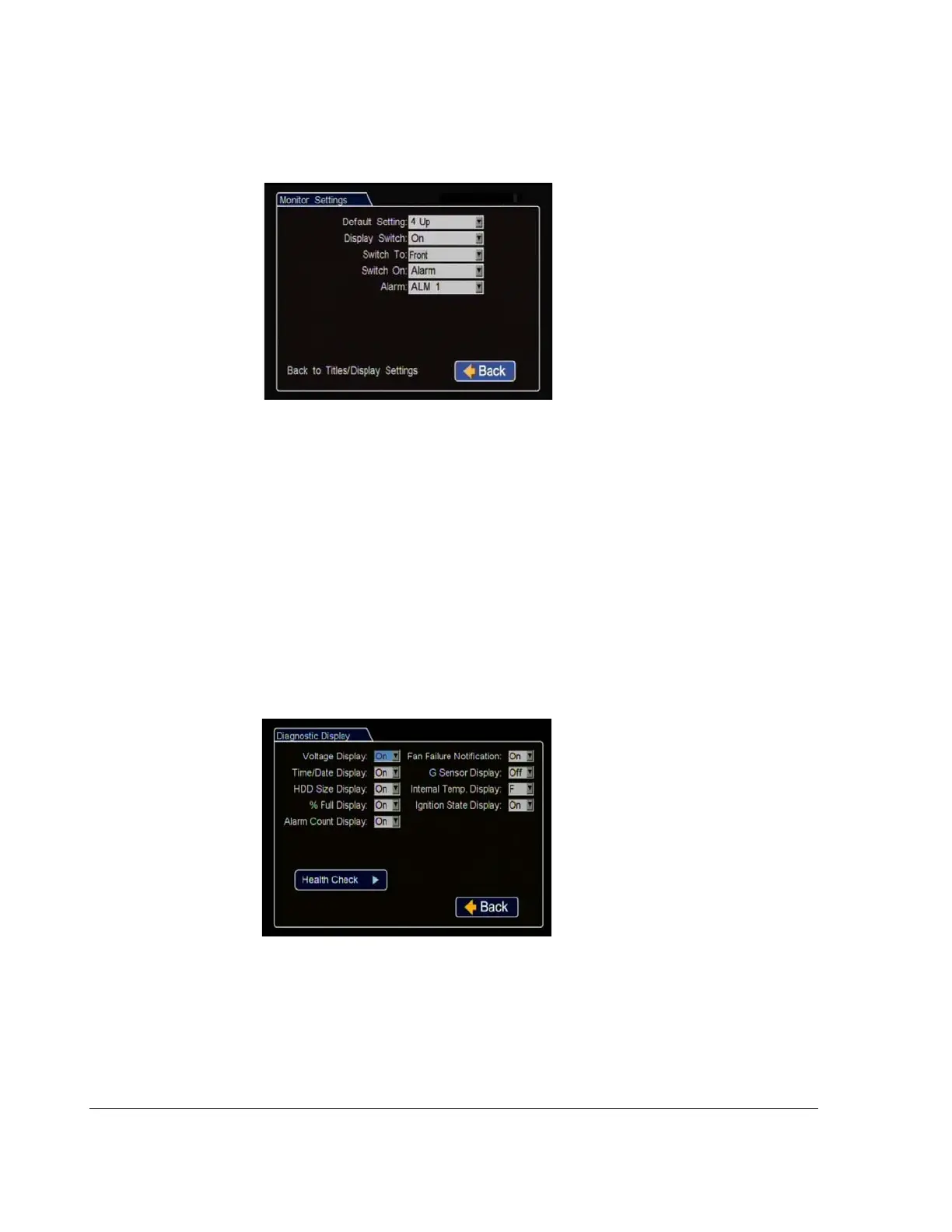
7. In the Monitor Settings menu, select options to provide monitor display for the
camera output.
8. In the Titles and Display menu, click Diagnostic Display.
9. In the Diagnostic Display menu, select options to display as overlays in the play
view.
10. In the Configuration menu, click Record.
Default Setting
:
Choose a monitor
view setting which will display all
the cameras you have connected.
Display Switch
:
Leave On to switch
the display as per the following
settings.
Switch To
:
If a rear view camera is
installed, select the channel that will
display the rear camera view or
select the camera channel customer
wishes to switch to when the
following alarm or signal setting triggers the switch.
Switch On
:
Select the switch type (alarm or signal) that will activate the selected
camera to be displayed on the monitor output.
Alarm
:
Select the specific alarm or signal that will activate the selected camera
to be displayed on the monitor output.
Click Back to save the menu settings.
Figure 2-8
Monitor Settings Menu
The diagnostic display options are a
customer preference. Leave all these
settings On.
Internal Temp Display
:
For
temperature measurement display,
leave on default F for Fahrenheit
(USA) or choose C for Celsius
(Canada).
Click Back to save the menu
settings.
Figure 2-9
Diagnostic Display Menu



 To Next Page