74 75Unison
Sequential Prophet X User’s Guide
Master Volume/Program Volume
Key Modes and Unison Mode
Key Mode (sometimes called note priority) determines what note has
priority when more than one note is played on the keyboard or via MIDI.
• Low-Note Priority is most common in vintage synths and is often used
for playing trills by holding a note and repeatedly tapping a lower note.
• Low Retrigger causes the envelopes to be retriggered with each
keystroke.
• High Note and High Retrigger are similar to the low note settings,
except that the highest note is given priority.
• Last Note and Last Retrigger give priority to the last note played.
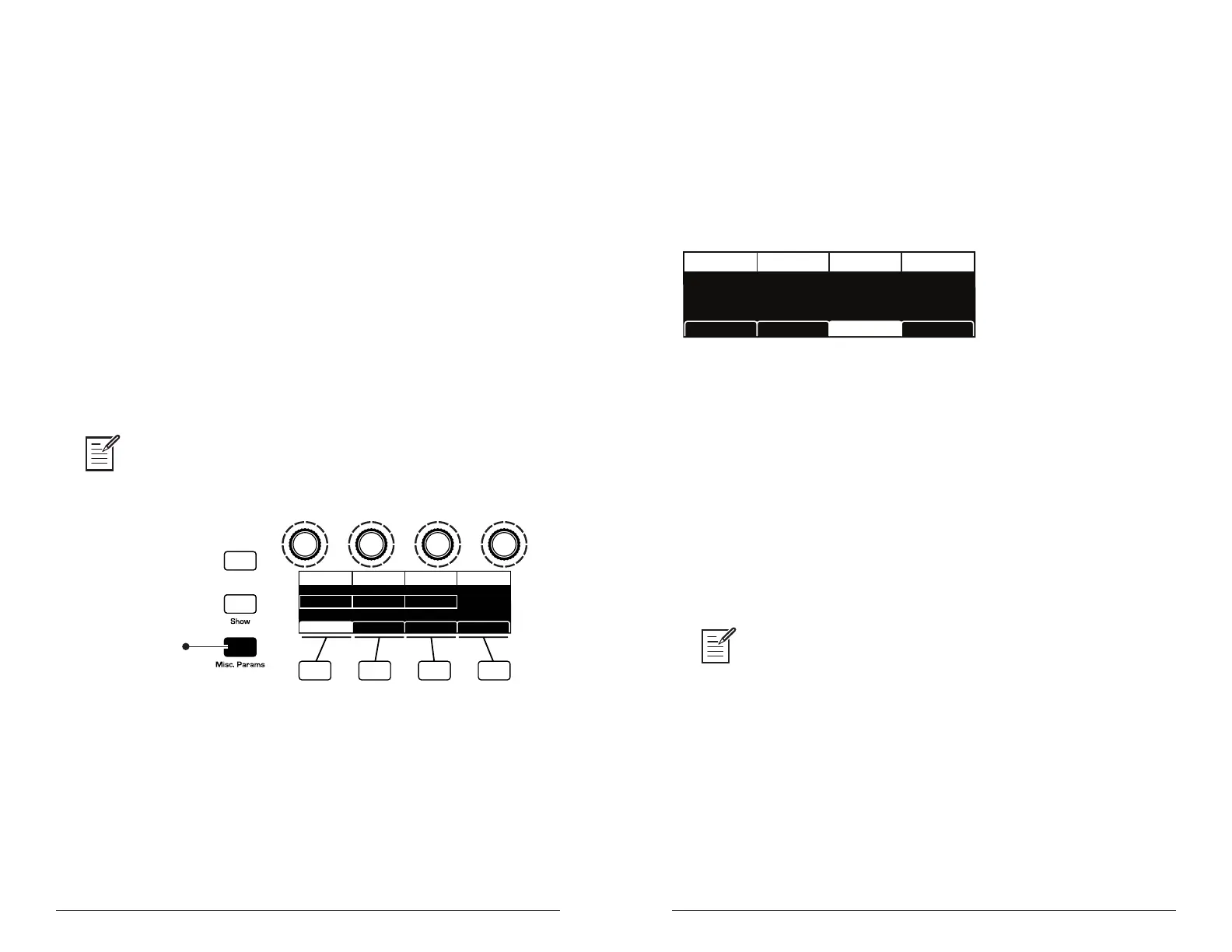
To choose the Key Mode:
1. Press the misc params button and use Soft Knob 3 to scroll to the
desired mode.
2. Play a few notes to listen to the result.
Key Mode settings are only relevant to Unison mode. They do not affect poly-
phonic playback.
Press to see the
Misc Parameters menu
Revert
Range Up Key ModeRange Down Split Point
RANGE DOWN
2
SPLIT POINT
Low2
KEY MODE
Keyboard Glide RateUnison Glide
RANGE UP
C3
Misc Parameters button
Master Volume/Program Volume
The master output level of the Prophet X is controlled by the front-panel
master volume knob. In addition, the volume of an individual program
can be set with the prog volume parameter (in the amp envelope menu).
This is useful for ensuring that your sounds have roughly the same
volume from program to program. Unison sounds in particular can be
very loud compared to other programs.
PROG VOLUME
Prog Volume Pan Spread
PAN SPREAD
0127
Vol/PanVCA ADSR VCA Env Amt
Setting Program Volume in the Amp Envelope menu
To set the volume of an individual program:
1. Choose a program.
2. Move any of the amp envelope controls on the front panel.
3. In the display menu, press Soft Key 3.
4. Hold down a chord on the keyboard.
5. Turn Soft Knob 1 (prog volume) to adjust the volume level from 1 to
127.
6. Save the program. (See “Saving a Program” on page 7.)
MIDI volume can also inuence the overall volume of the Prophet X if you are
controlling it from an external MIDI source.















 To Next Page