114 115
Sequential Prophet X User’s Guide
Rear Panel Connections
Chapter 4: Connections/Setups
Chapter 4: Connections/Setups
This chapter explains the various connectors and connections that you
can make to your Prophet X. It also covers the various parameters in the
Global menu, how to save and load programs to and from your computer,
how to update your operating system if necessary, and how to import
add-on sample libraries.
Rear Panel Connections
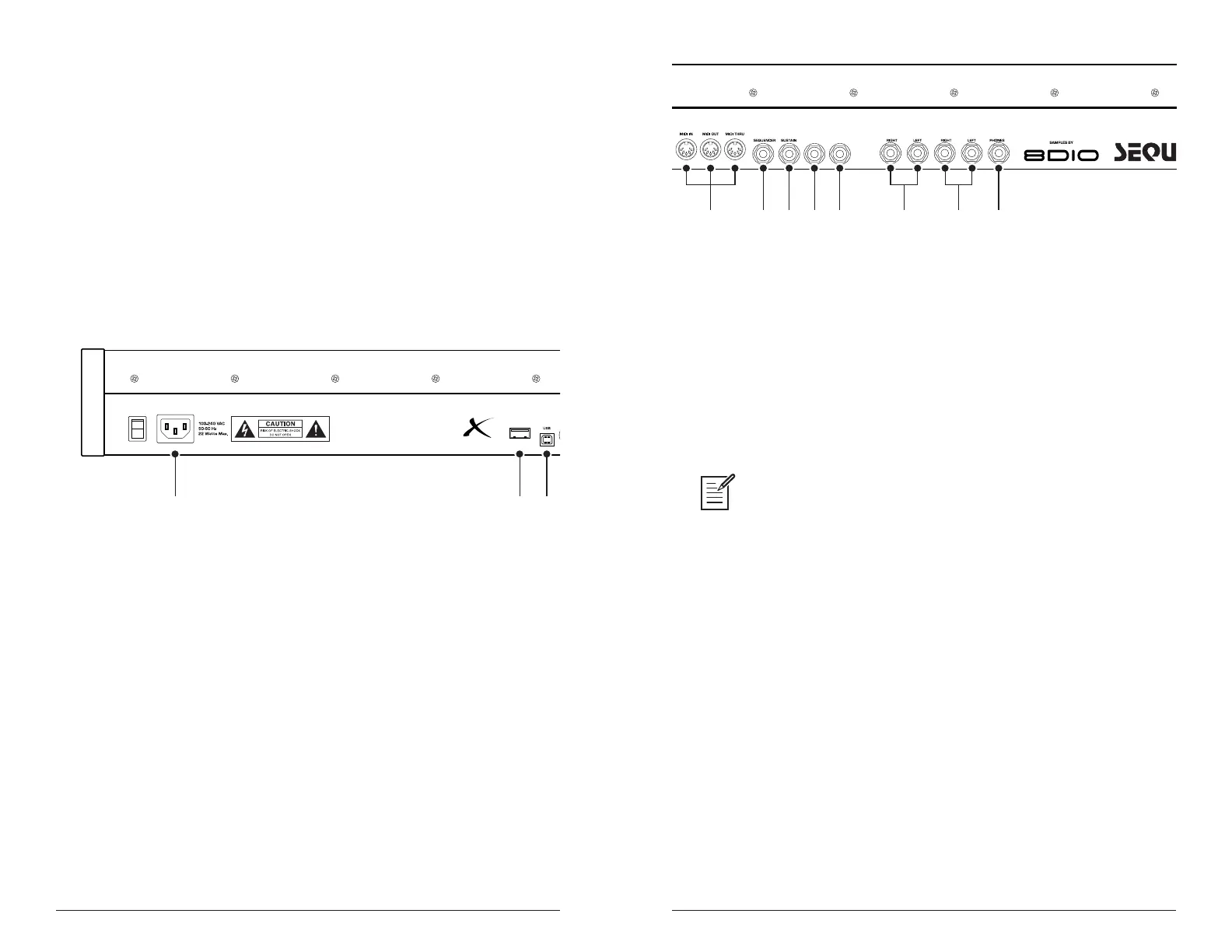
The rear panel of the Prophet X has connectors for power, USB, MIDI,
audio, and pedals.
Prophet X Rear Panel
1. AC Power Connector—Accepts a standard, grounded IEC power
cord. Operates over a range of 100 to 240 volts and 50 to 60 Hz.
2. Sample Import—Accepts a standard, USB 3.0 ash drive (USB stick)
for importing samples into the Prophet X. The Prophet X has an inter-
nal memory capacity of 50 GB for additional sound libraries and user
samples. See “Formatting a USB Flash Drive” on page 120 to learn how
to import sample libraries.
3. USB—For bidirectional MIDI communication with a computer. The
Prophet X is a Class Compliant USB device and does not require addi-
tional drivers when used with Mac OS or Windows. See Using USB on
page 116 for more information.
4 5 6 7 11
VOLUME
8
PEDAL/CV
MAIN A OUTPUT
9 10
B OUTPUT
Prophet X Rear Panel
4. MIDI In, Out, and Thru—Standard 5-pin MIDI DIN connectors.
5. Sequencer—Accepts a momentary, normally open or normally closed
footswitch to turn the sequencer or arpeggiator on and off. Alternatively,
an audio signal connected to this jack can be used to either control
sequencer/arpeggiator playback, or to gate the lter and amplier enve-
lopes while notes are held. See Seq Pedal Mode on page 126 for more
information about choosing the appropriate mode for these behaviors.
Audio signals used to drive the arpeggiator/sequencer should not exceed 5
volts peak-to-peak.
6. Sustain—Accepts a momentary, normally open or normally closed
footswitch to control sustain.
7. Volume—Accepts a standard expression pedal that has a variable
resistor on a TRS (tip-ring-sleeve) ¼ inch phone plug. Once connected,
you can use the modulation matrix to route the pedal to control a variety
of things such as volume or lter cutoff frequency to add expressiveness
to live performance.
8. Pedal/CV—Accepts a standard expression pedal that has a variable
resistor on a TRS (tip-ring-sleeve) ¼ inch phone plug. Once connected,
you can use the modulation matrix to route the pedal to control a variety
of things such as volume or lter cutoff frequency to add expressiveness
to live performance.















 To Next Page