15
(19)
Alarm 2 (A2) action delayed timer setting
Sets Alarm 2 (A2) action delayed timer.
0 seconds
(20)
Event output function selection
Selects an Event output type.
Time signal
output
(21)
Pattern end output time setting
Sets pattern end output time.
0s (Continuous
output)
(22)
Direct/Reverse action selection
Selects Direct (Cooling) or Reverse (Heating) action.
Reverse
(Heating) action
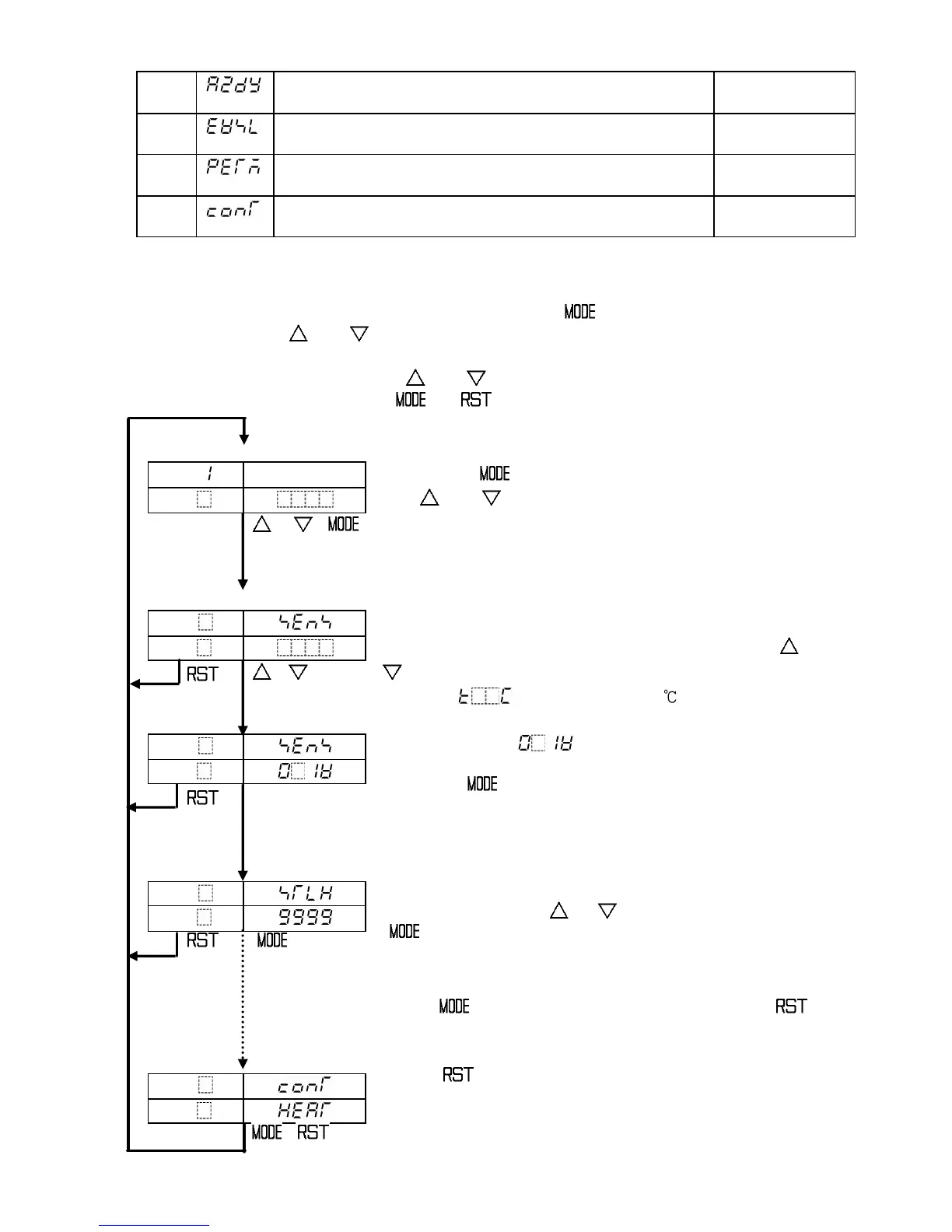
5.2 Basic operation for setup
The following shows how to bring up Auxiliary function setting mode 2 and set it up.
To go to Auxiliary function setting mode 2, press the key for 3 seconds while
holding down the and keys in the program standby mode or in the program control
run mode.
Set or select the values with the and key.
To register the values, use the or key.
Program standby mode or program control run mode
PTN
[ ]
PV
Actual temp.
STEP
[ ]
SV
[ ]
+ +
(for 3s)
Press the key for 3 seconds while holding down
the and keys.
Auxiliary function setting mode 2 will show up and the
Input type selection item will appear.
Auxiliary function setting mode 2
PTN
[ ]
PV
[ ]
STEP
[ ]
SV
[ ]
,
Input type selection
Select a sensor type to match with users’ with the or
key.
• Default: (K, -200 to 1370 )
PTN
[ ]
PV
[ ]
STEP
[ ]
SV
[ ]
DC voltage input (0 to 1V DC) has been selected.
in this example.
Press the key. The input type will be registered
and the Scaling high limit setting item will appear.
If any other input type except for DC input is selected,
the Filter time constant setting item will appear.
PTN
[ ]
PV
[ ]
STEP
[ ]
SV
[ ]
PTN
[ ]
PV
[ ]
STEP
[ ]
SV
[ ]
Scaling high limit setting
Set a value with the or key and register it with the
key.
Set other items in the same way according to the users’
conditions.
If the key is pressed several times or if the key
is pressed, the controller reverts to the program standby
mode.
If the key is pressed, the controller reverts to
the program standby mode from any mode.
,



 To Next Page