55
Communication line : Based on EIA RS-485
Communication method : Half-duplex communication start-stop synchronous
Communication protocol: Shinko, Setting value digital transmission (Shinko
protocol), Setting value digital reception (Shinko
protocol), Modbus ASCII, Modbus RTU
[Default value: Shinko protocol]
Communication speed : 2400, 4800, 9600, 19200bps, [Default value: 9600bps]
Selectable by keypad operation
Parity : Even, Odd and No parity
Selectable by keypad operation [Default value: Even]
Stop bit : 1, 2 (Selectable by keypad operation) [Default value: 1]
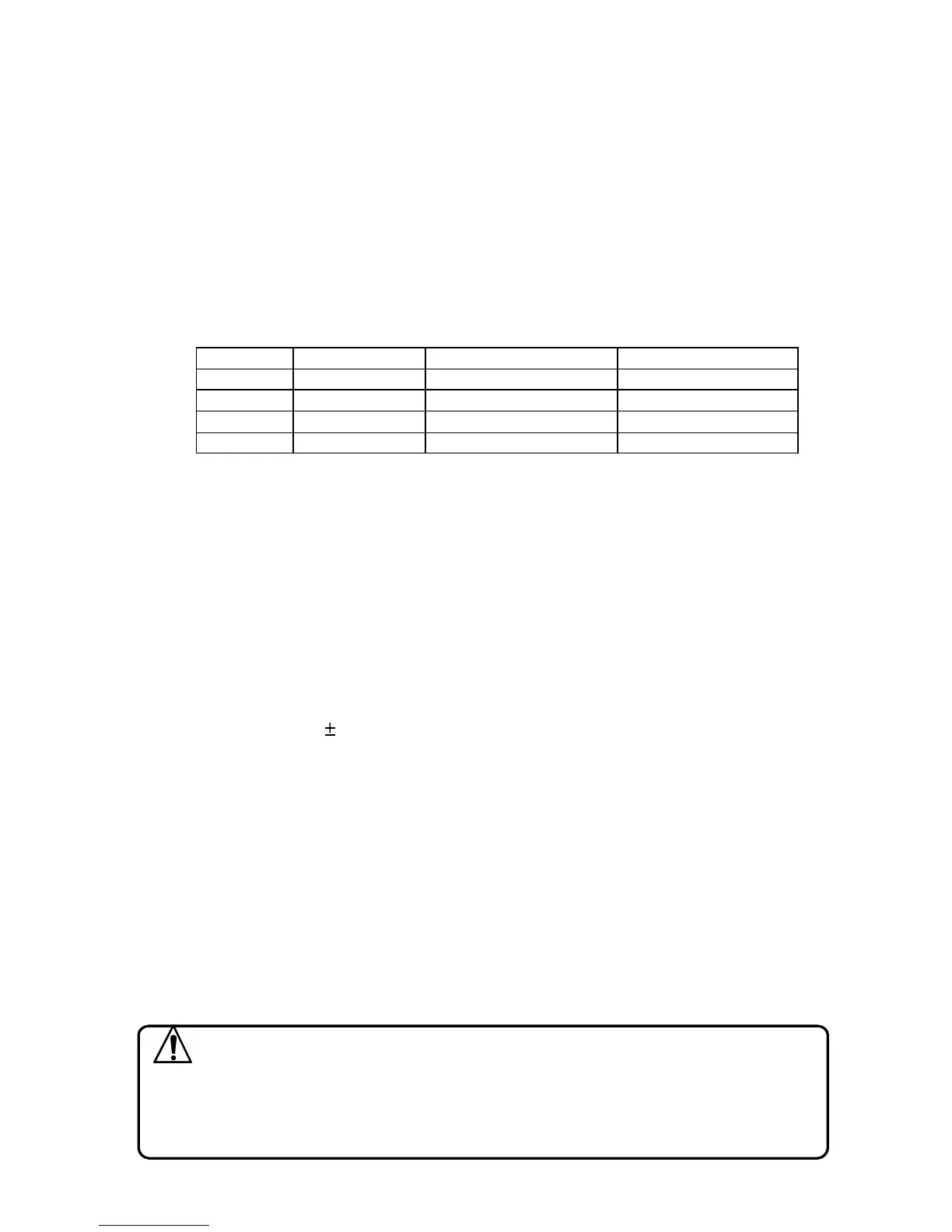
Data format : Data bit is automatically changed by selecting a
communication protocol.
Protocol Shinko Modbus ASCII Modbus RTU
Start bit 1 1 1
Data bit 7 7 8
Parity Even Selected value (Even)
Selected value (No)
Stop bit 1 Selected value (1) Selected value (1)
Value in the bracket ( ): Basic setting value
Setting value digital transmission (Option code: SVTC)
If option SVTC is added, external operation function is not available.
If Setting value digital transmission is selected from Communication protocol
selection, step SV of the PCD-33A can be transmitted digitally to a maximum of 31
units of Shinko controllers with communication function (option C5).
If Setting value digital reception is selected from Communication protocol selection,
step SV can be received from Shinko PC-935/PCD-13A/PCD-33A with Setting value
digital transmission (option SVTC).
Isolated power output (Option code: P24)
When option P24 is added, Alarm 2 (A2) is not available.
Output voltage: 24 3V DC (When load current is 30mA DC)
Ripple voltage: Within 200mV DC (When load current is 30mA DC)
Max. load current: 30mA DC
Color black (Option code: BK)
Front panel: Dark gray
Case : Black
Terminal cover (Option code: TC)
Electrical shock protection terminal cover
11. Troubleshooting
If any malfunctions occur, refer to the following items after checking the power
and the wiring.
Warning
Turn the power supply to the instrument off before checking the wiring.
Working or touching the terminal with the power switched on may
result in severe injury or death due to Electric Shock.



 To Next Page