40
(Fig. 7.4-1)
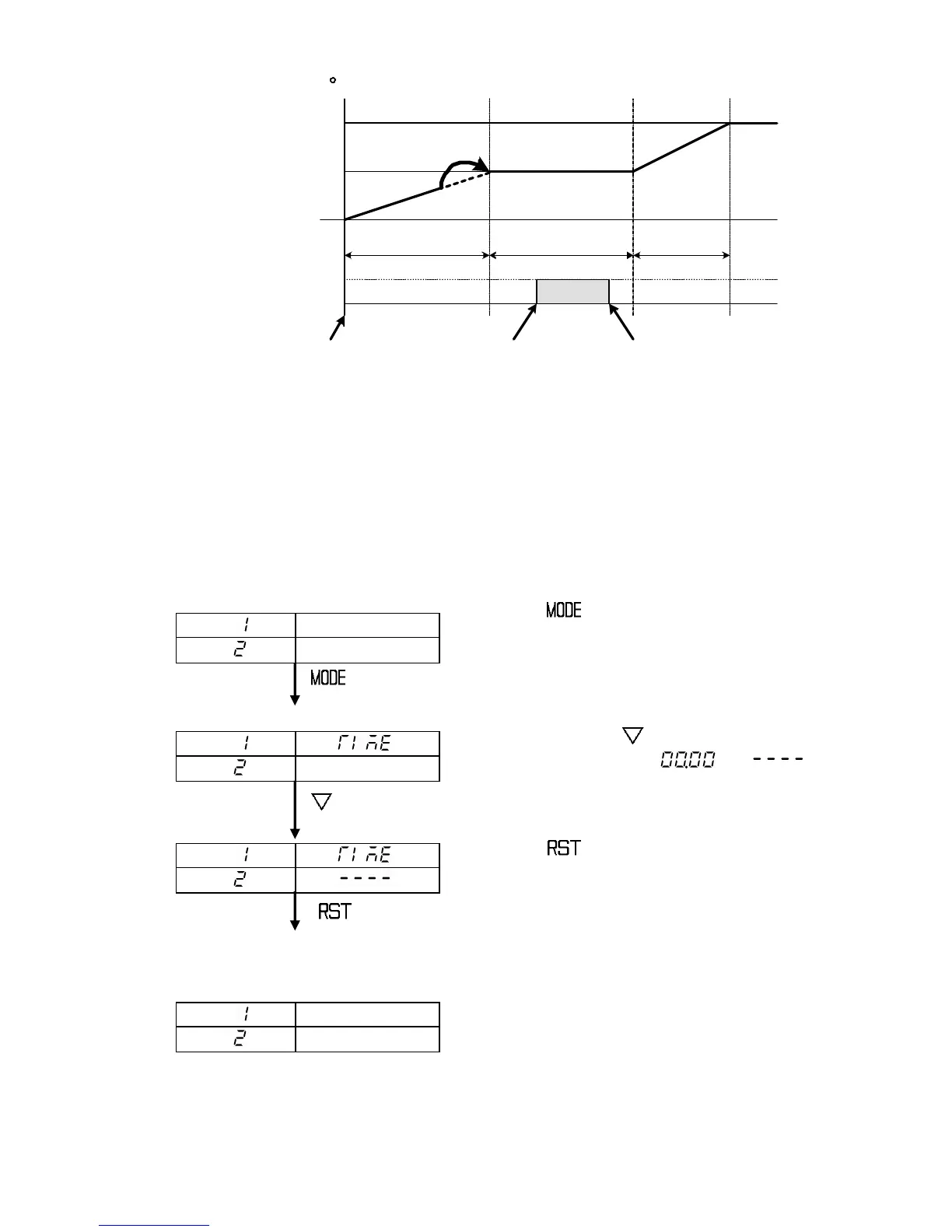
7.5 How to switch to Fixed value control (Hold function)
Fixed value control (identical to control of the indicating controller) at the step
temperature can be carried out when the step time is held.
[How to switch to Fixed value control at Step 2]
[During Program control run]
Press the key 4 times.
Step 2 step time setting item is selected.
(4 times)
[Step 2 step time setting]
Keep pressing the key.
Step time switches from [ ] to [ ],
which is the Hold function character.
(Keep pressing)
Press the key.
Fixed value control can be performed at the
step temperature as a main setting value.
Performs fixed value control.
[Indication when switched to fixed value control at Step 2]
PTN display : Selected program pattern number
PV display : Current actual temperature
STEP display : Step 2 after switched to the
Fixed value control
SV display : Step 2 step temperature
RUN indicator : Blinks during fixed value control
Other indicators : Lit or unlit according to the
controller status
500
1000
OFF
ON
Turned ON after 1 hour
and 20 minutes
01.00 (1 hour) 00.40(40min.)
Advance
01.00 (1 hour)
Time signal
Program control run
Time
Turned OFF after 1 hour
and 50 minutes
Setting Time signal OFF time: 1 hour and 20 minutes,



 To Next Page