31
[Program standby mode or program control run mode]
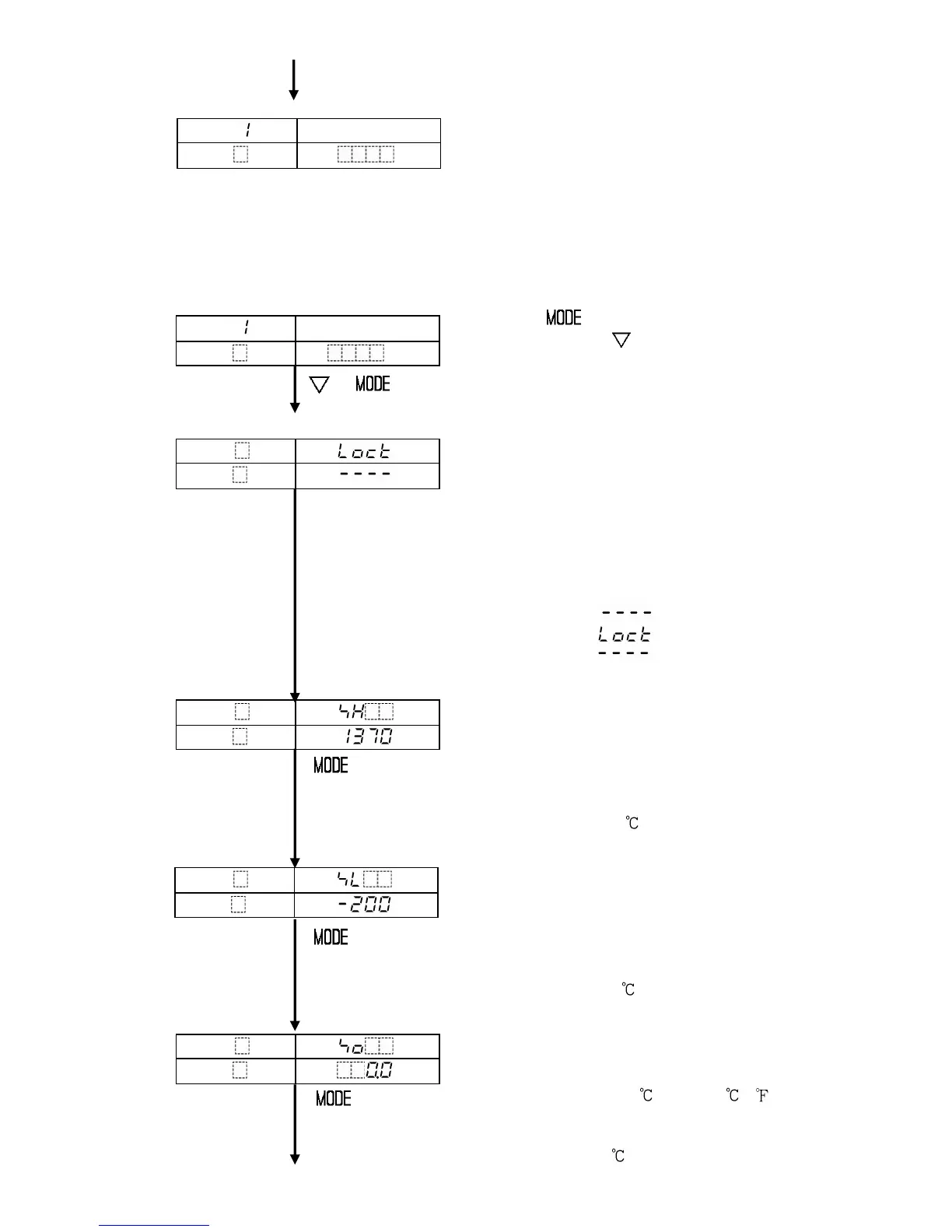
(8) Auxiliary function setting mode 1
The settings in Auxiliary function setting mode 1 are applied to all program pattern
numbers.
[Program standby mode or program control run mode]
Press the key for 3 seconds while
holding down the key.
Auxiliary function setting mode 1 is selected, and
+ (3s) Setting value lock selection item is indicated.
[Auxiliary function setting mode 1]
Setting value lock selection
Locks the setting value to prevent erroneous
settings.
Before designating the lock function, set each
setting item in advance.
Unlock : All setting values can be changed.
Lock : None of the setting values can be
changed.
• Selecting item: (Unlock)
(Lock)
• Default value : (Unlock)
SV (Setting value) high limit setting
Sets the step SV high limit.
• Setting range:
SV low limit to input range high limit value
For DC input, SV low limit to scaling high
limit value
• Default value: 1370
SV (Setting value) low limit setting
Sets the step SV low limit.
• Setting range:
Input range low limit value to SV high limit
For DC input, scaling low limit value to
SV high limit
• Default value: -200
Sensor correction setting
Sets the value to correct PV.
PV=PV + Sensor correction value
• Setting range: -100.0 to 100.0 ( )
For DC input, -1000 to 1000 (The placement of
the decimal point place follows the selection.
• Default value: 0.0
PTN
PV
Actual temp.
STEP
SV



 To Next Page