32
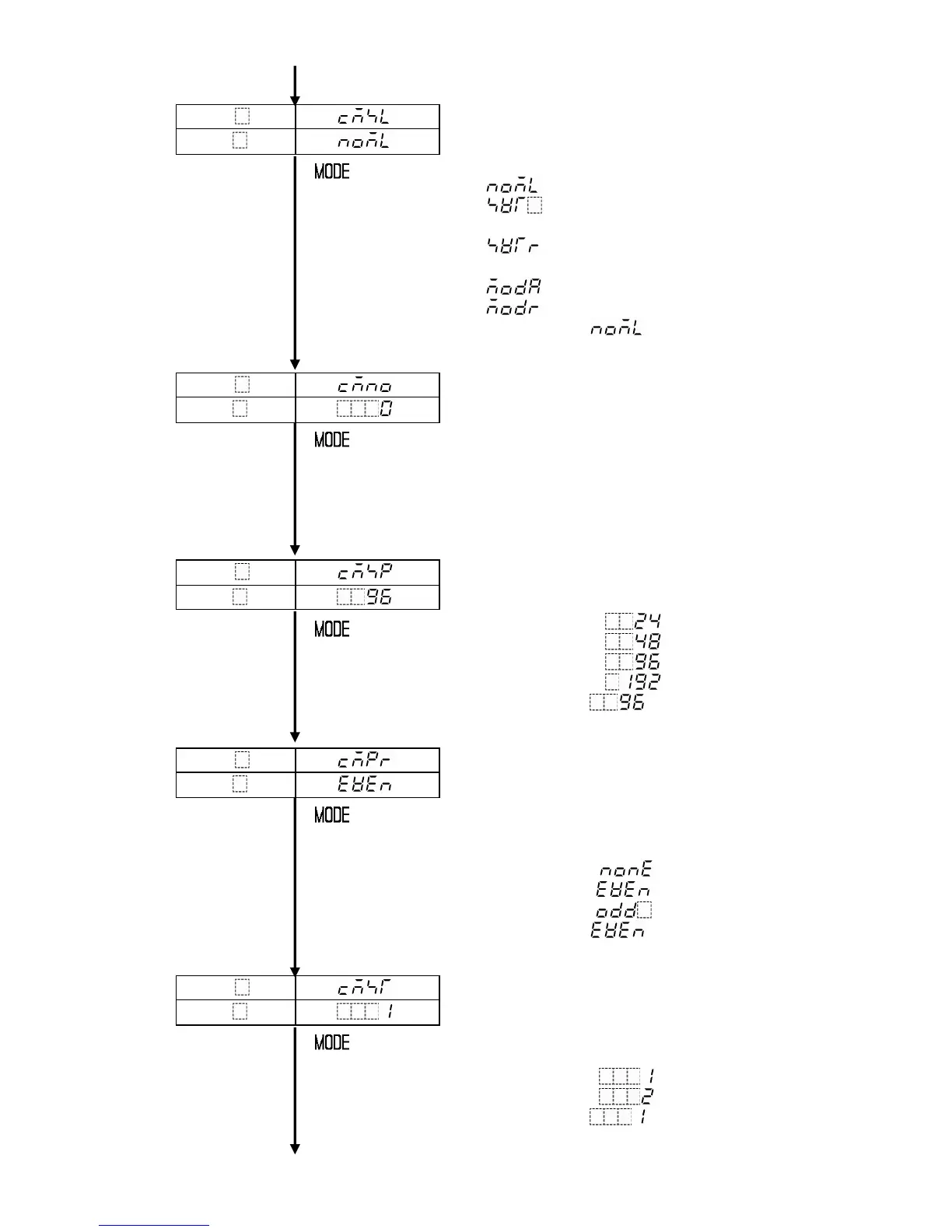
Communication protocol selection
Selects the communication protocol and form.
Available only when C5 (option) is applied.
• Selecting item:
Shinko protocol
Setting value digital transmission
(Shinko protocol)
Setting value digital reception
(Shinko protocol)
Modbus protocol ASCII mode
Modbus protocol RTU mode
• Default value: Shinko protocol
Instrument number setting
Selects the instrument number.
Set the PCD-33A to the instrument number
individually when communicating by
connecting plural PCD-33As.
Available only when C5 (option) is applied.
• Setting range: 0 to 95
• Default value: 0
Communication speed selection
Selects the communication speed.
Available only when C5 (option) is applied.
• Selecting item: 2400bps
4800bps
9600bps
19200bps
• Default value: 9600bps
Parity selection
Selects the parity type from a choice of: No
parity, Even and Odd parity in accordance with
the host computer.
Available when C5 (option) is applied, and
when Modbus ASCII or RTU mode is selected.
• Selecting item: No parity
Even parity
Odd parity
• Default value: Even parity
Stop bit selection
Selects the stop bit in accordance with the host
computer from 1 or 2.
Available when C5 (option) is applied, and
when Modbus ASCII or RTU mode is selected.
• Selecting item: (stop bit 1)
(stop bit 2)
• Default value: (stop bit 1)
PTN
PV
STEP
SV



 To Next Page