Page 55 of 92
Chapter: 5. Calibration procedure
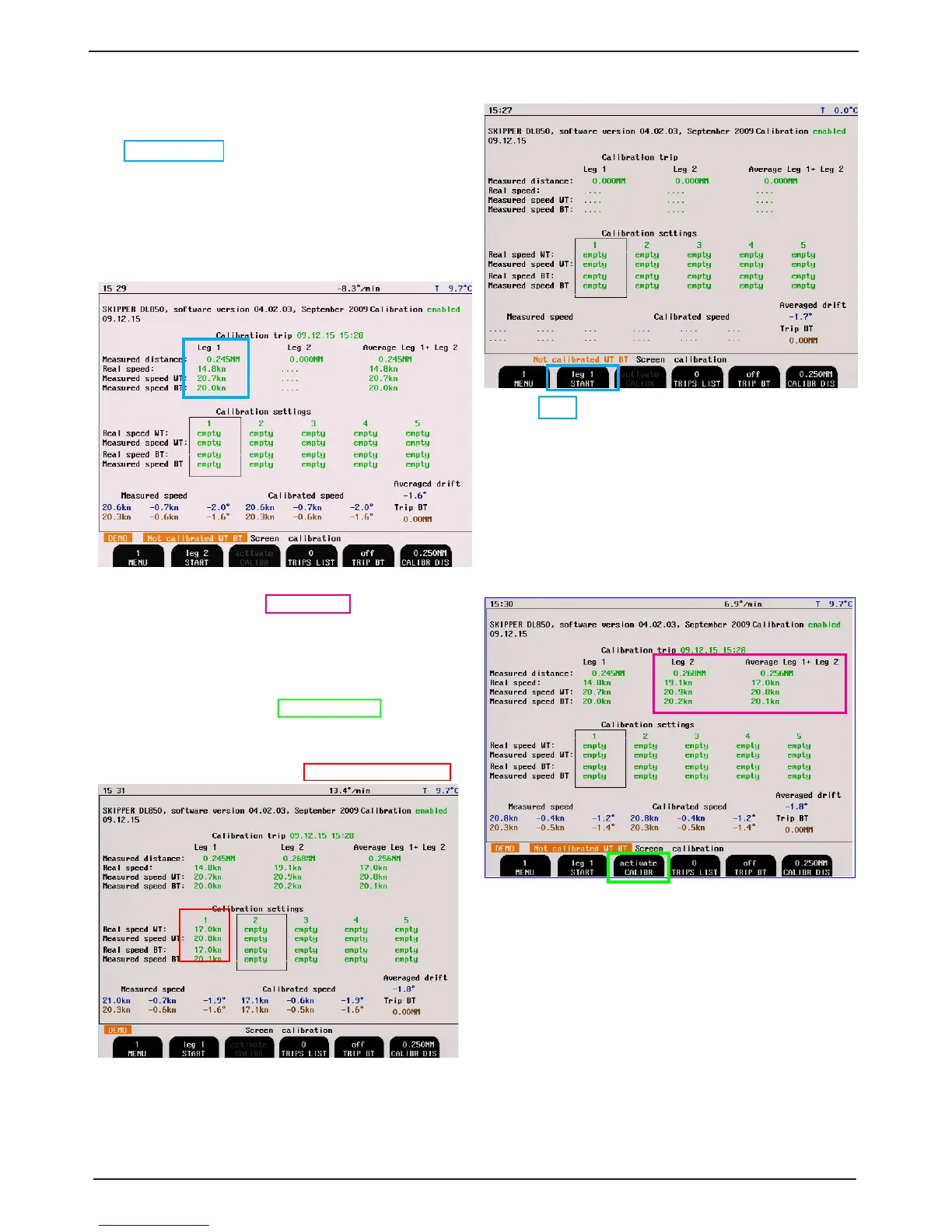
2. Sail at a straight course in direction A to B and at
a constant speed. When passing to point A, Press
“START leg 1” on menu 1. The button text will
change to stop and a calibrating warning will show
on the screen.
3. The leg 1 measured distance will count up. You
may ignore this. When you reach point B, press
STOP. The system will then calculate the measured
speed (from the measured distance and time) and
the real speed (from the Calibr distance and time).
4. Turn the vessel and repeat for leg 2 in the opposite
direction at the same speed. The results will show
in the Leg 2 table. The average of the two legs
will show in the nal table. This is the correct
calibration.
5. If the calibration looks correct, you may select
which calibration settings table to place it in,
and transfer using the activate calibr ation button
(which will be active if the calibration is within
limits).
6. You have now made a calibration point. We
recommend a point at low speed (1-3 kn) and one at
high speed (20 kn).
7. Once calibrated, check the system at other speeds. If
it is inaccurate, you may add more points (max 5).
Note: These values may be overwritten in some software upgrades or if master reset is performed. We advise
recording the values somewhere, just in case. Doppler systems typically have a calibration factor within 10
% i.e. measured 9 kn, real 10 kn.
Note: Screen menu sw 4.02.03
also valid for 4.03.00



 To Next Page