32 smart CX01
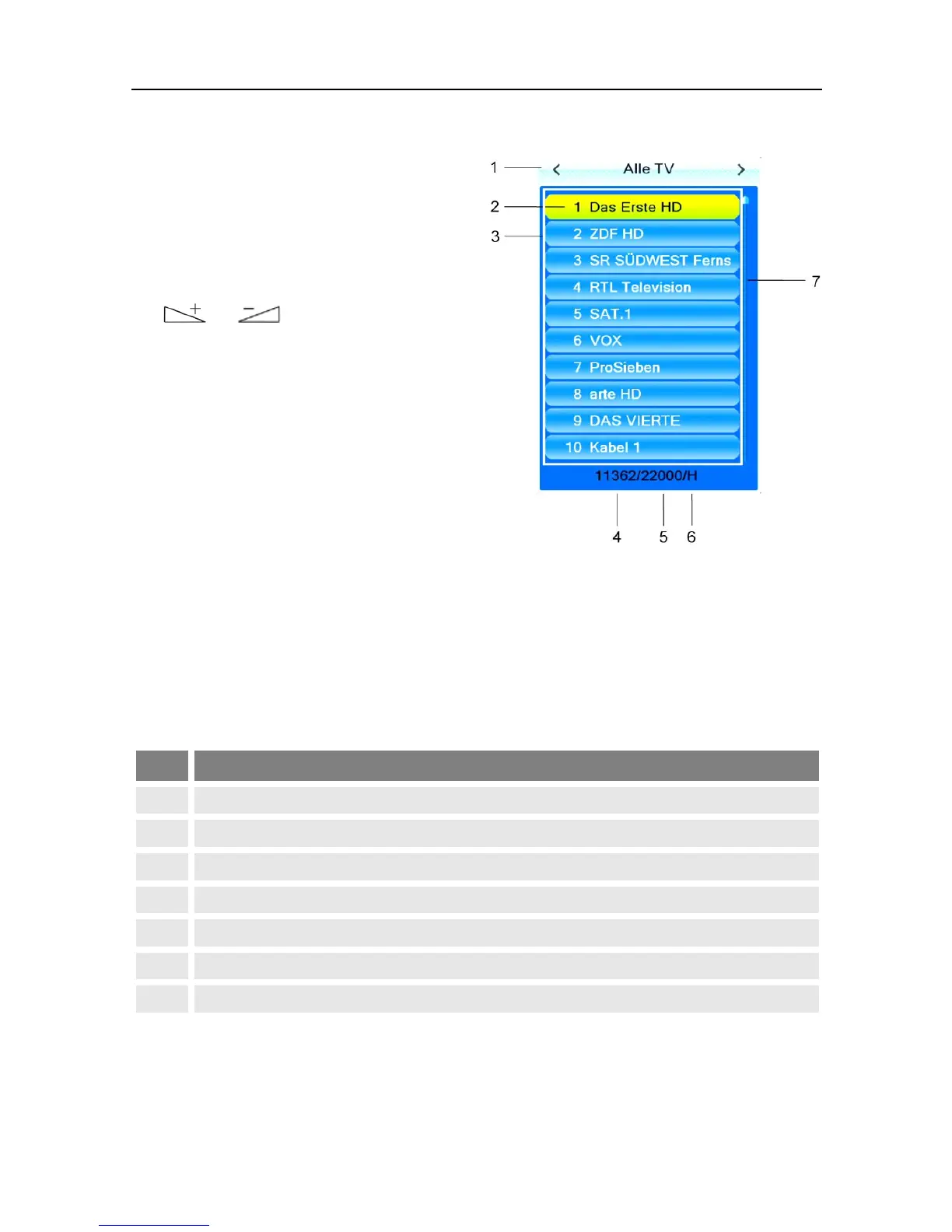
5.7.2 Channel Selection via Selection Window
1. Press the OK key to display a selec-
tion window with all available
channels (3).
2. Select the channel list with the
desired channel by using the keys
or (1)
or
Press the FAV key to select from
your favorite lists (see p. 55).
3. Select the channel to be displayed (2) by using the keys PR+ and PR- for
single steps or P+ and P- for steps of ten, and confirm your selection by
pressing OK.
The channel will be correspondingly switched.
4. Press OK or EXIT to close the selection window.
Channel selection window:
Display of current channel list
Channels included in the current channel list
Frequency of current channel (example: 33800 is 338.00 MHz)
Symbol rate of current channel (in megasymbols/second)
Polarization of current channel
Scroll bar – shows position of current channel in channel list
5.7.3 Channel Selection via Search Function
The channel lists can be quite comprehensive; correspondingly, the smart CX01
offers various possibilities to filter the list, search for channels in the list, or sort
the list:



 To Next Page