Symbols
13.3 Activity Menu options
Figure 71: Activity Menu options
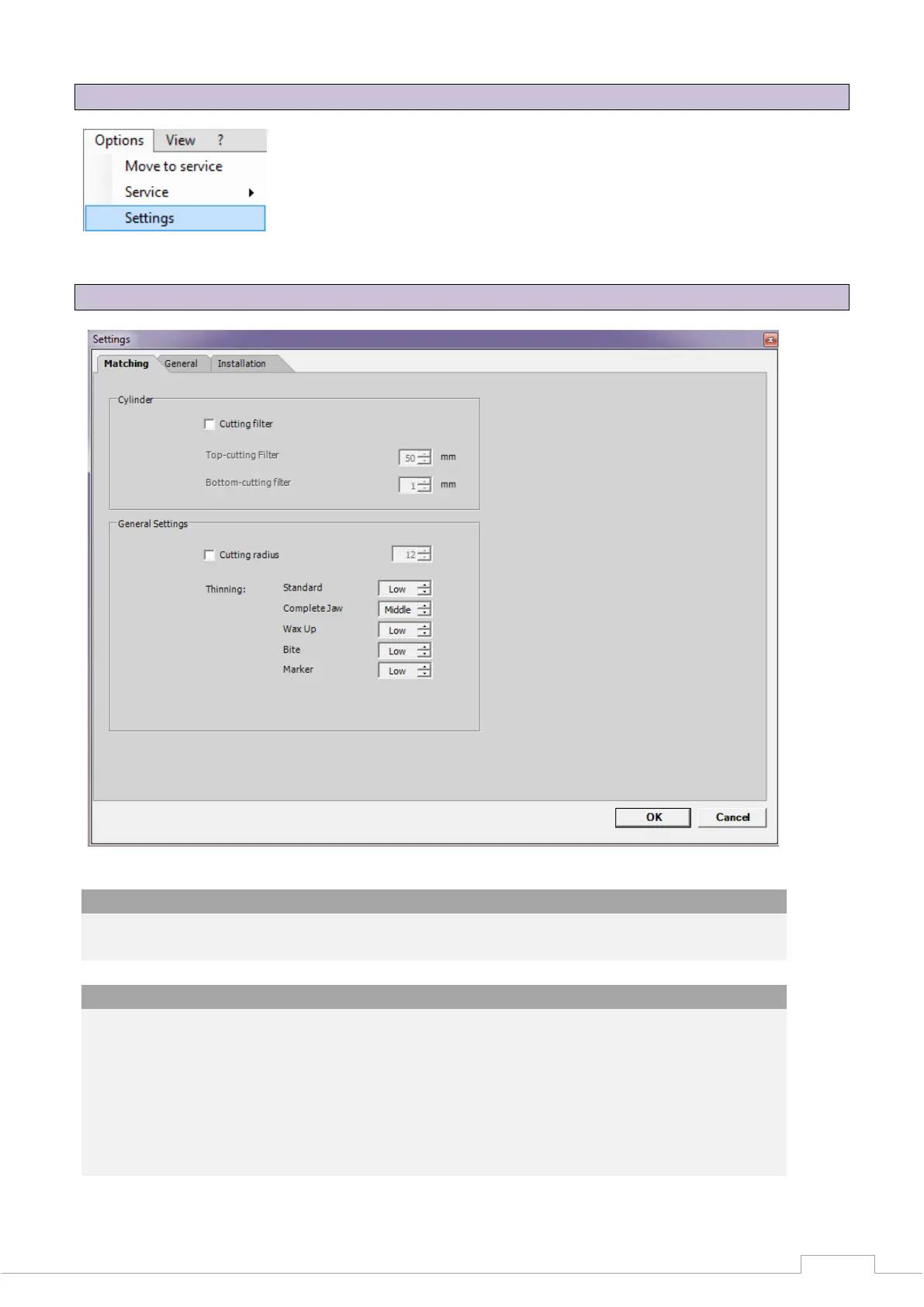
13.4 Options Settings Matching
Figure 72: Settings - Matching
Cylinder:
The checkbox is used to activate a cutting filter, which cuts the upper and/or lower area of
the STL data set. The dimensional unit is millimetres.
General settings:
Thinning out is used to determine the STL accuracy and hence the data size.
The maximum resolution of the sensor is reproduced at "OFF".
A somewhat larger spacing of the pixels to a data set is linked under "LOW".
This spacing is enlarged further at "MIDDLE" and "STRONG".
"AUTO" varies the thinning out as selected. The stronger the thinning out, the smaller the
linked data set. The greatest accuracy is therefore attained when thinning out is set to
"OFF" or "LOW".


 To Next Page