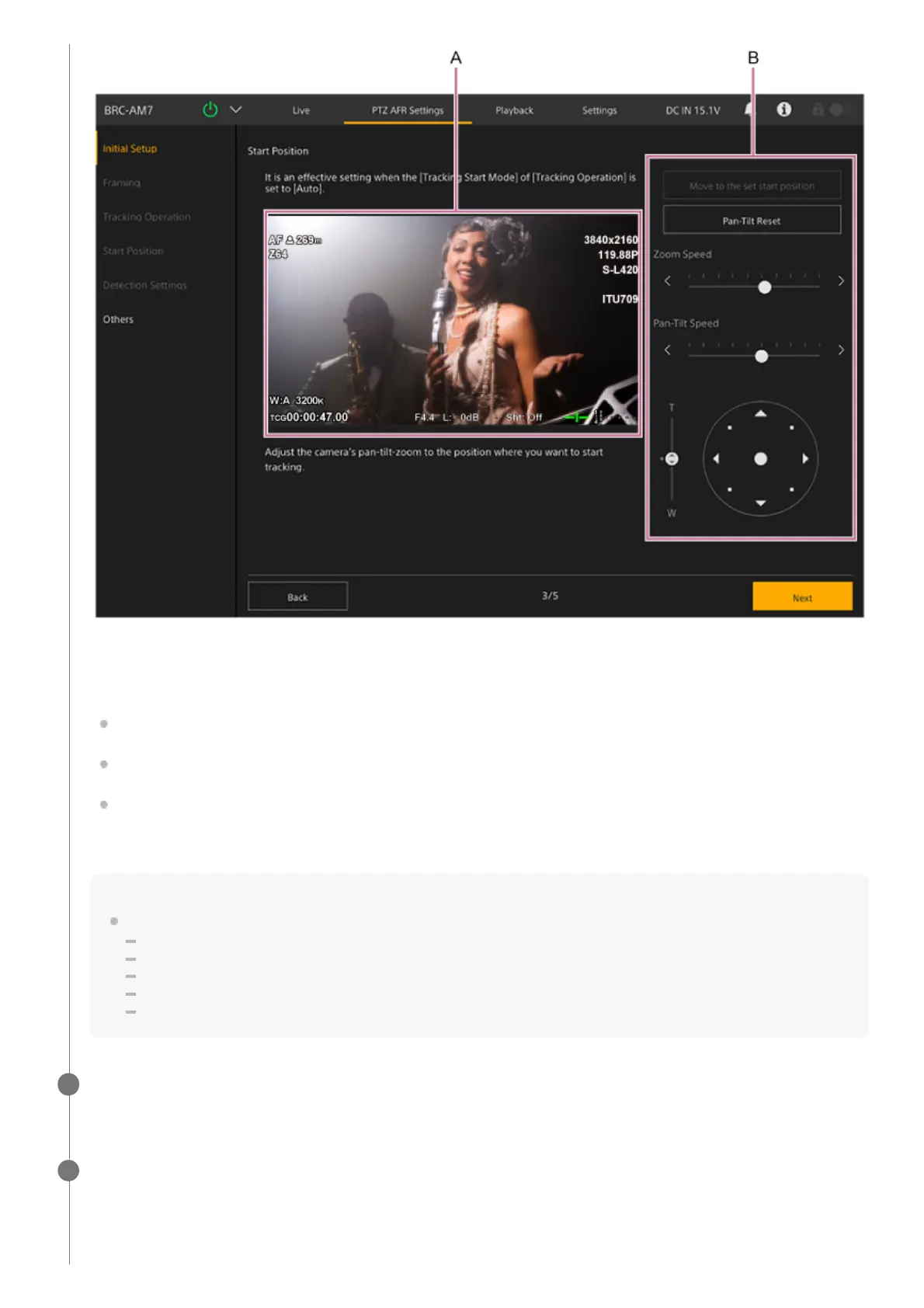
A: Camera image panel
B: Framing control panel
Set the start position.
Set the start position using the framing control panel to pan, tilt and zoom the camera image while monitoring the
camera image in the camera image panel. You can adjust the pan/tilt and zoom transition speed using the sliders.
By default, the [Move to the set start position] button is disabled. It is enabled after the initial configuration is
completed. Press it to move to the currently configured start position.
Press the [Pan-Tilt Reset] button to reset the pan/tilt. Press the button when the POWER lamp and NETWORK lamp
are blinking simultaneously on the front panel of the unit or when [Execute Pan-Tilt Reset.] is displayed in the
framing control panel.
Note
Reconfiguration will be required in the following cases.
When [Rec Format] – [Video Format] is changed from 1920×1080 to 3840×2160 during Clear Image Zoom operation
When the [Zoom Type] setting is changed
When [S&Q Motion] – [Frame Rate] is set to a value exceeding 60fps
When [P/T Range Limit] is changed
When [P/T Direction] – [Direction] – [Ceiling] is changed
When finished configuring, press the [Next] button.
The next setup screen appears.
8
Set the detailed settings related to auto tracking start on the [Detection Settings] screen.
This setting is not required for manual tracking start mode.
9



 To Next Page