116
Remote
Commander
~I~~~I
3
t-----+---+1
4
1-------;-'+-1
i==~=
ffi]--~
[ID---+"..,;-;;
[]
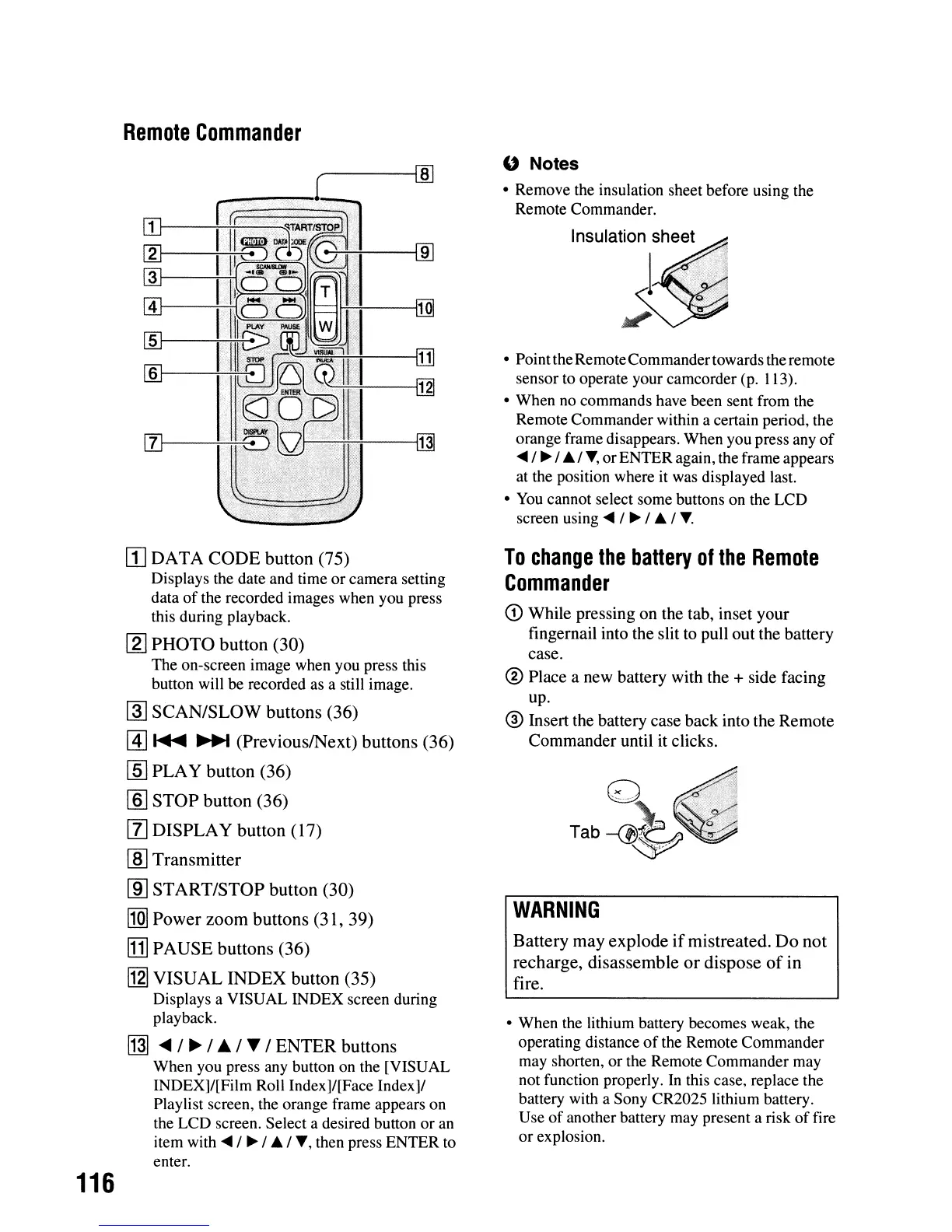
DATA
CODE
button
(75)
Displays the date and time or camera setting
data
of
the recorded images when you press
this during playback.
[1J
PHOTO
button
(30)
The on-screen image when you press this
button will be recorded as a still image.
@]
SCAN/SLOW
buttons
(36)
@]
~
~
(PreviouslNext)
buttons
(36)
[§J
PLA
Y
button
(36)
rnJ
STOP
button
(36)
[1]
DISPLAY
button
(17)
[ID
Transmitter
[ID
START/STOP
button
(30)
I1Q]
Power
zoom
buttons
(31,
39)
[1]
PAUSE
buttons
(36)
[j2I
VISUAL
INDEX
button
(35)
Displays a VISUAL INDEX screen during
playback.
~
....
/
~
/
.&
/ T /
ENTER
buttons
When you press any button on the [VISUAL
INDEX]/[Film Roll Index]/[Face Index]/
Playlist screen, the orange frame appears on
the LCD screen. Select a desired button or
an
item with
~
/
~
/
..
/.,.,
then press ENTER to
enter.
" Notes
• Remove the insulation sheet before using the
Remote Commander.
InSUlatiO.~She.e.
t
..
'./
1
..
,,"
:1
,-
'i
.,
• PointtheRemoteCommandertowards the remote
sensor to operate your camcorder (p.
113).
• When no commands have been sent from the
Remote Commander within a certain period, the
orange frame disappears. When you press any
of
~
/
~
/
..
/.,., orENTER again, the frame appears
at the position where
it
was displayed last.
•
You
cannot select some buttons on the LCD
screen using
~ /
~
/
..
/
.,..
To
change
the
battery
of
the
Remote
Commander
CD
While pressing
on
the tab, inset
your
fingernail into the slit to pull
out
the battery
case.
@
Place
a
new
battery with the + side facing
up.
® Insert the battery case
back
into the
Remote
Commander
until it clicks.
WARNING
Battery
may
explode
if
mistreated.
Do
not
recharge,
disassemble
or
dispose
of
in
fire.
• When the lithium battery becomes weak, the
operating distance
of
the Remote Commander
may shorten, or the Remote Commander may
not function properly.
In
this case, replace the
battery with a Sony CR2025 lithium battery.
Use
of
another battery may present a risk
of
fire
or explosion.






 To Next Page