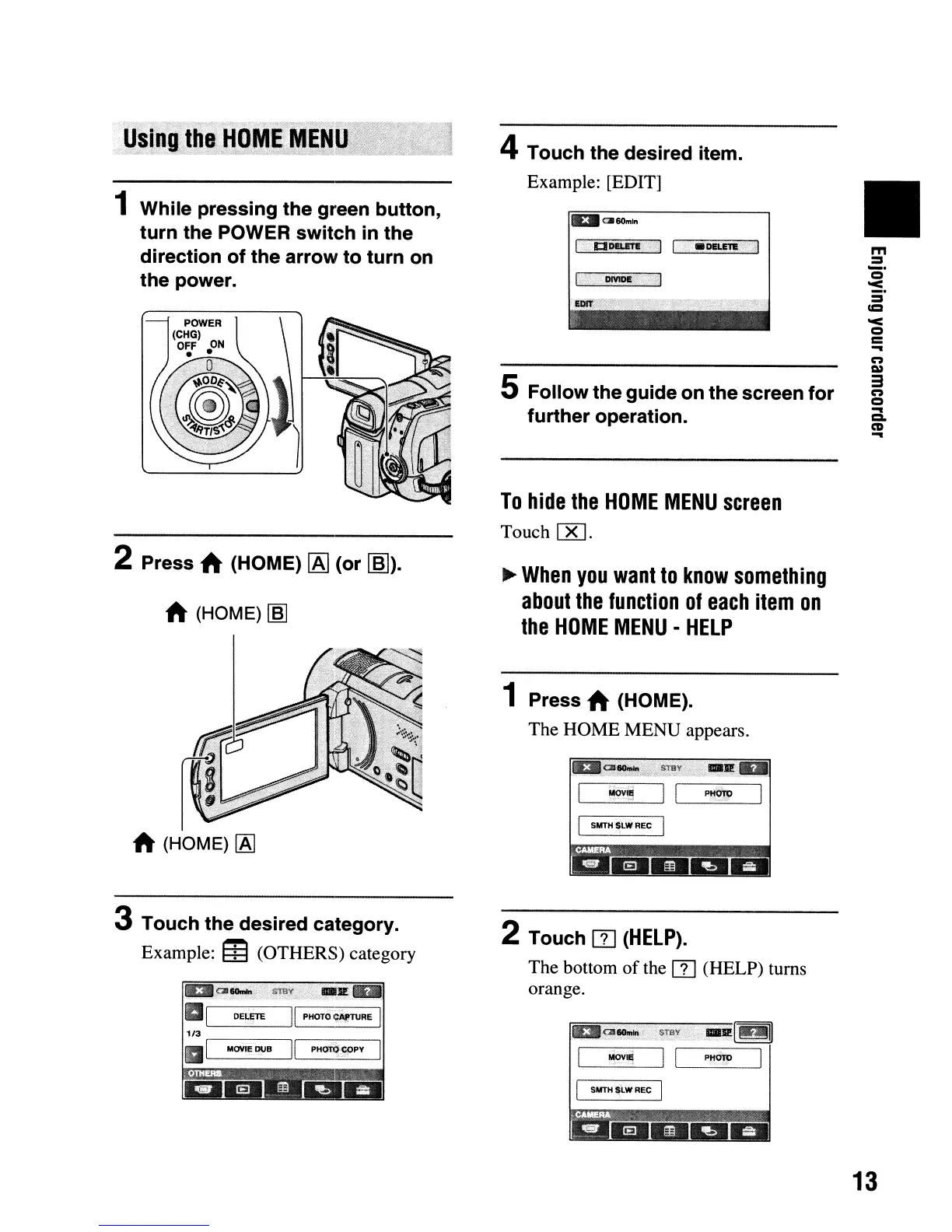
1 While pressing the green button,
turn the POWER switch in the
direction of the arrow to turn
on
the power.
2 Press A (HOME)
IAl
(or
~).
A (HOME)
~
3 Touch the desired category.
Example: m(OTHERS) category
aQl~i':
STaY:
<;-,.II1II
aI
DE~fiTE
II
PHOTO
C~TURE
I
1/3
,----,--
.----;:-_,1
aI MOYIE O!JB
II
PHOTq
~PY
4 Touch the desired item.
Example: [EDIT]
E1I~6Om"
I
•.
··•··
.a~;F\~
[
".'
.DELE'M.·I
5 Follow the guide on the screen for
further operation.
To
hide
the
HOME
MENU
screen
Touch
00.
~
When
you
want
to
know
something
about
the
function
of
each
item
on
the
HOME
MENU
-
HELP
1 Press A (HOME).
The HOME MENU appears.
_~~!~t0~3~~
':.::
~J!._
il<jv'!l
I I
PHIm)
I
I SUTH
SLW
REC
I
2 Touch [1]
(HELP).
The bottom
of
the
[1]
(HELP) turns
orange.
MOVul
I SUTH SLW
REC
I
II
m
=
_.
o
~.
=
=
'<
o
=
...
n
C»
3
n
o
...
CL
CD
...
13












 To Next Page