Insulation sheet
us
6
• Connect cables to the connectors
of
the
Handycam Station when using your camcorder
attached to the Handycam Station. Do not
connect the cables to both the Handycam
Station and your camcorder.
• Do not apply shock
or
vibration to your
camcorder. The internal hard disk
of
the
camcorder may not be recognized
or
recording/
playback may not be possible.
• Do not use your camcorder in very loud areas.
The hard disk
of
your camcorder may not be
recognized, or recording may not be possible.
• To protect the internal hard disk from shock by
dropping, the camcorder has drop sensor
function
*.
When a drop occurs,
or
under a non-
gravity condition, the block noise made when
this function
is
activated by the camcorder may
also be recorded.
If
the drop sensor catches a
drop repeatedly, recording/playback may be
stopped.
• When the temperature
of
the camcorder
becomes extremely high or extremely low, you
may not be able to record
or
play back on the
camcorder, due to the protection features
of
the
camcorder being activated in such situations. In
this case, a message appears on the LCD screen
or
in
the viewfinder (p. 30).
• Do not tum on the camcorder
in
a low-pressure
area, where the altitude
is
more than 3,000
meters (9,800 feet). Doing so may damage the
hard disk drive
of
your camcorder.
• If you repeat recording/deleting images for a
long time, fragmentation
of
data occurs on the
media. Images cannot be saved
or
recorded. In
such a case, save your images on some type
of
external media first, and then perform [MEDIA
FORMAT]*.
• Fasten the grip belt and hold your camcorder
correctly while recording.
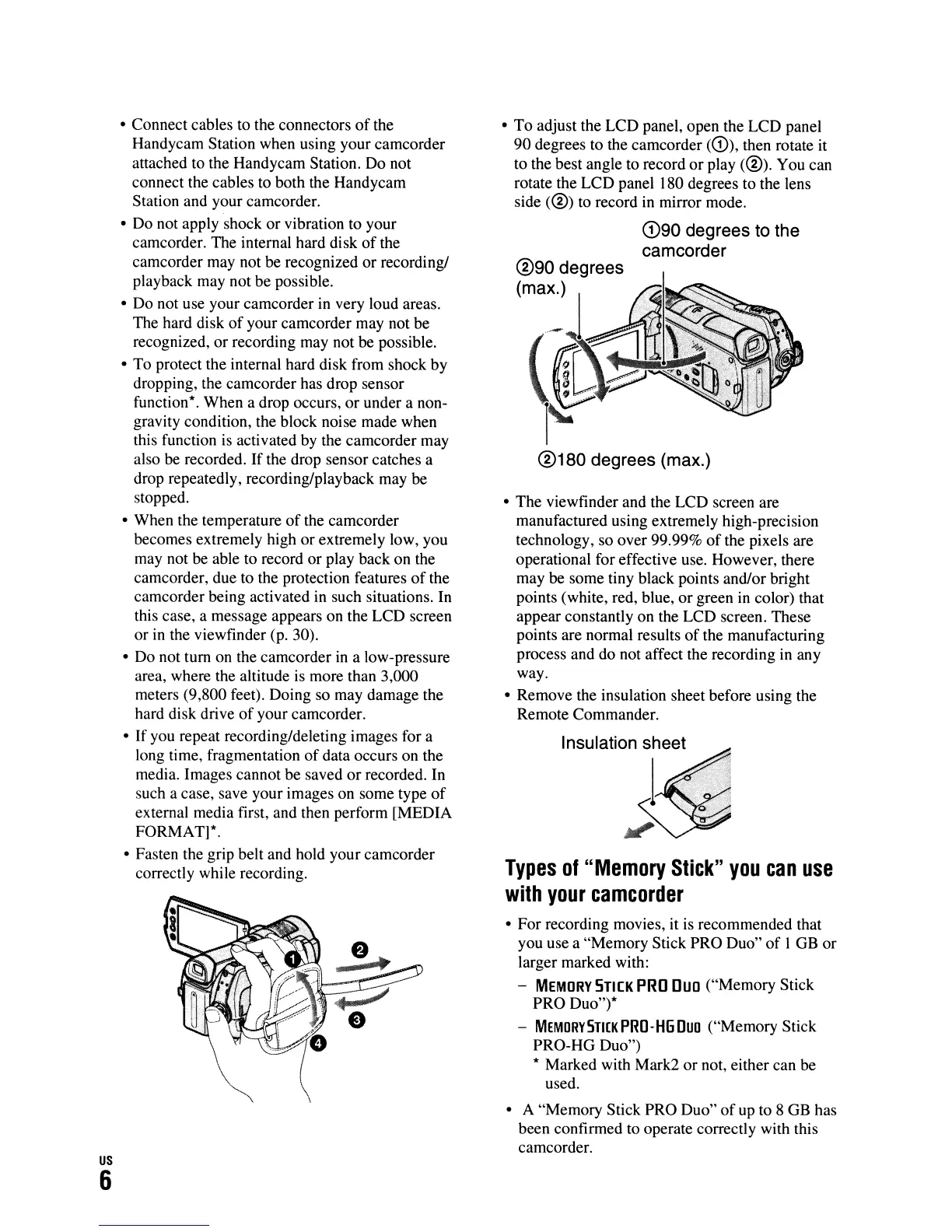
•
To
adjust the LCD panel, open the LCD panel
90 degrees to the camcorder
(CD),
then rotate
it
to the best angle to record
or
play
(@).
You can
rotate the LCD panel 180 degrees to the lens
side
(@)
to record
in
mirror mode.
G)90 degrees to the
camcorder
®180
degrees (max.)
• The viewfinder and the LCD screen are
manufactured using extremely high-precision
technology, so over 99.99%
of
the pixels are
operational for effective use. However, there
may be some tiny black points and/or bright
points (white, red, blue, or green
in
color) that
appear constantly on the LCD screen. These
points are normal results
of
the manufacturing
process and do not affect the recording in any
way.
• Remove the insulation sheet before using the
Remote Commander.
Types
of
"Memory
Stick"
you
can
use
with
your
camcorder
• For recording movies,
it
is recommended that
you use a "Memory Stick PRO Duo"
of
I GB
or
larger marked with:
-
MEMORY
STICK
PRO
Duo ("Memory Stick
PRO Duo")*
-
MEMORYSTI[KPRO-HGDuo
("Memory Stick
PRO-HG Duo")
* Marked with Mark2
or
not, either can be
used.
• A "Memory Stick PRO Duo"
of
up to 8 GB has
been confirmed to operate correctly with this
camcorder.












 To Next Page