.
_',"-';~>\.y;
~
".'.
.
~,
··~';':;:;':>;?~<?-;'.'·(.~":;~f~,
·.f:
'.;/
Playil1ltback
recorded
mov,'es/,tilM~a:ge
.,...
""-w.·
. •
_M._
,
~
<
__
><-
f.v'",,~.
.'
.,,",,;'-
•
,_;;;
1 Turn the POWER switch
[g]
to turn on your camcorder.
2 Press
[EJ
(VIEW IMAGES)
OJ
(or
[gJ).
The
VISUAL
INDEX
screen appears
on
the
LCD
screen (It
may
take
some
seconds).
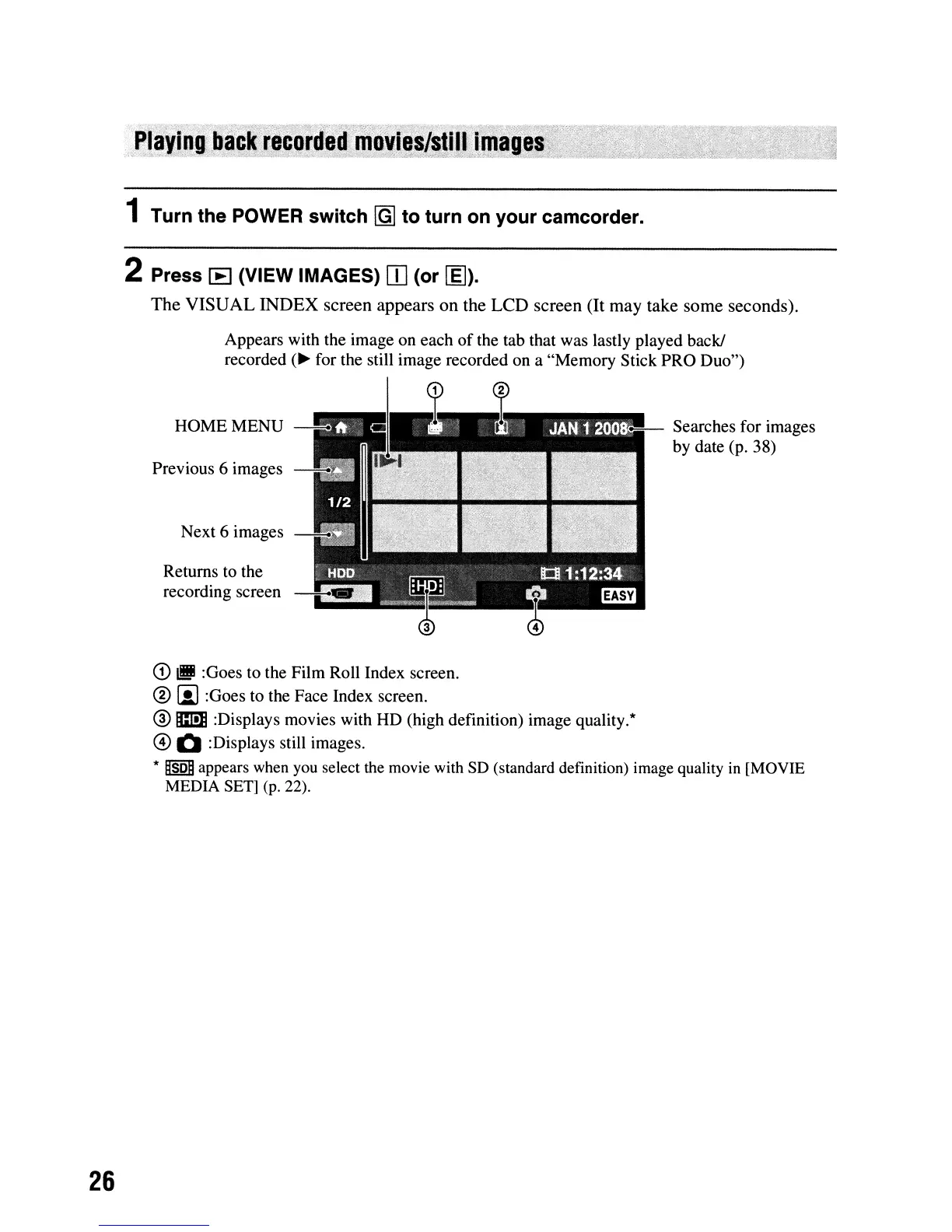
Appears with the image on each
of
the tab that was lastly played back!
recorded
(~
for the still image recorded on a "Memory Stick PRO Duo")
HOMEMENU
--.
Previous 6 images
~
Next 6 images
Returns to the
recording screen
•• :
~
Searches for images
by date (p. 38)
26
CD
IIJ
:Goes to the Film Roll Index screen.
@)
!il :Goes to the Face Index screen.
® m :Displays movies with HD (high definition) image quality.*
@ Q :Displays still images.
*
~SDn
appears when you select the movie with
SO
(standard definition) image quality
in
[MOVIE
MEDIA SET]
(p.
22).





 To Next Page