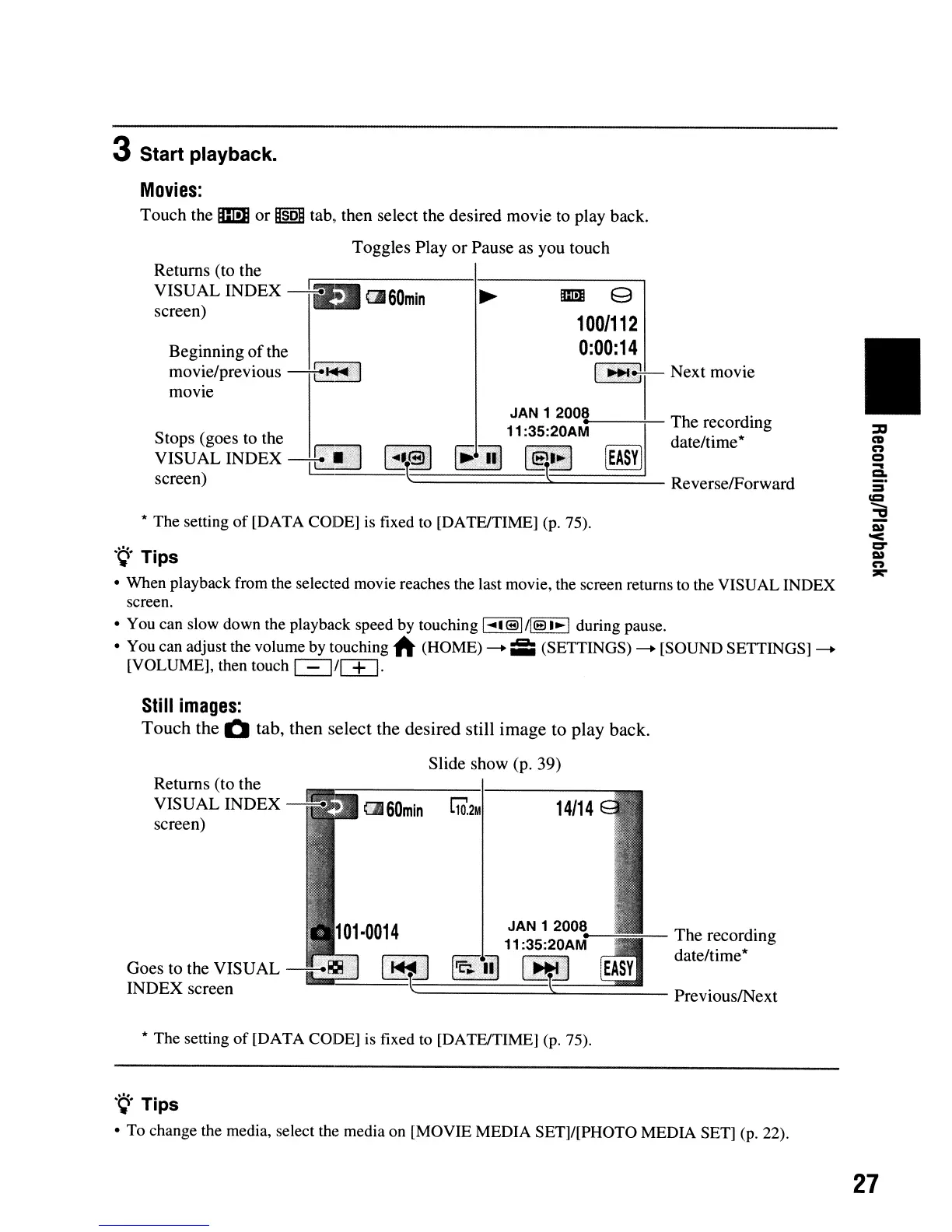
3 Start playback.
Movies:
Touch
the m
or
ijsoij
tab, then select the desired movie to play back.
Toggles
Play
or
Pause as you touch
Returns (to the
VISUAL
INDEX
~
a.60min
screen)
* The setting
of
[DATA CODE]
is
fixed to [DATElTIME] (p. 75),
.~.
Tips
• When playback from the selected movie reaches the last movie, the screen returns to the VISUAL INDEX
screen.
• You can slow down the playback speed by touching
I
....
I®I/I@I~I
during pause.
• You can adjust the volume by touching
A (HOME) --+ iii:i (SETTINGS) --+ [SOUND SETTINGS]--+
[VOLUME], then touch
c:=::J/~.
Beginning
of
the
movie/previous
-+
....
1:;:,1
movie
Stops (goes to the
...
VISUAL
INDEX
~
screen)
~
m 9
100/112
0:00:14
l(~:!ll
Next
movie
JAN
12008
.
11
:35:20AM
The
r~cordmg
1.
..
:'1
.....
';.;]
~.'
date/tlme*
lE!~
~
~!b
[EASY]
c.
============_.s:::::========_
Reverse/Forward
•
Still
images:
Touch
the
Q
tab,
then
select
the
desired
still
image
to
play
back.
Slide show (p. 39)
Returns (to the
VISUAL
INDEX
screen)
Goes
to the
VISUAL
INDEX
screen
C1J
60min
r;o,2M
1
01
0014
JAN 1 2008
•
11
:35:20AM The recording
date/time*
~_·r<
=======1
=~tt::::'~===~_
"--
PreviouslNext
* The setting of [DATA CODE]
is
fixed to [DATElTIME] (p. 75).
'Q'Tips
• To change the media, select the media on [MOVIE MEDIA SET]/[PHOTO MEDIA SET] (p. 22).
27





 To Next Page