EasyManua.ls Logo

Sony SLV-360 - Page 71

Sony SLV-360
127 pages
Print Icon
To Next Page IconTo Next Page
To Previous Page IconTo Previous Page
Loading...
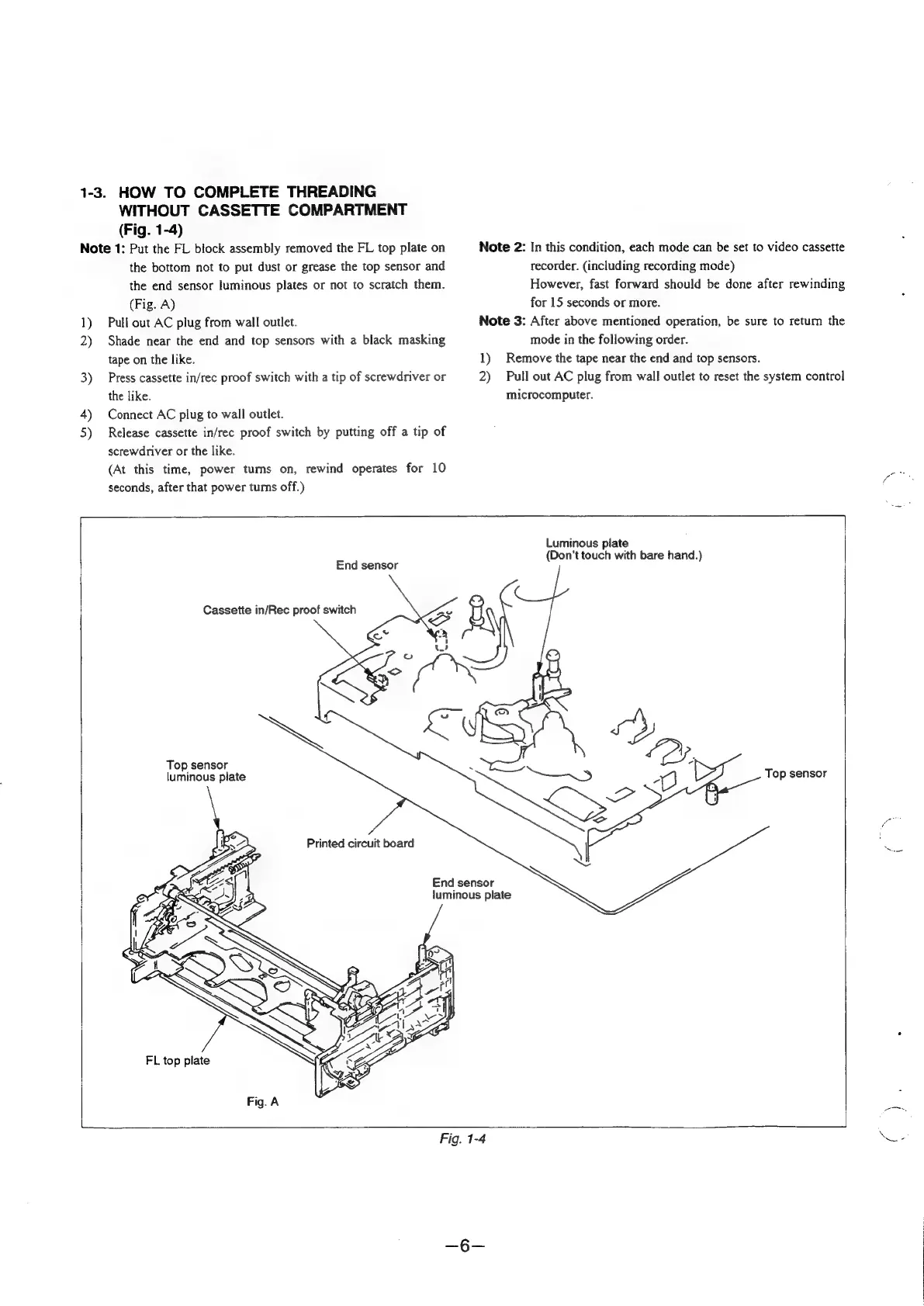
1-3.
HOW
TO
COMPLETE
THREADING
WITHOUT
CASSETTE
COMPARTMENT
(Fig.
1-4)
Note
1:
Put
the
FL
block
assembly
removed
the
FL
top
plate
on
the
bottom
not
to
put
dust
or
grease
the
top
sensor
and
the
end
sensor
luminous
plates
or
not
to
scratch
them.
(Fig.
A)
1)
Pull
out
AC
plug
from
wall
outlet.
2)
Shade
near
the
end
and
top
sensors
with
a
black
masking
tape
on
the
like.
3)
Press
cassette
in/rec
proof
switch
with
a
tip
of
screwdriver
or
the
like.
4)
Connect
AC
plug
to
wall
outlet.
5)
Release
cassette
in/rec
proof
switch
by
putting
off
a
tip
of
screwdriver
or
the
like.
(At
this
time,
power
tums
on,
rewind
operates
for
10
seconds,
after
that
power
tums
off.)
Note
2:
In
this
condition,
each
mode
can
be
set
to
video
cassette
recorder.
(including
recording
mode)
However,
fast
forward
should
be
done
after
rewinding
for
15
seconds
or
more.
Note
3:
After
above
mentioned
operation,
be
sure
to
retum
the
mode
in
the
following
order.
1)
Remove
the
tape
near
the
end
and
top
sensors.
2)
Pull
out
AC
plug
from
wall
outlet
to
reset
the
system
control
microcomputer.
End
sensor
Cassette
in/Rec
proof
switch
Top
sensor
luminous
plate
Printed
circuit
board
FL
top
plate
Fig.
A
End
sensor
luminous
plate
Luminous
plate
(Don’t
touch
with
bare
hand.)
Top
sensor
Fig.
1-4

Table of Contents

Related product manuals