INSTRUCTION, USE AND
MAINTENANCE MANUAL
GB
Page 19 of 58
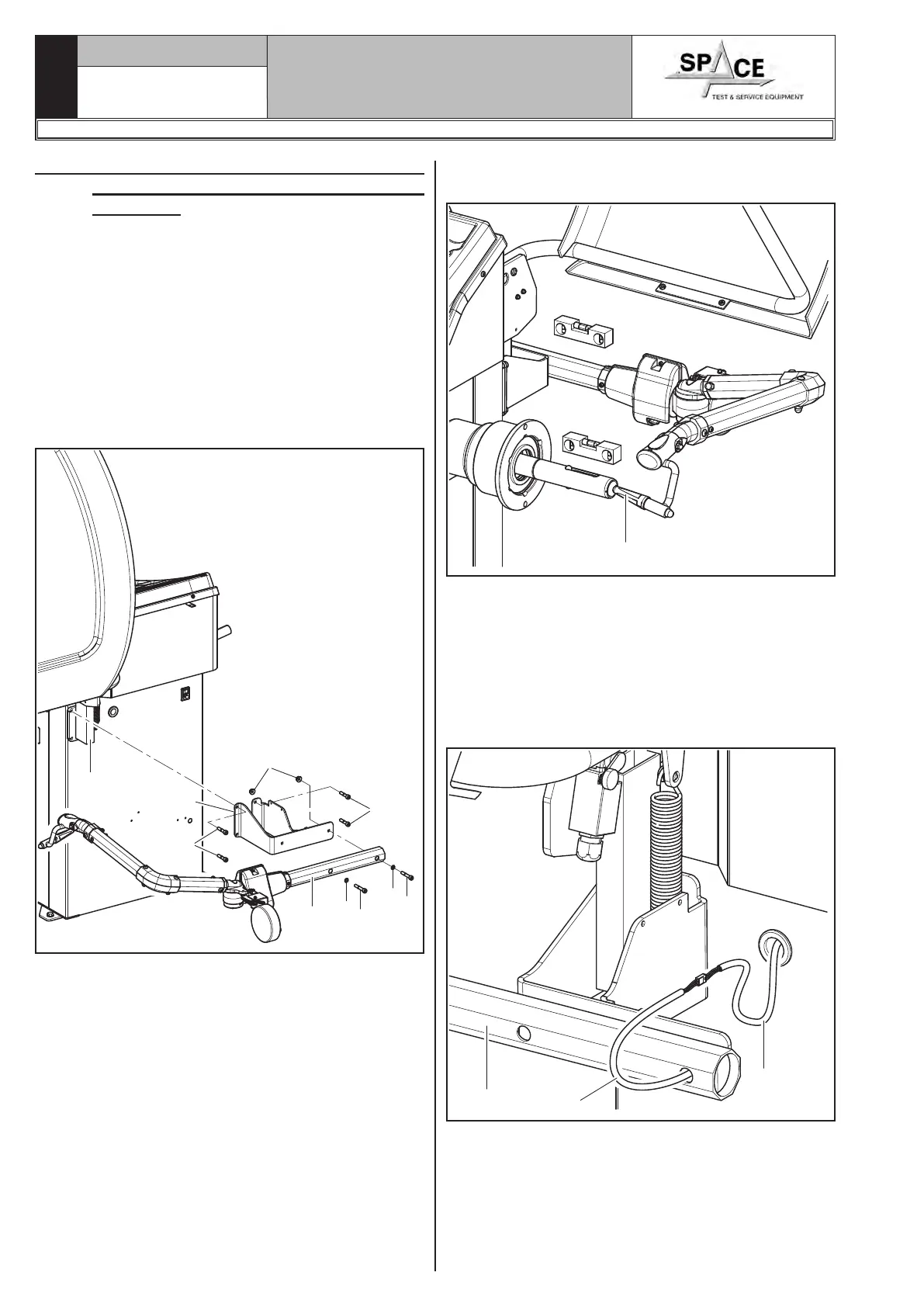
3. Make sure the gauge tip is positioned at the centre
of the mandrel (Fig. 22 ref. 1).
1
Fig. 22
4. Connect connector (Fig. 23 ref. 1) of the cable com-
ing from inside the machine to connector (Fig. 23
ref. 2) of the cable coming from the gauge arm. Fit
the section of the cable with the connectors inside
the arm (Fig. 23 ref. 3).
5. Fasten the cable with clamps.
6. Enable the external data gauge and carry out the
device's calibration.
1
2
3
Fig. 23
1296-M010-0_P
Space s.r.l.
ER232R - ER234R - ER236R - ER238R - ER238RFM - ER248R - ERP248R
9.3.6 Fitting of GAR264 automatic external
data gauge (optional for ER248R -
ERP248R)
1. Unscrew the 3 screws (in vertical position) of the
protection guard support (Fig. 21 ref. 1) being very
careful about holding the same support.
2. Screw the 4 screws (Fig. 21 ref. 2) to the gauge
bracket (Fig. 21 ref. 3) and in the special threaded
inserts placed on the rear side of the frame.
Lock the gauge arm (Fig. 21 ref. 4) by screwing the
2 screws provided (Fig. 21 ref. 5) and the washers
(Fig. 21 ref. 6). Lock these screws with the nuts
(Fig. 21 ref. 7) so that the mandrel and the gauge
arm are levelled out (see Fig. 22).
1
2
2
3
4
5
6
5
6
7
Fig. 21



 To Next Page