GB
Page 38 of 58
INSTRUCTION, USE AND
MAINTENANCE MANUAL
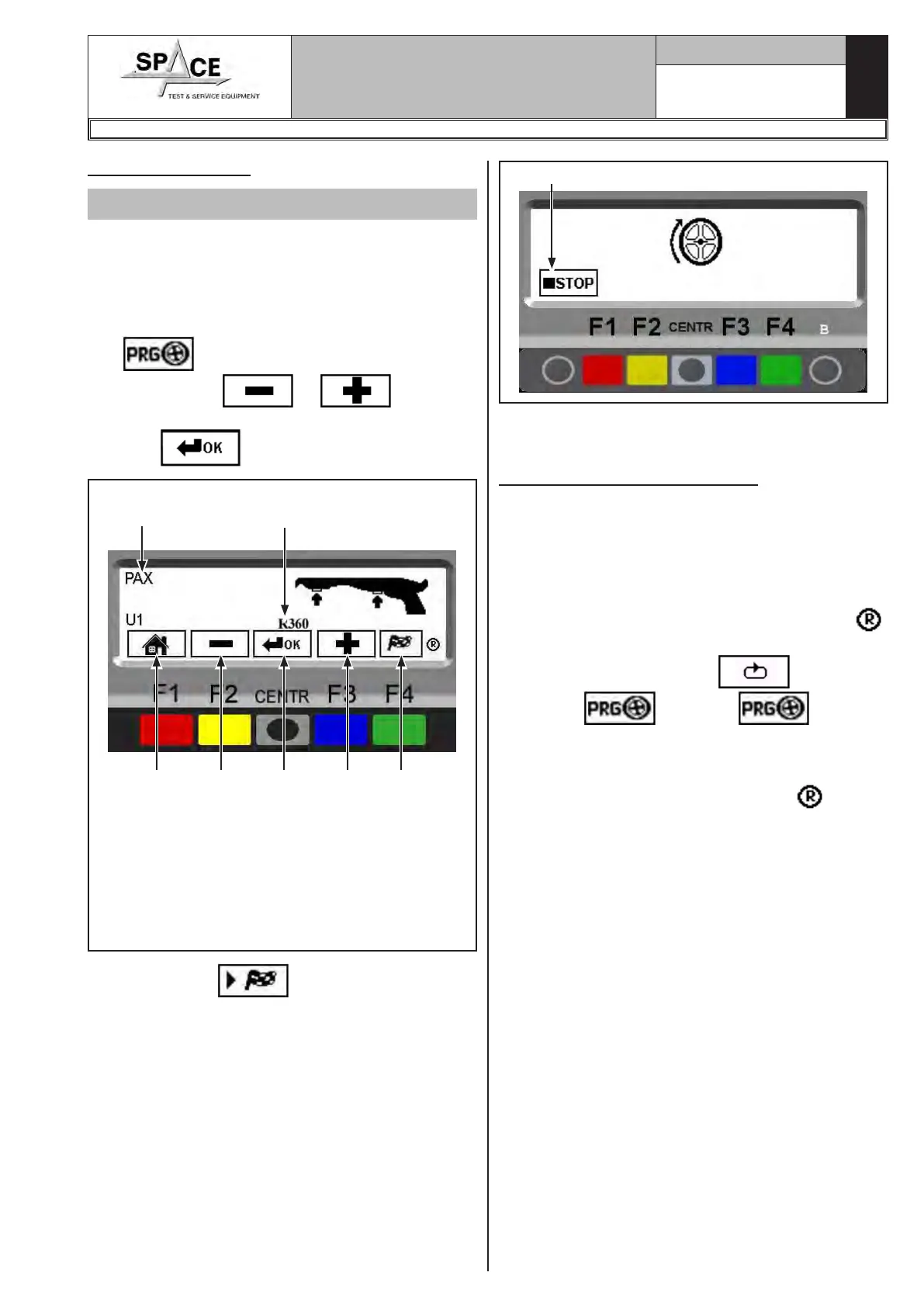
15.4.14 PAX mode
Valid for car
Make sure there are no stones and/or mud on the
wheel.
Remove any counterweights.
Fit the wheel and make sure it is properly fastened
(Chap. 12.0).
From the first display page (Chap. 14.0) press the “F3
key”
to select the type of desired correction;
Through the keys or display the
PAX function. Confirm the selection by pressing the
“CENTR”
key.
KEY
1 – Return to initial program phase (RED) (F1)
2 – Select the PAX wheel type (YELLOW) (F2)
3 – Display selected PAX wheel type measure-
ments (CENTRAL)
4 – Select the PAX wheel type (BLUE) (F3)
5 – Performs spin (GREEN) (F4)
Fig. 61
1 3 4 5
Wheel type
Type of wheel selected
2
Press the “F4 key” to perform a spin. In just a
few seconds, the wheel will run at full speed; the wheel
balancer display indicates the wheel rotation (Fig. 62).
After the spin, the wheel stops automatically, taking
into account the measured unbalance so that the fitting
position of the outer weight is around at 12 o' clock.
Fig. 62
Press in case of emergency
Proceed to fit the weight as shown for the ALU-S mode
(Par. 15.4.12).
15.5 Recalculation Function
After making a spin, the wheel automatically stops,
and the required weight/s and its/their position is/are
always indicated.
If a test is performed in DYNAMIC, ALU-S, or STATIC
mode, the data of the other modes can be obtained
without making another spin by simply setting other
dimensions and pressing the “Recalculation key .
From the page where the results are shown (see for
example, Fig. 48), press “F2”
key until dis-
playing the key. Press and select
the wished program.
At this point, simply set the dimensions again, in ALU-
S, STATIC or again DYNAMIC mode, as explained in
Par. 15.1, and press key “Recalculation” .
The screen will show a new page with weights and posi-
tion, in the new ALU-S, STATIC or DYNAMIC modes,
taking into account the new dimensions.
No new spin has to be made because the machine con-
tinues to store the data of the previous spin.
Similarly, new weight and position data can be obtained
by switching from an “Auxiliary Programs” mode (see
Par. 15.4) to another mode (ALU-S1 – ALU-S2 - STAT-
IC1 - STATIC2 - ALU1 – ALU2 – ALU3 - ALU4 – PAX)
without making another spin.
1296-M010-0_P
Space s.r.l.
ER232R - ER234R - ER236R - ER238R - ER238RFM - ER248R - ERP248R



 To Next Page