GB
Page 42 of 58
INSTRUCTION, USE AND
MAINTENANCE MANUAL
18.0 WEIGHTS HIDDEN BEHIND
SPOKES MODE
Valid for car/motorcycle
Adhesive correction weight positioning may not look at-
tractive on some types of rims. In this case, the "weights
hidden behind spokes" mode can be used. This splits
any correction weight on the outer side into two parts
to be hidden behind the rim spokes. It can be used in
ALU-S Static mode.
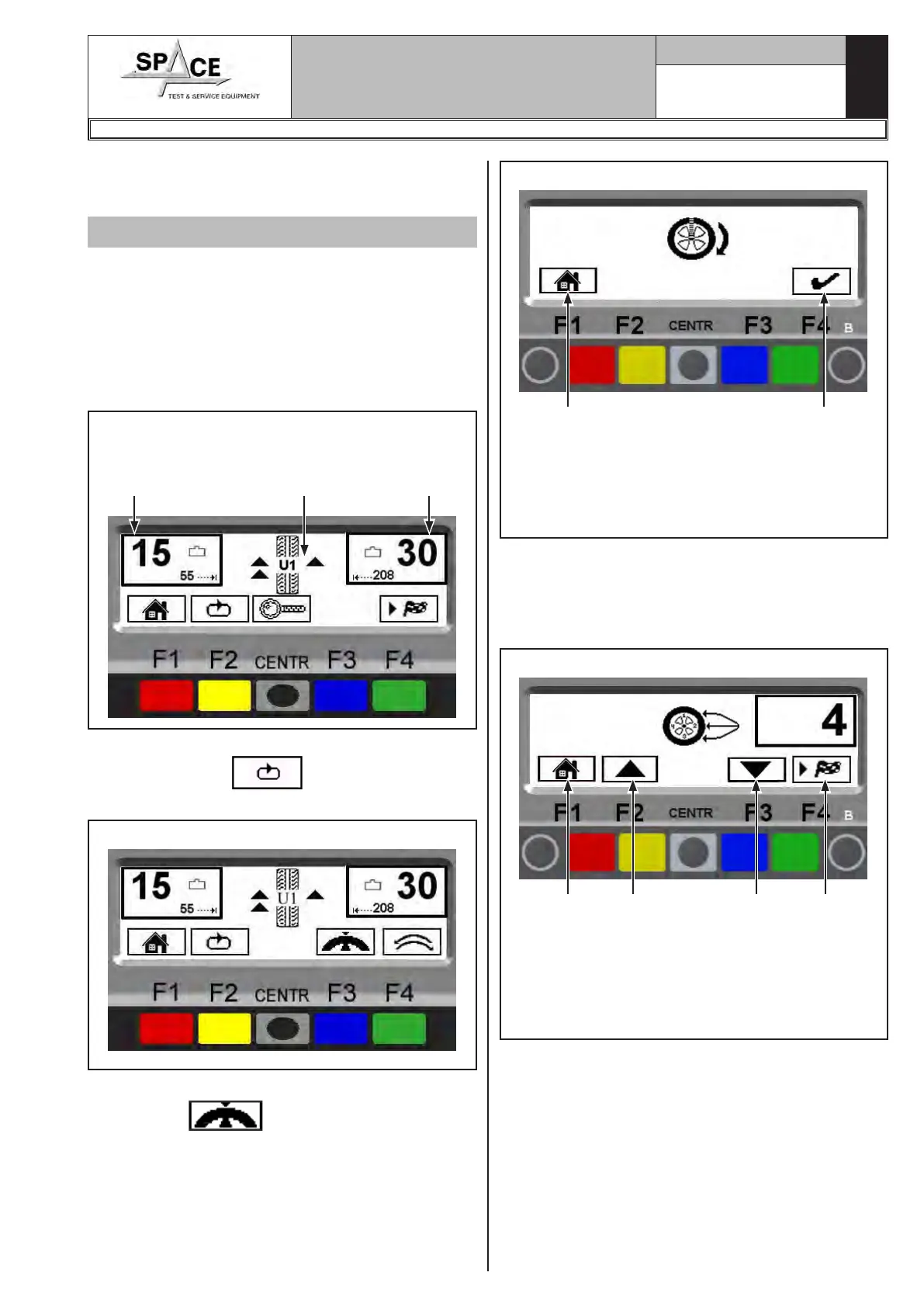
Proceed to display the ALU-S unbalance measurements
by performing a spin (Fig. 72).
Fig. 72
Total inner
weight
Total outer
weight
ALU-S Un-
balance
Once the unbalance values have been determined,
press the “F2 key” . At this point, the next
row of keys is displayed on the monitor.
Fig. 73
Press the “F3 key” relating to the weights hidden behind
spokes mode .The program will display the
screen page in Fig. 74.
Move any spoke up to 12 o' clock (in many cases, the
position could already be behind or near one of the
spokes) and press the “F4 key” to confirm and con-
tinue.
Fig. 74
KEY
1 – Return to previous screen page (RED) (F1)
2 – Confirm spoke positioning at 12 o' clock
(GREEN) (F4)
1 2
Enter the number of spokes existing on the wheel, us-
ing keys F2 and F3 (Fig. 75).
A minimum of 3 spokes and a maximum of 12 can
be entered.
Press the “F4 key” to confirm and continue.
Fig. 75
KEY
1 – Return to previous screen page (RED) (F1)
2 – The number of spokes increases (YELLOW) (F2)
3 – The number of spokes decreases (BLUE) (F3)
4 – Confirm number of spokes (GREEN) (F4)
1 2 3 4
1296-M010-0_P
Space s.r.l.
ER232R - ER234R - ER236R - ER238R - ER238RFM - ER248R - ERP248R



 To Next Page