INSTRUCTION, USE AND
MAINTENANCE MANUAL
GB
Page 41 of 58
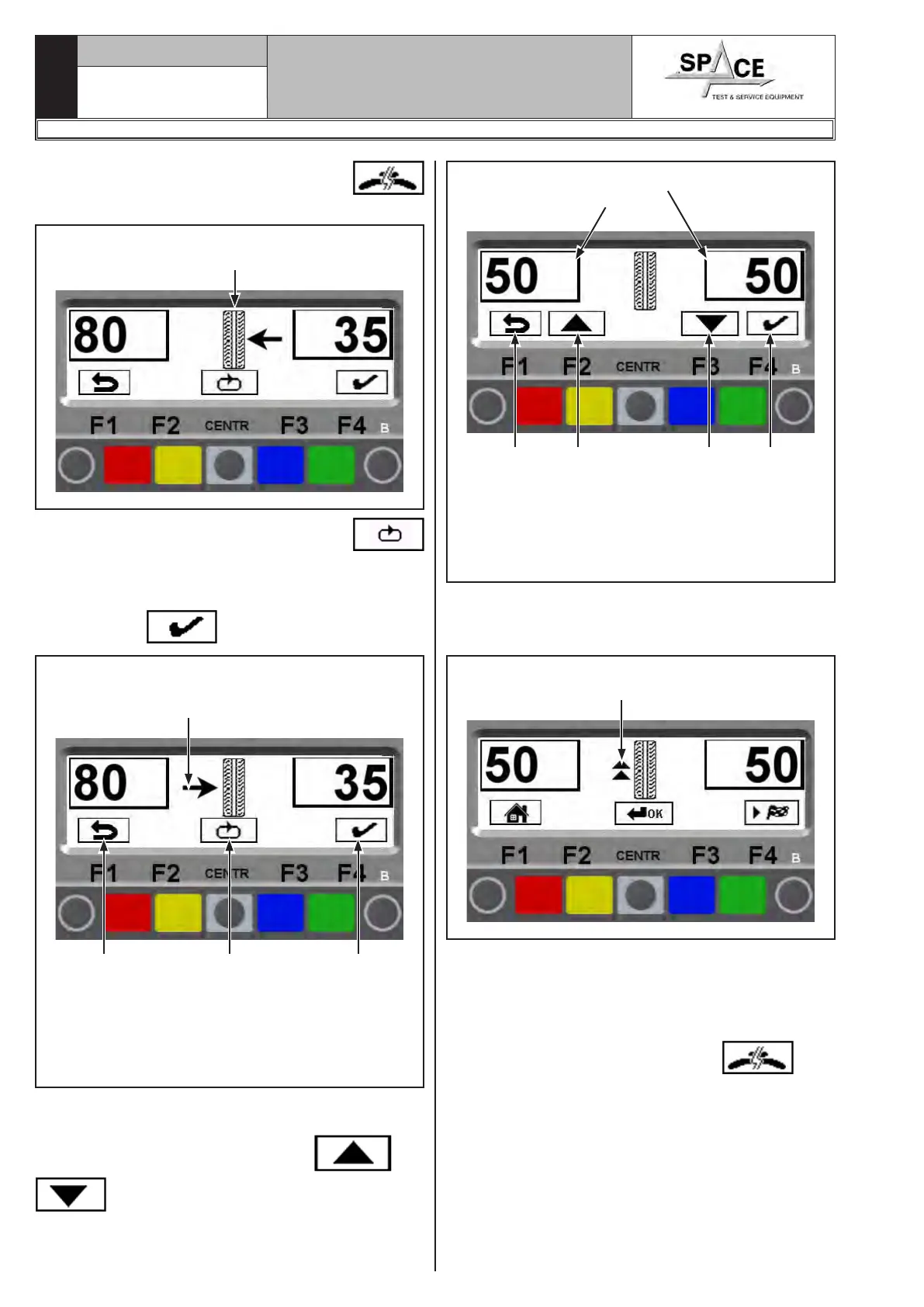
Press the key relating to the SPLIT function
, the system will display the screen page in Fig. 68.
Fig. 68
SPLIT function selected.
Choose the desired wheel side
Press “CENTR key” corresponding to icon
to select the desired wheel side (outer or inner). De-
pending on the selected side, the monitor will show
the position of the direction arrows.
Press “key F4” to confirm.
Fig. 69
Confirm the wheel side.
In the example, the selected side is the in-
ner; where the total weight is higher.
KEY
1 – Display of program previous page (RED) (F1)
2 – Selects wheel side (outer or inner) (CENTRAL)
3 – Confirms selection and continues (GREEN)(F4)
1 2 3
At this point, the system will display the quantity of
the two weights to be fitted on the wheel (see Fig. 70).
Using the keys corresponding to icons and
, the operator can increase or decrease the
quantity of the weights in the awareness that, the bigger
the weights, the bigger the distance will automatically
be between them.
Fig. 70Choose the weights to be fitted
and confirm
KEY
1 – Display of program previous page (RED) (F1)
2 – The weight to be fitted increases (YELLOW) (F2)
3 – The weight to be fitted decreases (BLUE) (F3)
4 – Confirms selection and continues (GREEN)(F4)
1 2 3 4
Turn the wheel at the point indicated by the arrows,
until the correct position has been reached to correct
the unbalance (par. 15.3.2).
Fig. 71
Arrows to help positioning in correc-
tion weight fitting point
The monitor again displays Fig. 71. Turn wheel at
the point indicated by the direction arrows, and fit the
SECOND weight.
The inner side operation is complete, press “CENTR”
key to quit.
Press the “CENTRAL” key function key
again
(to perform the same operation for the outer side of
the wheel) or fit the outer weight on the top part of the
wheel, at 12 o' clock.
1296-M010-0_P
Space s.r.l.
ER232R - ER234R - ER236R - ER238R - ER238RFM - ER248R - ERP248R



 To Next Page