INSTRUCTION, USE AND
MAINTENANCE MANUAL
GB
Page 47 of 58
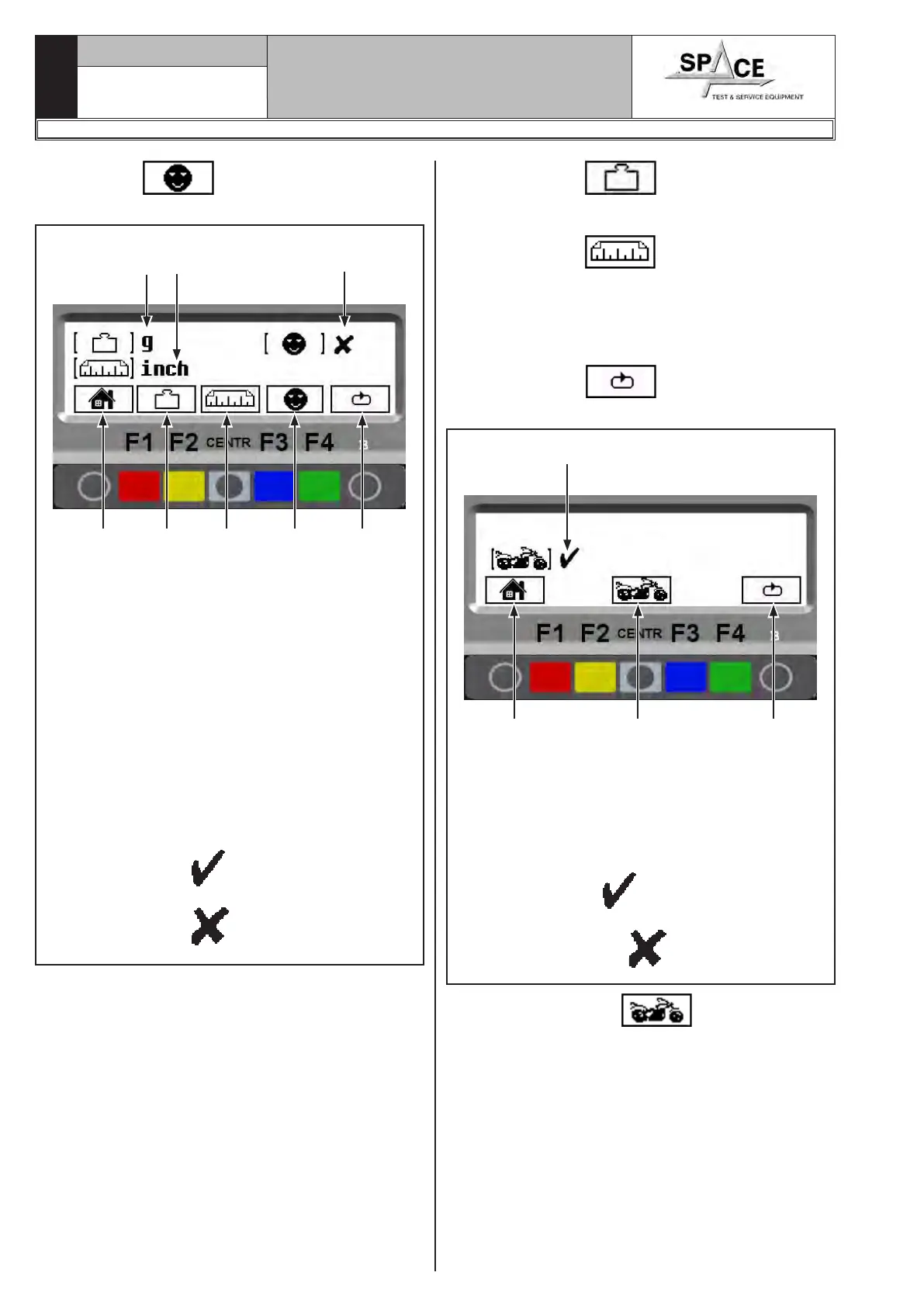
Press key “F2” and the program will display
the following figure:
Fig. 88
KEY
1 – Return to Fig. 87 screen page (RED) (F1)
2 – Change unit of weight measurement from
grams (g) to ounces (oz) and vice versa (YEL-
LOW) (F2)
3 – Change unit of width/diameter measurements
from inches (inch) to millimetres (mm) and
vice versa (CENTRAL)
4 – Enable/disable “User control” function see Par.
15.2 (BLU) (F3)
5 – Display subsequent operations (GREEN) (F4)
6 – Selected weight measurement unit = grams (g)
7 – Selected unit of width/diameter measurement
= inches (inches)
8 – “User Control” function
ENGAGED →
“User Control” function
DISABLED →
1 2 3 4 5
6
7 8
Press the “F2 key” to change weight unit of
measurement from grams to ounces and vice versa.
The symbol "g" or "oz" appears on the monitor.
Press the “F3 key” to change the width and
diameter unit of measurements from inches to mil-
limetres and vice versa. The symbol "inch" or "mm"
appears on the monitor.
After setting the required measurement unit, to engage
or disengage the motorcycle wheel balancing mode,
press the “F4 key” . The program will show
the following image:
Fig. 89
KEY
1 – Return to the image in Fig. 87 (RED) (F1)
2 – Engage/Disengage motorcycle wheel balancing
mode (CENTRAL)
3 – Display subsequent operations (GREEN) (F4)
4 – Motorcycle wheel balancing mode
ENGAGED →
Motorcycle wheel balancing mode
DISENGAGED →
1 2 3
4
Press the “CENTR key” to engage or disen-
gage motorcycle wheel balancing mode. All the settings
of the measurement unit are stored even after the
machine is switched off.
1296-M010-0_P
Space s.r.l.
ER232R - ER234R - ER236R - ER238R - ER238RFM - ER248R - ERP248R



 To Next Page