- 9 -
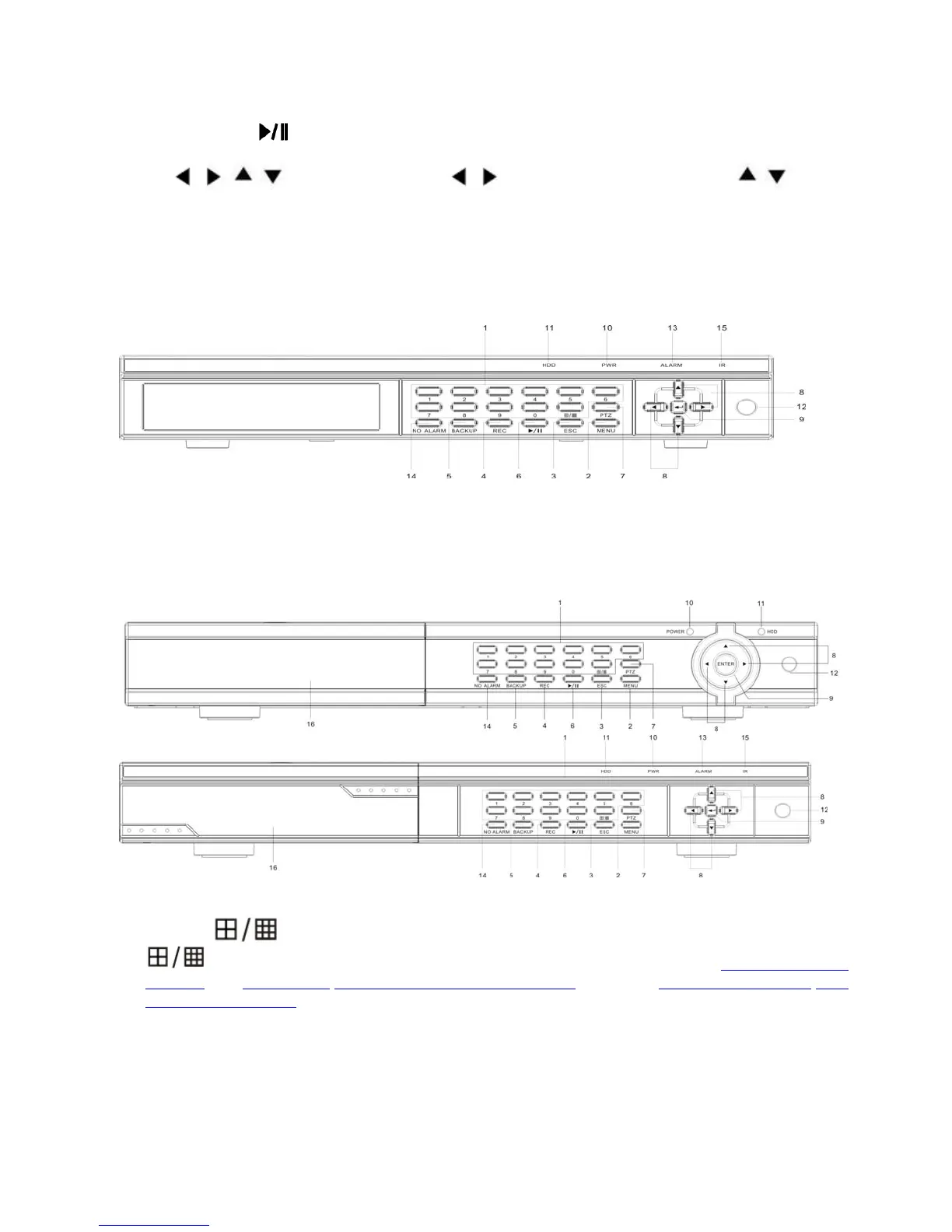
2. MENU: Press this button to display the main menu.
3. ESC: Exit window or switch the tool bar(main menu) and status bar
4. REC: Start or Stop manual record function.
5. Backup: Open video search and backup menu
6. Play/Pause (
): Open video search and playback menu. press to pause playback.
7. PTZ: Open camera selected with PTZ operation menu.
8.
, , , : Arrow Buttons. Press , to move to selection box, press , to select
submenu parameters.
9. Enter: Confirm operation.
10. Power LED
11. HDD LED
12. IR Window
8CH DVR(1 x SATA or 2 x SATA)
8CH DVR(2 SATA HDD, with DVDRW or HDD removable Rack)
Key buttons 2 ~ 12 are same as 4CH DVR, except:
1. 1~8 /
Direct switch to single channel window , or 9 camera windows.
Start and Stop time setting of playback or back up in schedule record(Chapter 4.5 Video
Playback), or 5.4.6 Motion/5.4.7 Privacy Mask setting(Mosaic) setting, or 5.3.2 Record Schedule/5.6.4
Alarm Schedule setting
13. ALARM LED: indicate alarm happened
14. NO ALARM: Cancel Alarm and Buzzer
15. IR LED
16. DVD Burner or Removable HDD Cover
8CH DVR(1 x SATA or 2 x SATA) with complex key combination



 To Next Page