- 44 -
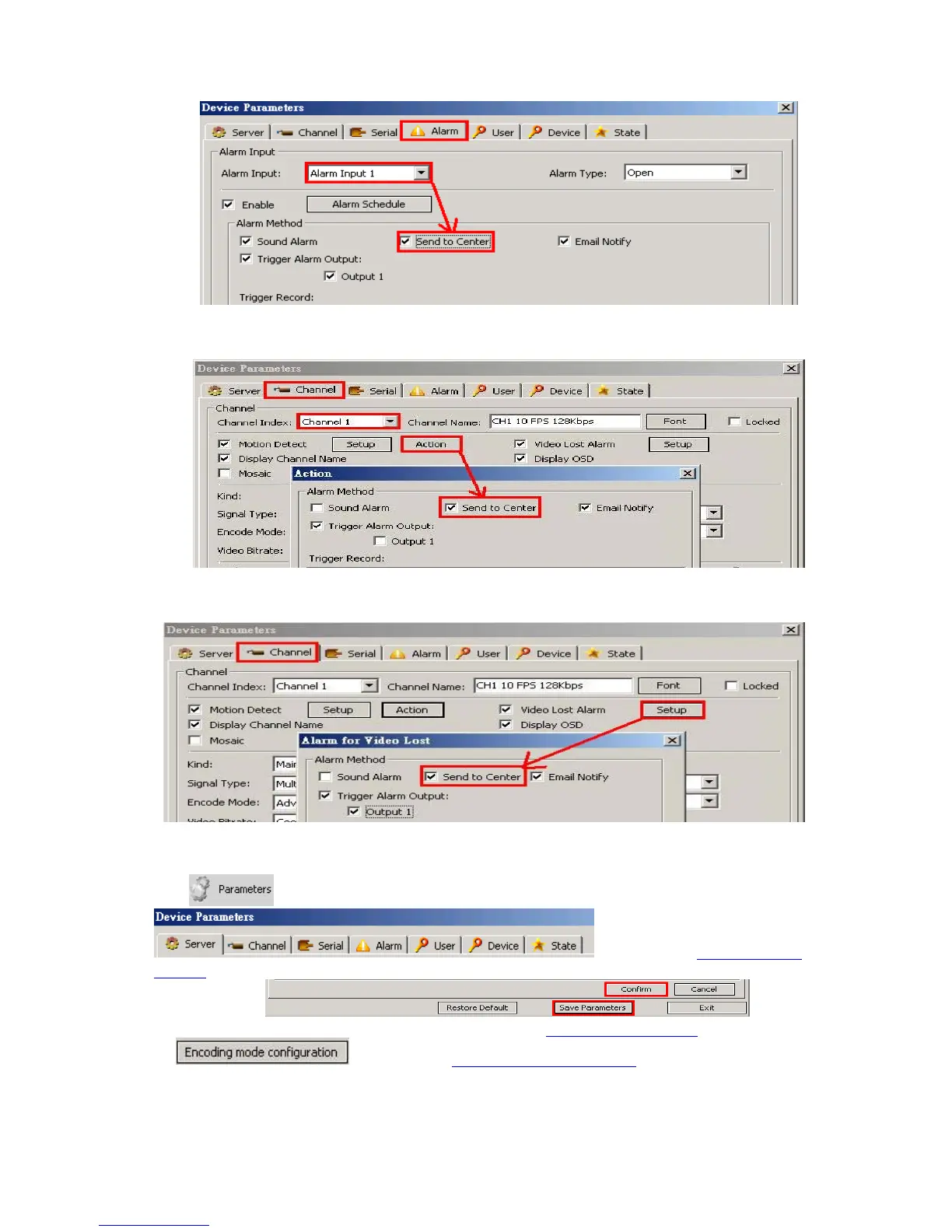
When alarms of remote notification occur, the alarm notification with alarm input number contained
such as “Device alarm: IO alarm, IO input x” will be displayed in the right up side of the main
screen. Enable this function in Device Parameters setting.
When alarms of motion detection with remote notification occur, the alarm notification with the alarm
channel number contained such as “Device alarm: motion detection, channel X” will be displayed in
the right up side of the main screen.
When alarms of video loss with uploading to center occur, the alarm notification with the alarm
channel number contained such as “Device alarm: video loss, channel x” will be displayed in the
right up side of the main screen.
6.5 Device Parameters Settings
Click , the Device Parameters will appear
, please refer to Chapter 5 DVR
Settings as well. After settings, please click “Confirm” and “Save Parameters” to be effective for each
setting window:
ServerÆNetwork setting, video system – please refer to Chapter 5.5 Net Setting
as well, for
, please refer to 5.2.9 Resource Management



 To Next Page