- 51 -
7.1 Windows Mobile
Open accessory CD and find the “amplayersetup.CAB” for the surveillance software.
Please refer to PDA user manual, copy *.cab into windows mobile pda
Double click on *.cab can start install software into PDA. After install completed, user can find QQEYE in the
application list.
Execute QQEYE program and click to setup IP address of remote DVR.
In the ensuing screen, input the Username (Admin), Password, and IP address(or DDNS) of your DVR (Server);
input the mobile Port no.(default 6003), and Notes for this DVR description; click the “OK” and “Auto
Connect” to save it and start to connect automatically; or click the “History” to choose one DVR that ever
connected.
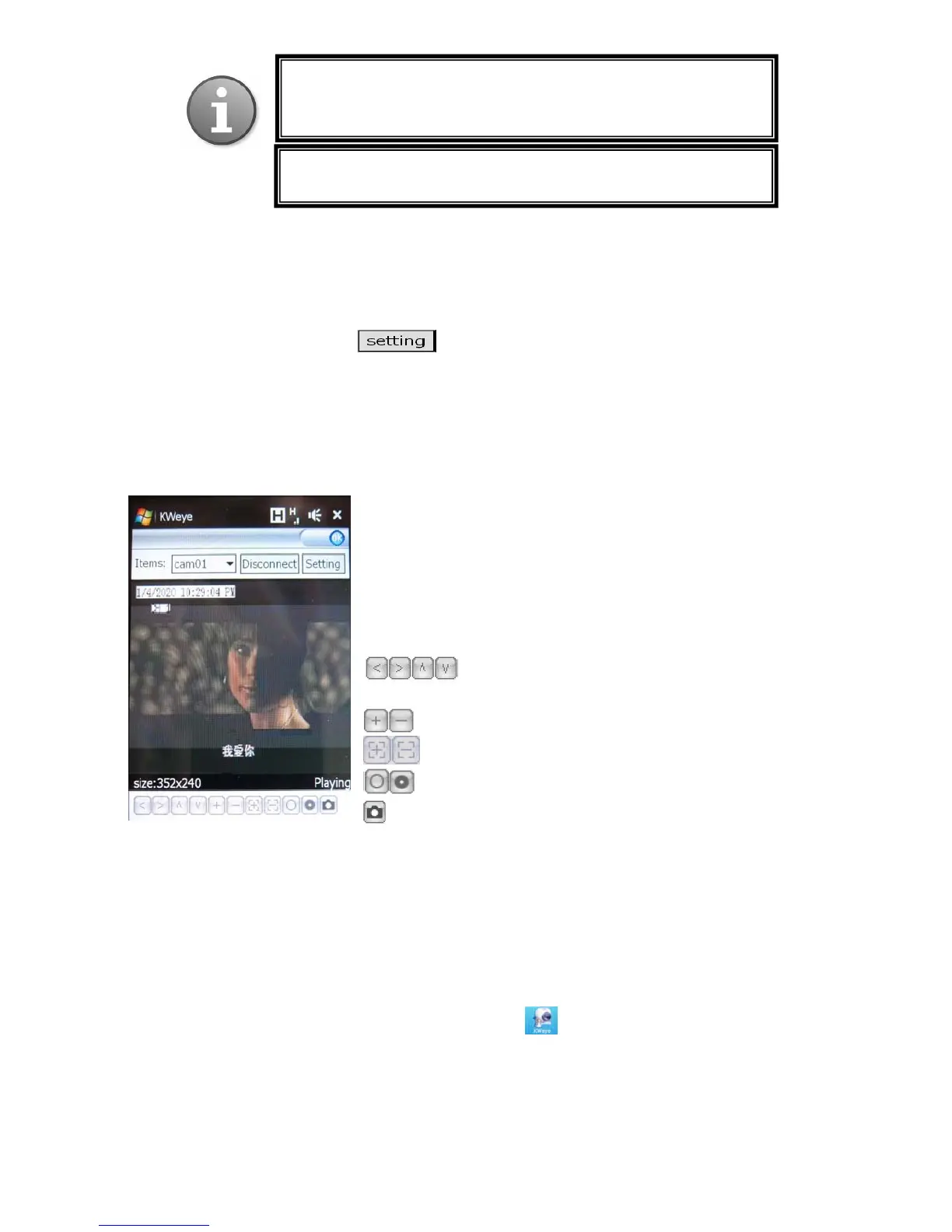
The main window of the Mobile Phone application offers the choice of channels(Items), Disconnect/connect
and Settings buttons.
To connect to the system and start watching the live feed from your CCTV
cameras, click on the Connect button or Disconnect to stop watching
To choose the camera, use the Items dropdown menu.
To modify settings, press the Setting button.
On-screen data will provide information about current time (in the
MM-DD-YYYY HH:MM:SS format), Channel name, resolution, and
status of the camera.
The menu bar contains the following controls.
Directional buttons for controlling the direction of the
PTZ camera view
Zoom in / out
Focus
Iris
Snapshot
7.2 Nokia/Samsung/LG Symbian S60 3
rd
/S60 5
th
Phones
Open accessory CD and find the “KWeye_JH_3rd_1222.sisx”, or “KWeye_JH_5th1222.sisx” mobile
surveillance software according to Symbian OS S60 3
rd
or 5
th
. Please refer to user manual of mobile
phone to install the software into mobile phone. While install the software, must set “software
installation -ALL”, and “Online Certificate check - off”, ex. Main menu --> Applications --> App.
mgr. (application management) --> Options --> settings --> software installation ,set ALL -->
Online Certificate check , set off
After installation is complete, please locate the KWeye
icon in the list of applications on your
mobile phone.
Execute KWeye and the program window will appear on the screen.
Note: Prior to using this feature, you should apply for the Internet
connection service for your mobile phone, such as 3G or 3.5G.
Please contact
our mobile service
rovider for details.
You can only watch one live feed channel at a time with your
mobile
hone.



 To Next Page