- 39 -
5.6.4 Alarm Setting(Schedule), Zoom Out and Hard Disk Full actions
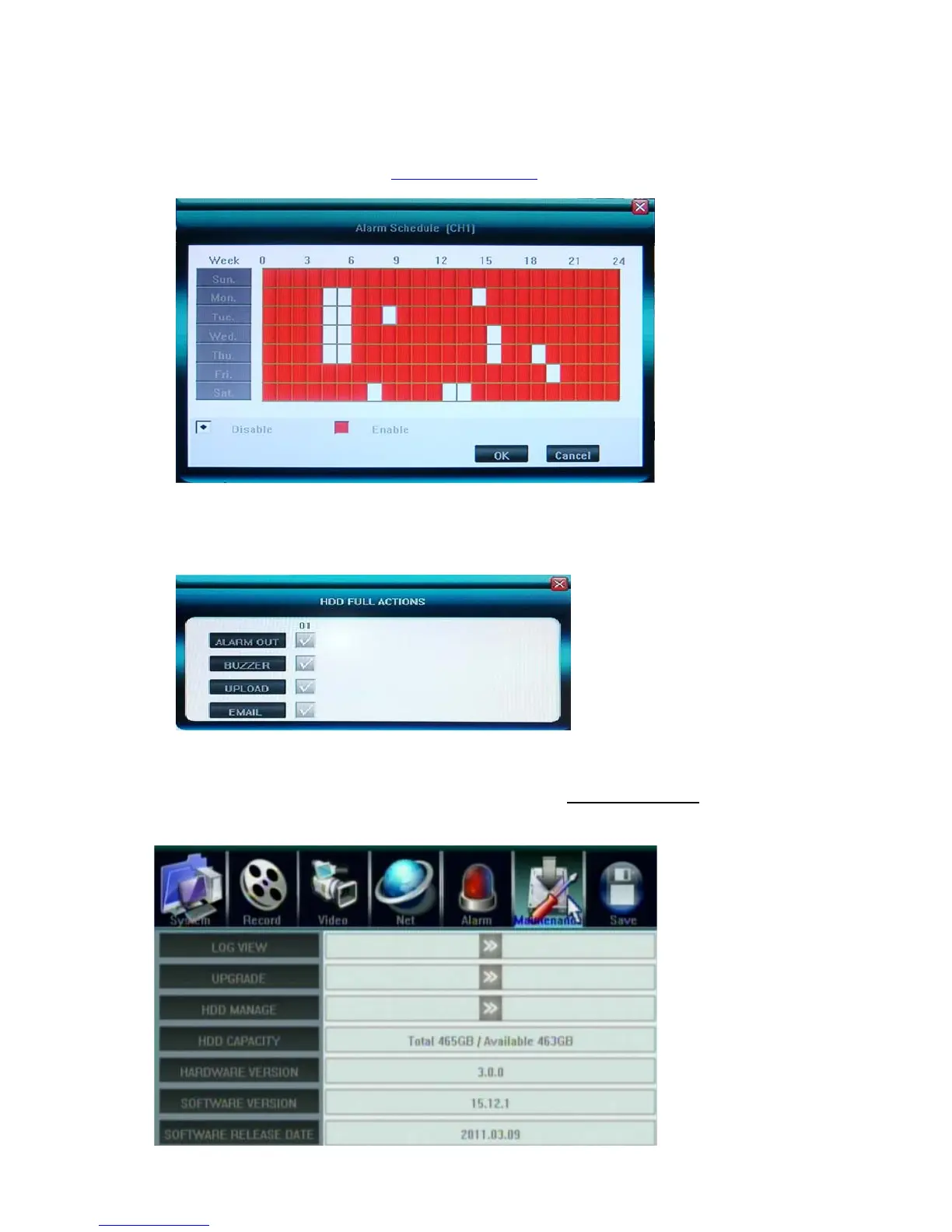
ALARM SETTING - Alarm Schedule
Click 〖>>〗to open sub window for alarm schedule setting.
User can enable/disable alarm output by weekly schedule, the unit is hour, enable is red, disable is
white. There are mouse/faceplate buttons/remote control operations for set up as well, same as
record schedule, you can refer to 5.3.2 Record Schedule for details
Please note Motion/Alarm Schedule recording dose not compliant to Motion/Alarm event(action)
schedule
Alarm Zoom Out
Set the time interval(seconds) for channels pop out display while alarmed(Motion and Sensor)
Hard Disk Full actions
z Alarm Out: Set the Alarm output enabled
z Buzzer: Set the internal Buzzer enable
z Upload: upload these events message to IE or CMS server, to be displayed at the top right corner
z E-mail: Send E-mail with Snapshot picture(please refer to 5.5.6 E-mail Server
about how to set up
the E-mail address list)
5.7 Maintenance



 To Next Page