- 10 -
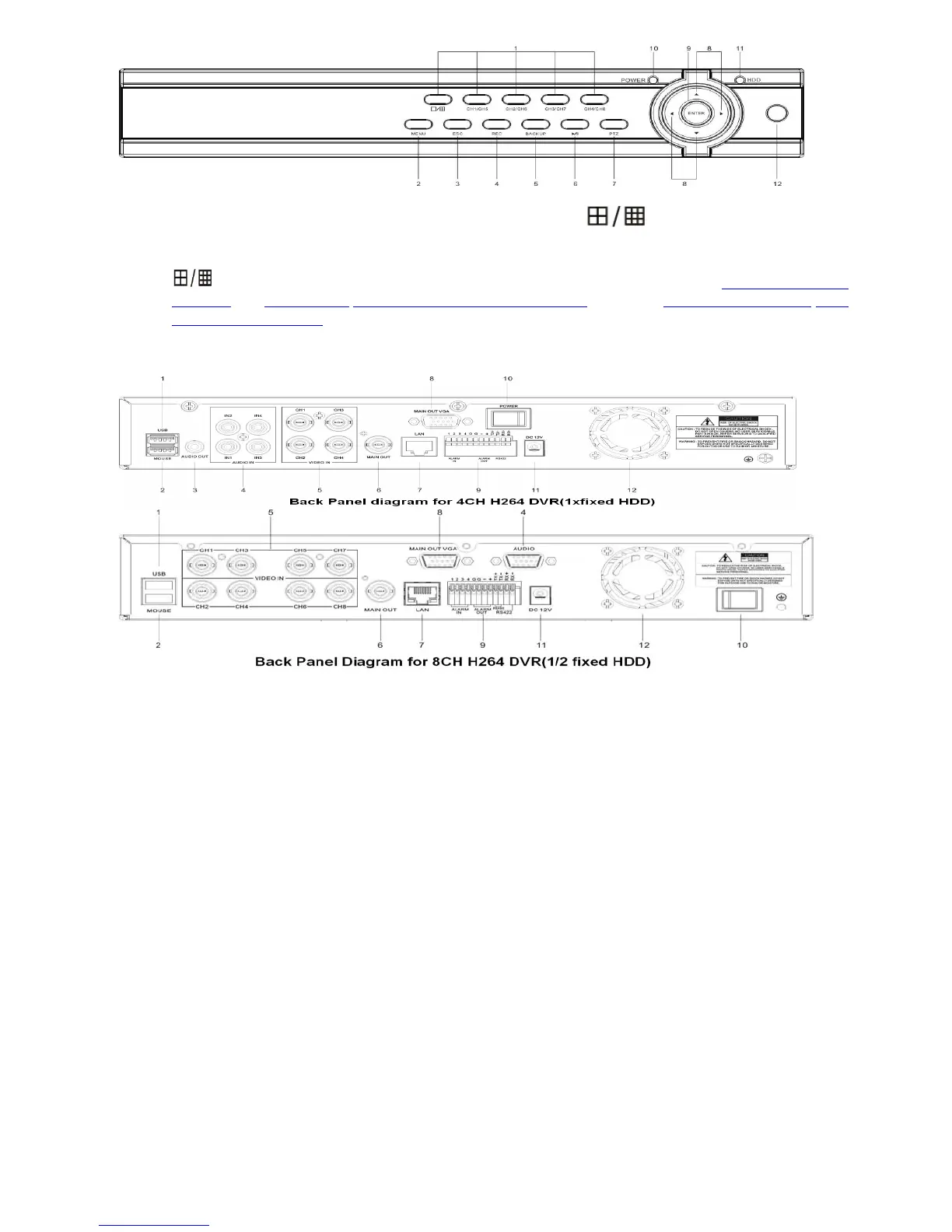
Key buttons 2 ~ 12 are same as 4CH DVR, except:
1. Complex keys - CH1/CH5, CH2/CH6, CH3/CH7, CH4/CH8,
Channel 1/Channel 5, Channel 2/Channel6, Channel 3/Channle 7, Channel 4/Channel 8 toggle switch
button, and also button switch between 1/9 camera windows
Start and Stop time setting of playback or back up in schedule record(Chapter 4.5 Video
Playback), or 5.4.6 Motion/5.4.7 Privacy Mask setting(Mosaic) setting, or 5.3.2 Record Schedule/5.6.4
Alarm Schedule setting
Back Panel
1. USB connector: Connect backup devices like flash drive, portable HDD or DVD burner
2. Mouse Connector: Connect USB mouse.
3. Audio Output Connectors: 1 channel audio output, RCA (2Vp-p,600Ω) for 4CH DVR
4. Audio Input Connectors (AUDIO IN 1-4/1-8): 4 channel audio input, RCA (2Vp-p,600Ω) for 4CH
H264 DVR; or connector for 8CH H264 DVR to connect Audio cable(8CH Audio Input+ 1CH Audio
Output)
5. Video Input Connectors (1-4/1-8): 4 or 8 channel video input, BNC (1Vp-p,75Ω)
6. Video Main Output Connector: DVR system screen output, BNC (1Vp-p,75Ω)
7. Ethernet Connector: RJ-45 10/100 Base-T Ethernet network.
8. VGA Connector (optional for 4CH): Connect VGA/LCD monitor
9. Alarm Input Connectors (ALARM IN 1-4, 5-6 Ground): Connect to external sensor device
Alarm Output Connectors (ALARM OUT 7-8):Connect to external sensor device
RS-422 Connector (9-12): RS-485 Connector (9-10, TX+, TX-) Support PTZ camera control
10. Power Switch
11. Power Input Socket (12V DC)
12. Fan
2.3 Remote Controller
The remote controller is an accessory to ease the user’s operations. You can do all the operations by the
remote controller instead of the buttons on the front panel.



 To Next Page