5-1
Operating Instructions Operator Manual 10083002
5.1 Intensity Controls The Harmony
®
LED Wall Control Unit allows the user to adjust the
lighthead intensity level (brightness) by pressing a membrane switch
(or “button”). An identifying number on the control display
corresponds to the same number on the lighthead suspension arm.
Additionally, each lighthead has its own “onboard” intensity controls,
located above the lighthandle adjacent to the lens. These controls
are usually referred to as the surgeon's control buttons or as the
surgeon's control (see Figure 5-2).
To Adjust Lighthead Intensity Levels:
1. Press ON touch pad at the control center.
2. Intensity levels for up to four lightheads can be controlled from
one control center (an additional remote power module is
required for three- or four-lighthead systems). A lighthead’s
surgeon's control buttons adjust the intensity level for that
lighthead.
Important: Avoid control center faults from excessive pressure on
keys. Do not continuously press and hold any control center button
for more than 40 seconds.
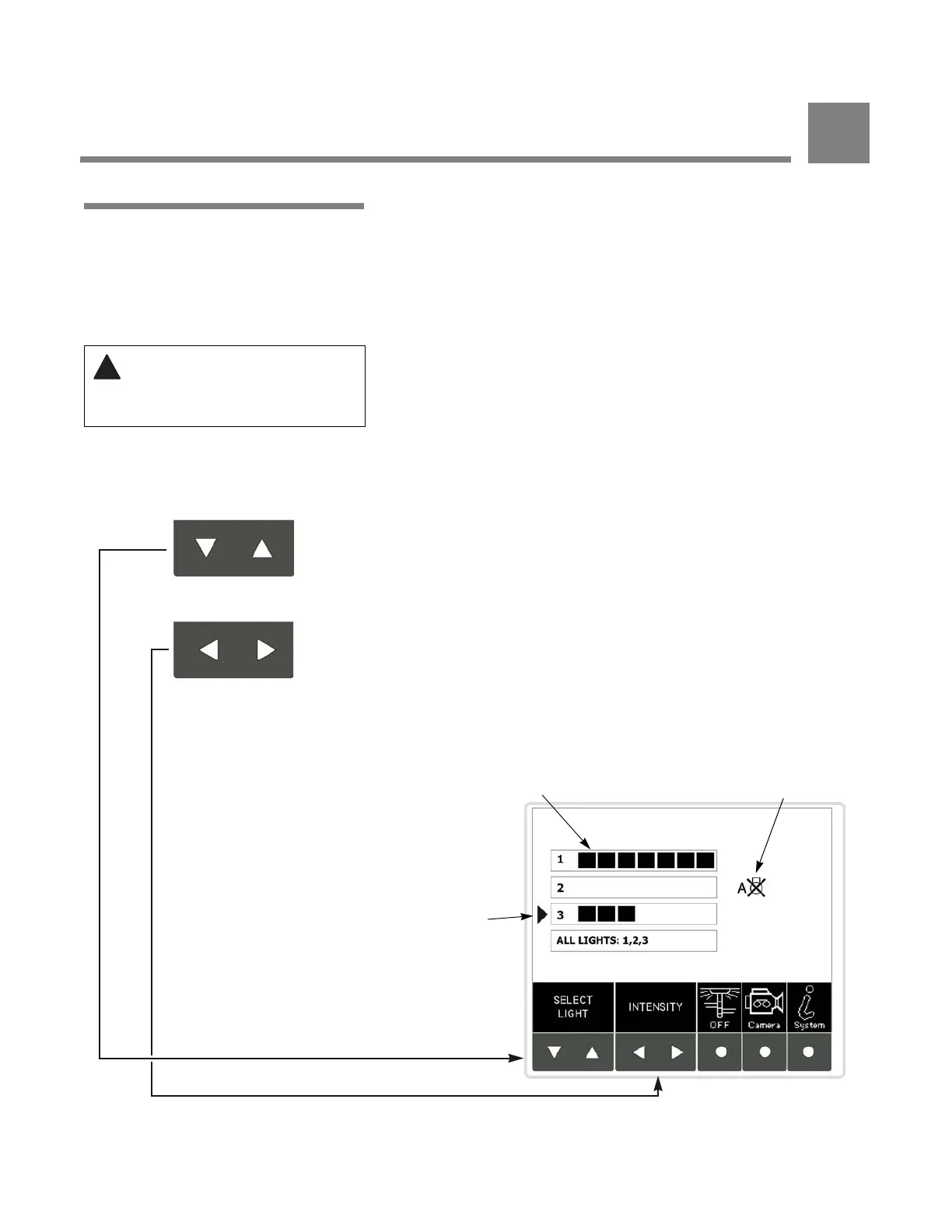
Control Center (see Figure 5-1)
1. Use the “Select Light” touch pads to move the display indicator
up or down until it aligns with the appropriate lighthead.
2. Once the lighthead is selected, press the right button to
increase light intensity level, or the left button to decrease light
intensity level.
3. If “All Lights” is selected, intensity for all lightheads in the system
is increased or decreased simultaneously.
NOTE: For longer LED module life, use lowest intensity level suitable
for surgical procedure.
WARNING – EXPLOSION
HAZARD: Do not use lighting
fixture in the presence of
flammable anesthetics.
Figure 5-1. Harmony Control Center Light Control Screen
for Harmony LED System
Down / Up Buttons
Select Lighthead
Left / Right Buttons
Adjust Intensity
Indicates Selected
Lighthead
Lighthead Intensity
Status
Fault Status
Indicator
OPERATING INSTRUCTIONS
5











 To Next Page