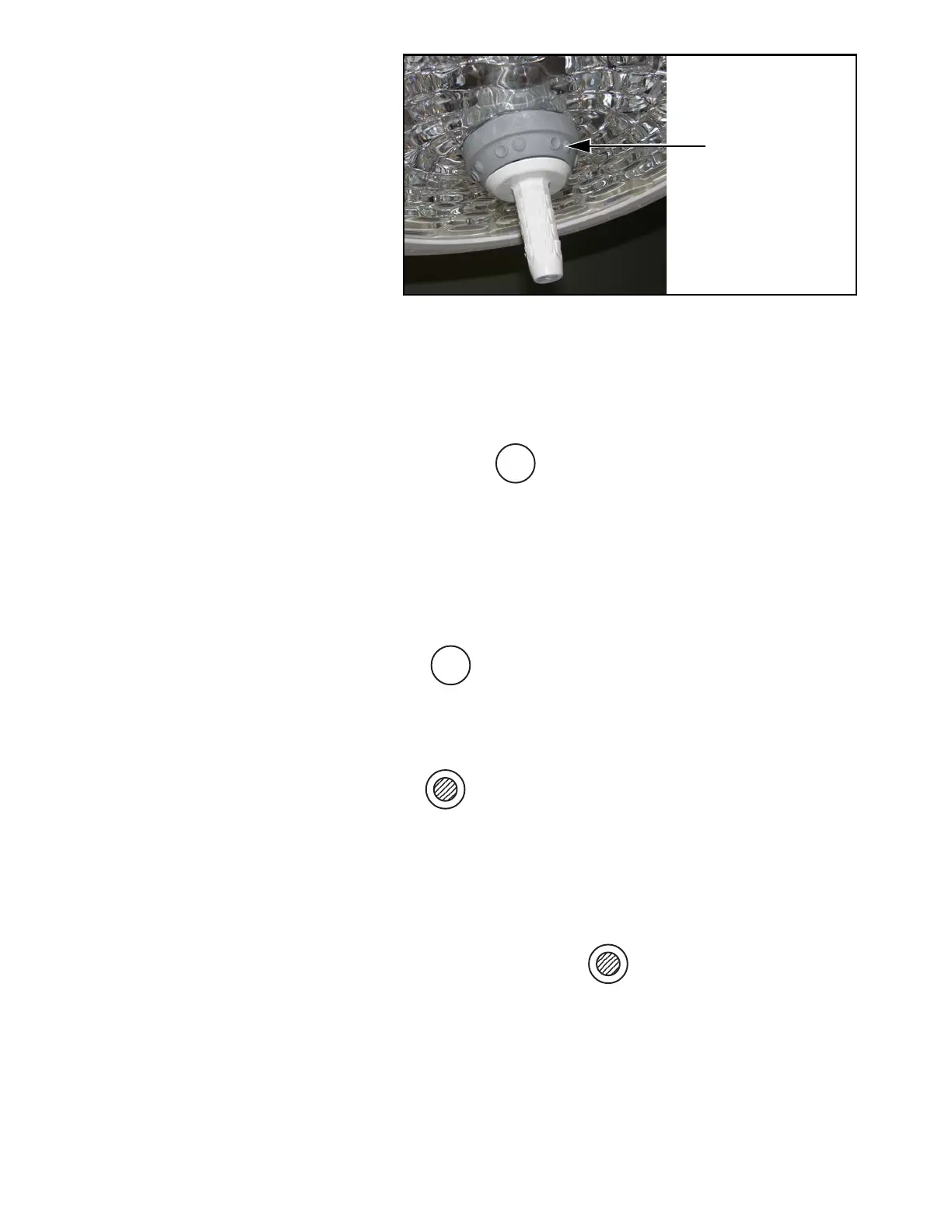
5-2
10083002 Operator Manual Operating Instructions
Surgeon's Intensity Control Buttons (See Figure 5-2)
1. Grasp the handle of the appropriate lighthead. A ring of
membrane buttons (six pairs) are located on the control bezel
adjacent to the lighthead lens.
2. Press the surgeon control button to turn on the
associated lighthead at its previously stored intensity level
setting.
Continuing to press and hold the same button for two or more
seconds turns on the remaining lights at their previously stored
intensity level settings.
3. Press any of the surgeon's intensity control buttons molded with
the following symbols:
to increase the lighthead intensity.
Press any of the surgeon's control buttons molded with the
following symbol:
to decrease lighthead intensity.
4. To turn lighthead OFF:
a. At the control center: press the “Select Light” button until
indicator points to the appropriate lighthead on the display.
Press the “Decrease Intensity” button until the light goes out.
b. Press and hold the or (recessed) surgeon’s control
button for two seconds to turn the associated lighthead off.
c. Continuing to press and hold the same button for an
additional two seconds turns off all lightheads on the
suspension system.
Figure 5-2. Lighthead Surgeon’s Control Buttons
Surgeon’s Control
Buttons
123456
123456
123456
123456
123456
123456
123456
123456
123456
123456
123456
123456











 To Next Page