5-20
10083002 Operator Manual Operating Instructions
5.12.1 Camera Operation The Harmony LED Wall Control Unit functions by transmitting signals
via a control cable to the camera located in the lighthead.
To initiate camera functions, press the appropriate touch pad on the
control face panel.
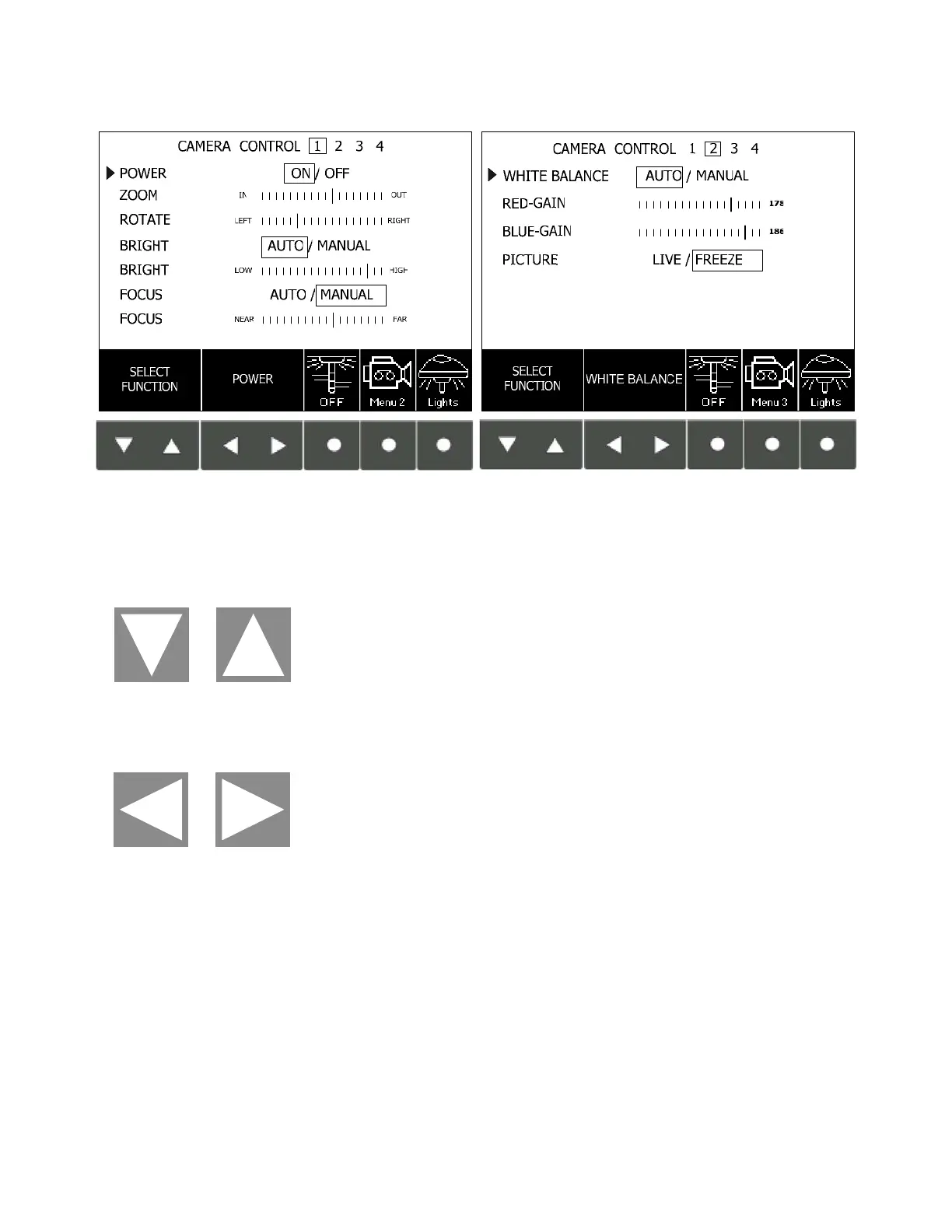
NOTE: The symbols “^” and “
v” on the control center are used to
select the functions shown on the menu. The symbols “<“ and “>” on
the control center are used to adjust the selected functions.
Refer to Figure 5-16. The control touch pads are used to control the
following camera functions:
Zoom – for determining the level of detail visible in the image field.
The Zoom function adjusts the image field continuously between two
extremes:
Telephoto – At extreme telephoto, the camera captures an
image showing great detail in a small area.
NOTE: At extreme telephoto, any motion of the lighthead/camera
may be exaggerated (jerky). The field of focus has little depth at
this extreme, forcing the Auto Focus function (if enabled) to
refocus the camera when any object (such as a hand) enters the
image field, or if camera position is adjusted. The camera is also
sensitive to light level changes at extreme telephoto.
Wide Angle – At extreme wide angle, the camera captures a
large image with less detail than telephoto.
NOTE: At extreme wide angle, the image field possesses a
greater depth of focus and less sensitivity to light level changes.
Figure 5-16. Camera Control Menus 1 and 2 (HD or SD Camera Modules)











 To Next Page