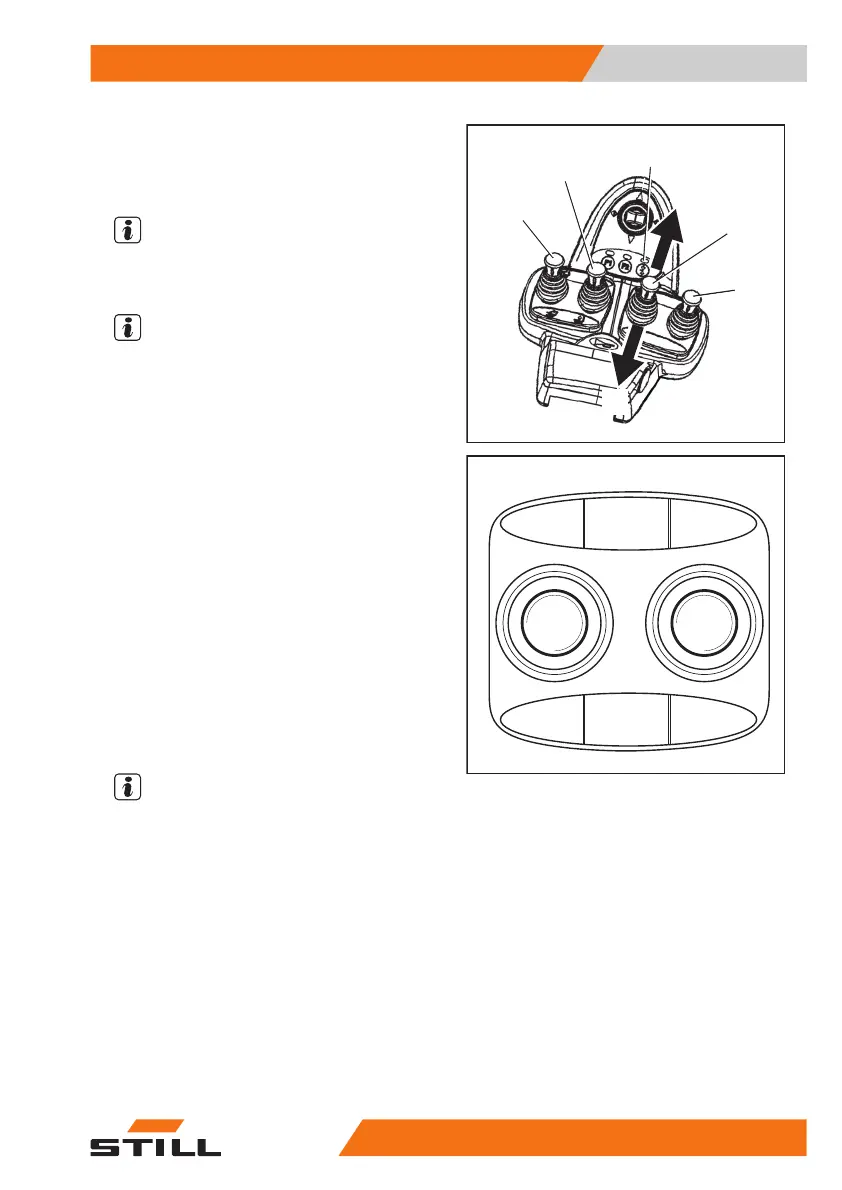
Controlling attachments using the
quadruple mini-lever and the 5th
function
NOTE
For technical reasons, clamping attachments
cannot
be controlled via the 5th function.
NOTE
Operating levers (1) to (4) are used to control
four hydraulic functions. The designation "5th
function" refers to the fact that the 5th hydraul-
ic function can be controlled with the operating
lever (3) by switching the functions using the
"5th function" function key (5).
The pictograms on the operating levers show
the respective functions that are activated by
these levers.
This essentially involves the following:
– Actuate the "5th function" function key (5)
and move operating lever (3) towards (E).
The attachment moves in accordance with the
pictogram in position (E).
– Actuate the "5th function" function key (5)
and move operating lever (3) towards (F).
The attachment moves in accordance with the
pictogram in position (F).
NOTE
The pictograms are attached depending on
the pre-assembled attachment. If an attach-
ment with other functions is fitted, the picto-
grams must be checked for the correct repre-
sentation and changed if necessary.
– Contact the authorised service centre if re-
quired.
7325_003-042
4
1
2
5
3
E
F
5060_003-120_V2
E
F
Operation
4
Attachments
19957348011850 EN - 08/2020 - 12



 To Next Page