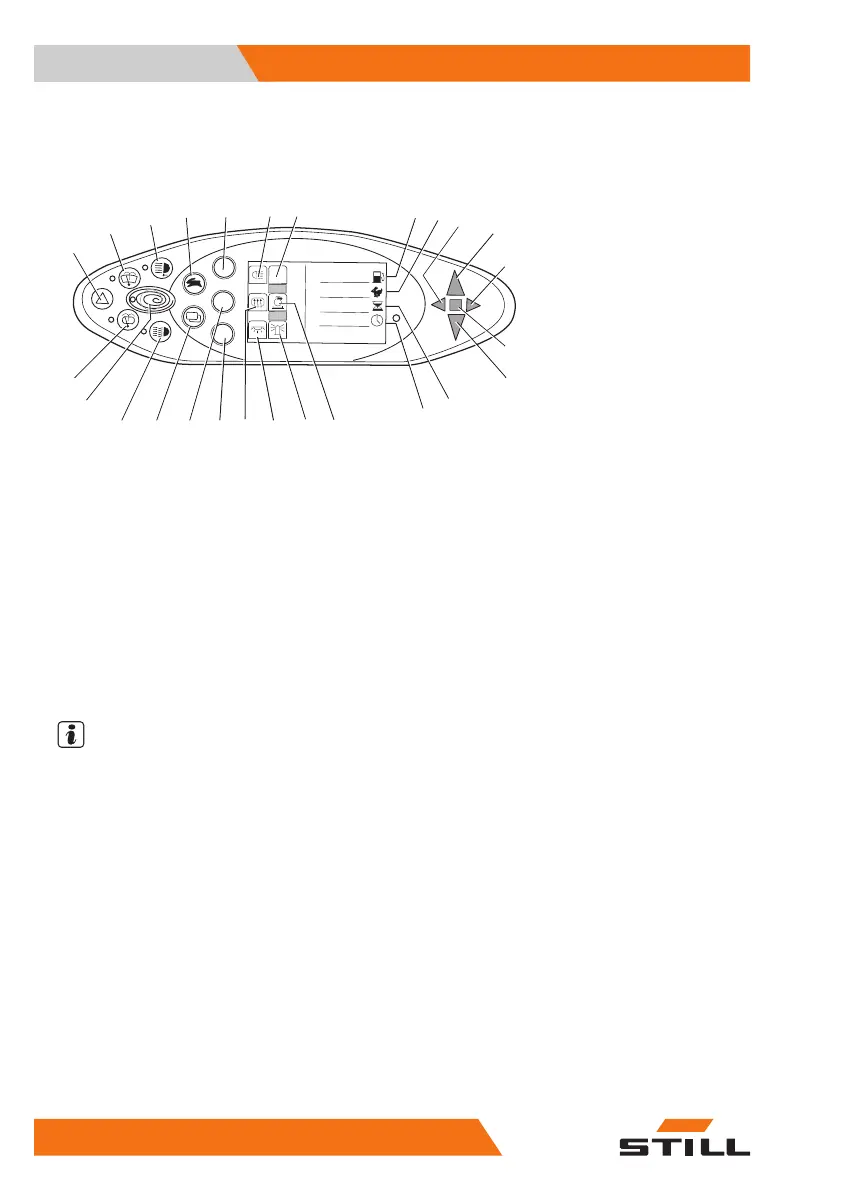
Operating devices and display elements
Display operating unit
8
9
6
7
2
0
1
3
5
4
%
75
2
234,7
h
12:15
1
2
3
4
56
7
8
9
10
11
12
13
14
15
16
17
18
19
20
21
22
23
24
25
26
Hazard warning system button
Front windscreen wiper button
Working spotlight button
Drive programme selector button
Lighting button
Lighting symbol
Not assigned
Fuel level display (percentage)
Drive programme display (numerical)
Left direction indicator control lamp
Forward travel display
Right direction indicator control lamp
Malfunction display
Reverse travel display
1
2
3
4
5
6
7
8
9
10
11
12
13
14
Operating hours display
Time display (digital)
Particle filter warning display
Rotating beacon display
Interior lighting display
Rear window heating display
Interior light/rotating beacon button
Rear window heating/particle filter regenera-
tion button
Menu change button
Lighting button
Blue-Q button
Rear window wiper button
15
16
17
18
19
20
21
22
23
24
25
26
NOTE
Buttons (5, 21, 22) and the accompanying dis-
play elements (6, 17, 18, 19, 20) are assigned
according to the installed equipment variant.
The assignment shown here is an example
and may differ from the assignment actually
programmed on the truck. Buttons may be as-
signed multiple functions that are called up ac-
cording to the menu navigation. For further in-
formation, see the "Operating the display and
operating unit" chapter.
– If you have any questions, please contact
your authorised service centre.
Operating devices for hydraulic and
driving functions
Different versions of the operating devices are
available for operating the truck's hydraulic
and traction functions.
Overviews
3
Operating devices and display elements
56 57348011850 EN - 08/2020 - 12



 To Next Page